---
title: "SafeKit: All-in-One SANless High Availability & Application Clustering Software"
description: "SafeKit: All-in-One SANless High Availability & Application Clustering Software"
canonical: "https://safekit.eviden.com/"
topics: "What is SafeKit?, 🔍 SafeKit High Availability Navigation Hub, Why Choose SafeKit for Simple and Cost-Effective High Availability?, SafeKit Use Cases, Why an All-in-One SANless High Availability Product is Essential?, Choosing Your High Availability Strategy: VM HA vs. Application HA, SafeKit High Availability Limitations, SafeKit Technical Failover Tutorials & Demos, How the SafeKit mirror cluster works with Windows/Linux?, How the SafeKit cluster in farm mode works with Windows/Linux?, Comparison of SafeKit with Traditional High Availability (HA) Clusters, Architectural Differentiators: SafeKit Software-Defined vs. Hardware HA Clusters, Key Differentiators of the SafeKit Mirror Cluster, Key Differentiators of the SafeKit Farm Cluster, VM High Availability: SafeKit's SAN-Less vs. Hyper-V/VMware HA, SafeKit HA Free Trial & Technical Documentation, SafeKit Application Module Library: Ready-to-Use HA Solutions"
category: "home"
lang: "en"
---

<h1 id="safekit-all-in-one-sanless-high-availability--application-clustering-software">SafeKit: All-in-One SANless High Availability &amp; Application Clustering Software</h1>
<h2 id="what-is-safekit">What is SafeKit?</h2>
<p><strong>SafeKit</strong> is an <strong>all-in-one high availability software</strong> solution that ensures 100% application uptime by combining real-time <strong>host-based replication</strong> , automatic <strong>failover</strong> , and <strong>load balancing</strong> into a single package.</p>
<p>By synchronizing data between standard servers, <strong>SafeKit</strong> eliminates the need for expensive shared storage (SAN) or specialized IT skills, providing a simple, cost-effective way to protect <strong>enterprise databases</strong> (like SQL Server), <strong>critical security systems</strong> (like Milestone XProtect Video Management Software), and <strong>SCADA industrial control software</strong> (like Siemens applications) across both Windows and Linux environments.</p>
<img src="/wp-content/uploads/2026/04/safekit-icon-512x512-1.png" width="128" alt="Evidian SafeKit official logo - SANless high availability and application clustering software icon">
<div class="button-row">
  <a class="btn-action" href="https://safekit.eviden.com/contact-us-for-safekit/">🧑 Contact us</a>
  <a class="btn-action" href="/resources/safekit-free-trial/">🎁 SafeKit free trial</a>
  <a class="btn-action" href="https://training.my.evidian.com/mod/page/view.php?id=712">🏅 Free certification</a>
  <a class="btn-action" href="https://safekit.eviden.com/get-a-quote-safekit/">💰 Perpetual license cost</a>
</div>
<h2 id="hub">🔍 SafeKit High Availability Navigation Hub</h2>
<p><strong>Explore SafeKit: Features, technical videos, documentation, and free trial</strong></p>
<table>
<thead>
<tr>
<th>Resource Type</th>
<th>Description</th>
<th>Direct Link</th>
</tr>
</thead>
<tbody>
<tr>
<td><strong>Key Features</strong></td>
<td>Why Choose SafeKit for Simple and Cost-Effective High Availability?</td>
<td><a href="/#why-choose-safekit-for-ha" title="Discover SafeKit features for simple and cost-effective high availability">See Why Choose SafeKit for High Availability</a></td>
</tr>
<tr>
<td><strong>Use Cases</strong></td>
<td>Explore How SafeKit Ensures the High Availability of Critical Infrastructure</td>
<td><a href="/#safekit-use-cases" title="Explore SafeKit high availability use cases">See All Use Cases (OEM Software, Edge Servers, SCADA, and more)</a></td>
</tr>
<tr>
<td><strong>Deployment Model</strong></td>
<td>All-in-One SANless HA: Shared-Nothing Software Clustering</td>
<td><a href="/#all-in-one-sanless-ha" title="Learn about all-in-one SANless high availability with shared-nothing software clustering">See SafeKit All-in-One SANless HA</a></td>
</tr>
<tr>
<td><strong>HA Strategies</strong></td>
<td>SafeKit: Infrastructure (VM) vs. Application-Level High Availability</td>
<td><a href="/#safekit-ha-redundancy-choices" title="Compare VM-level redundancy with SafeKit application-level high availability strategies">See SafeKit HA &amp; Redundancy: VM vs. Application Level</a></td>
</tr>
<tr>
<td><strong>Technical Specifications</strong></td>
<td>Technical Limitations for SafeKit Clustering</td>
<td><a href="/#safekit-ha-limitations" title="Technical requirements and limitations for SafeKit application clustering">See SafeKit High Availability Limitations</a></td>
</tr>
<tr>
<td><strong>Proof of Concept</strong></td>
<td>SafeKit: High Availability Configuration &amp; Failover Demos</td>
<td><a href="/#safekit-failover-tutorials" title="Step-by-step videos on SafeKit high availability, from installation to automated failover">See SafeKit Failover Tutorials</a></td>
</tr>
<tr>
<td><strong>Architecture</strong></td>
<td>How the SafeKit Mirror Cluster works (Real-Time Replication &amp; Failover)</td>
<td><a href="/#safekit-mirror-cluster" title="See technical architecture and failover mechanism of SafeKit Mirror Cluster">See SafeKit Mirror Cluster: Real-Time Replication &amp; Failover</a></td>
</tr>
<tr>
<td><strong>Architecture</strong></td>
<td>How the SafeKit Farm Cluster works (Network Load Balancing &amp; Failover)</td>
<td><a href="/#safekit-farm-cluster" title="Technical overview of SafeKit Farm Cluster architecture with network load balancing">See SafeKit Farm Cluster: Network Load Balancing &amp; Failover</a></td>
</tr>
<tr>
<td><strong>Competitive Advantages</strong></td>
<td>Comparison: SafeKit vs. Traditional High Availability (HA) Clusters</td>
<td><a href="/#safekit-ha-comparison" title="Detailed comparison of SafeKit software vs traditional hardware-based HA clusters">See SafeKit vs. Traditional HA Cluster Comparison</a></td>
</tr>
<tr>
<td><strong>Technical Resources</strong></td>
<td>SafeKit High Availability: Documentation, Downloads &amp; Trial</td>
<td><a href="/#safekit-ha-technical-resources" title="Access SafeKit free trial, technical documentation, and high availability white papers">See SafeKit HA Free Trial &amp; Technical Documentation</a></td>
</tr>
<tr>
<td><strong>Pre-configured Solutions</strong></td>
<td>SafeKit Application Module Library: Ready-to-Use HA Solutions</td>
<td><a href="/#safekit-ha-application-modules" title="Browse the library of pre-configured SafeKit modules for automated application failover">See SafeKit High Availability Application Modules</a></td>
</tr>
</tbody>
</table>
<h2 id="why-choose-safekit-for-ha">Why Choose SafeKit for Simple and Cost-Effective High Availability?</h2>
<h3 id="what-are-safekits-features">What are SafeKit’s features?</h3>
<p>SafeKit provides the following features for Windows and Linux in a single software product:</p>
<ul>
<li><strong>Load balancing</strong></li>
<li><strong>Synchronous real-time file replication</strong></li>
<li><strong>Automatic application failover</strong></li>
<li><strong>Automatic failback after a server failure</strong></li>
</ul>
<h3 id="do-i-need-special-skills-to-set-up-safekit">Do I need special skills to set up SafeKit?</h3>
<p>No. SafeKit is simple to deploy—no advanced expertise required.</p>
<h3 id="does-safekit-require-additional-hardware">Does SafeKit require additional hardware?</h3>
<p>No. SafeKit runs on your existing servers, virtual machines, or in the cloud—no shared disks or SAN storage needed.</p>
<h3 id="are-extra-software-licenses-required-for-safekit">Are extra software licenses required for SafeKit?</h3>
<p>No. SafeKit works with standard Windows and Linux editions and does not need enterprise database licenses.</p>
<h3 id="what-problems-does-safekit-solve">What problems does SafeKit solve?</h3>
<p>SafeKit solves:</p>
<ul>
<li>Hardware failures (20% of problems), including the complete failure of a computer room</li>
<li>Software failures (40% of problems), including restart of critical processes</li>
<li>Human errors (40% of problems) thanks to its ease of use</li>
</ul>
<h3 id="which-applications-are-supported-by-safekit">Which applications are supported by SafeKit?</h3>
<p>You can implement real-time replication and failover for:</p>
<ul>
<li>All types of applications, file directories, and services</li>
<li>Databases</li>
<li>Complete Hyper-V or KVM virtual machines</li>
<li>Docker, Podman, and cloud applications</li>
</ul>
<h3 id="how-does-safekit-cut-costs">How does SafeKit cut costs?</h3>
<p>SafeKit eliminates the following requirements:</p>
<ul>
<li>Network load balancers or dedicated proxy servers</li>
<li>Shared disks or replicated SAN storage</li>
<li>Enterprise editions of operating systems and databases</li>
<li>Specialized cluster maintenance skills</li>
</ul>
<h3 id="how-is-safekit-high-availability-priced-and-licensed">How is SafeKit High Availability priced and licensed?</h3>
<p><strong>SafeKit</strong> features a transparent, cost-effective <strong>per-node licensing model</strong> based strictly on the number of servers, regardless of CPU cores or sockets. Unlike many high-availability competitors that mandate recurring subscriptions, SafeKit offers <strong>perpetual licenses</strong> to ensure a lower Total Cost of Ownership (TCO) and long-term software assets.</p>
<ul>
<li><strong>No Hidden Costs:</strong> All <a href="/#safekit-ha-application-modules" title="Explore free SafeKit HA application modules">pre-configured HA application modules</a> are provided free of charge.</li>
<li><strong>Risk-Free Evaluation:</strong> Download a <a href="/#safekit-ha-technical-resources" title="Download SafeKit 30-day free trial">30-day free trial</a> to test failover and replication in your environment.</li>
<li><strong>Customized Quotes:</strong> Please <strong><a href="https://safekit.eviden.com/get-a-quote-safekit/" title="Request a customized SafeKit pricing quote" target="_blank" rel="noopener">contact us for a quote</a></strong> tailored to your specific high availability requirements.</li>
</ul>
<h2 id="safekit-use-cases">SafeKit Use Cases</h2>
<h3 id="safekit-for-oem">SafeKit for OEM</h3>
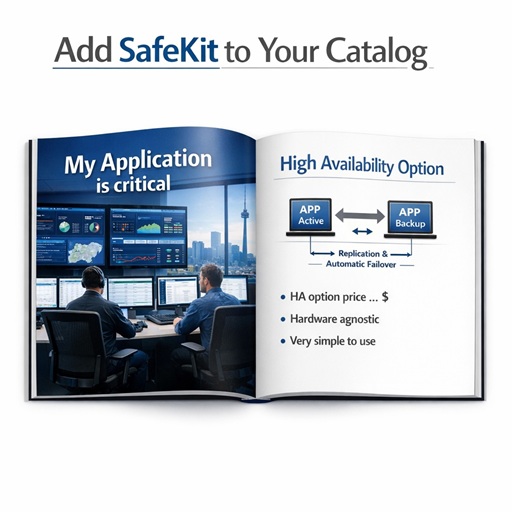
<p>Offering high availability with your application increases business value by ensuring continuous service, reducing downtime risks, and enhancing customer trust, while enabling critical operations to run without interruption on standard infrastructures.</p>
<img src="/wp-content/uploads/2026/05/safekit-for-oem-512-512.jpg" alt="SafeKit for OEM">
<p>Add SafeKit in your catalog as a high availability option: a software-only solution tailored to your application, with no hidden costs such as shared storage, fully hardware-agnostic, and deployable on physical, virtual, or cloud environments, with simple plug-and-play administration.</p>
<h3 id="safekit-for-edge">SafeKit for Edge</h3>
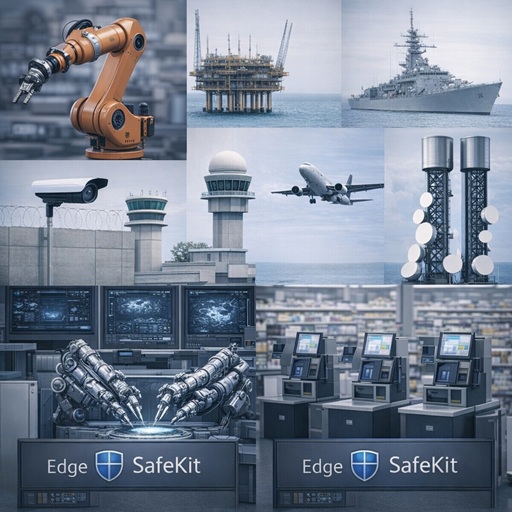
<p>Edge sites often have no data center and no HA expertise—yet business continuity is critical. SafeKit keeps edge applications running in factories, oil platforms, ships, building security, air traffic control, 5G networks, healthcare, retail&hellip;</p>
<img src="/wp-content/uploads/2026/05/safekit-edge-512-512.jpg" alt="SafeKit for Edge">
<p>SafeKit turns two standard edge servers (any brand) into a plug‑and‑play HA cluster—no shared storage/SAN. One lightweight stack delivers real‑time replication and automatic failover (and can also include load balancing), easy to install and administer.</p>
<h3 id="safekit-for-vms">SafeKit for VMS</h3>
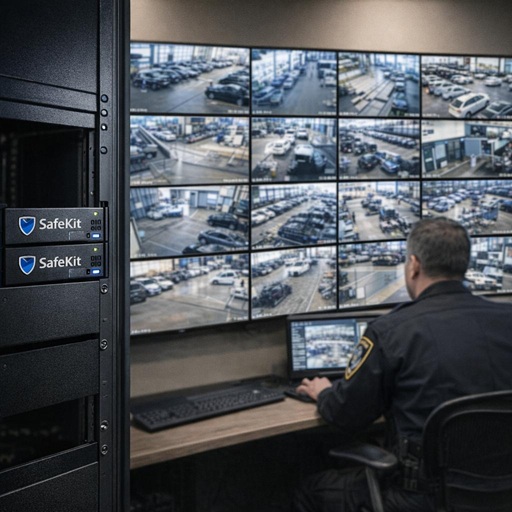
<p>Video Management Software (VMS) is critical to public safety, recording and displaying live and archived video so security officers can react instantly to incidents. Any VMS outage directly puts people and assets at risk.</p>
<img src="/wp-content/uploads/2026/05/safekit-vms-512-512.jpg" alt="SafeKit for VMS">
<p>SafeKit prevents video loss and monitoring gaps by maintaining continuous access to live and recorded streams, even during server or software failures. It integrates seamlessly with leading VMS platforms such as <strong>Milestone, Genetec, Hanwha</strong> , and others to keep surveillance operational when it matters most.</p>
<h3 id="safekit-for-eacs">SafeKit for EACS</h3>
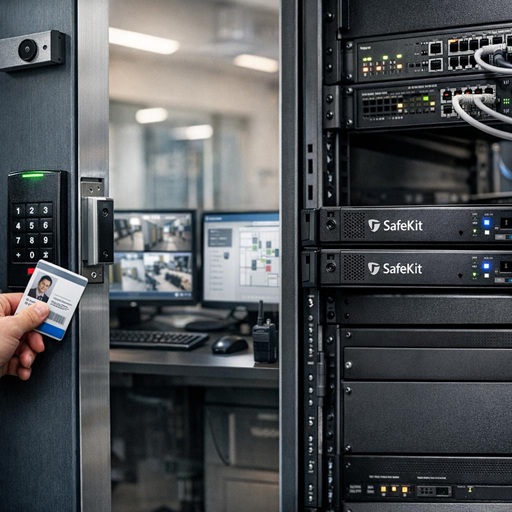
<p>Electronic Access Control Systems (EACS) are essential to physical security, controlling and monitoring access to private and sensitive areas through doors, badges, readers, and sensors. Any system outage can immediately expose people, buildings, and assets to intrusion.</p>
<img src="/wp-content/uploads/2026/05/safekit-eacs-512-512.jpg" alt="SafeKit for EACS">
<p>SafeKit keeps access control decisions, alarms, and credentials available at all times by eliminating single points of failure. It delivers resilient operation for EACS solutions such as <strong>Hirsch Microsesame, Nedap AEOS, and Siemens SiPass</strong> , ensuring secure access even during infrastructure incidents.</p>
<h3 id="safekit-for-scada">SafeKit for SCADA</h3>
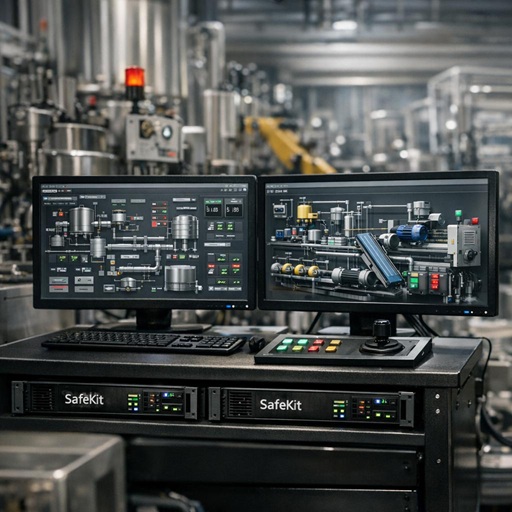
<p>SCADA (Supervisory Control and Data Acquisition) systems are at the core of industrial environments, enabling operators to monitor and control critical processes through sensors, valves, pumps, motors, and human‑machine interfaces.</p>
<img src="/wp-content/uploads/2026/05/safekit-scada-512-512.jpg" alt="SafeKit for SCADA">
<p>SafeKit minimizes production downtime by ensuring SCADA control systems—such as those powering <strong>Probat coffee roasters and ALSTEF baggage sorting machines</strong> —remain operational despite hardware or software incidents. This allows operators to retain full visibility and control of industrial processes at all times, preventing costly shutdowns and safety risks.</p>
<h3 id="safekit-for-bms">SafeKit for BMS</h3>
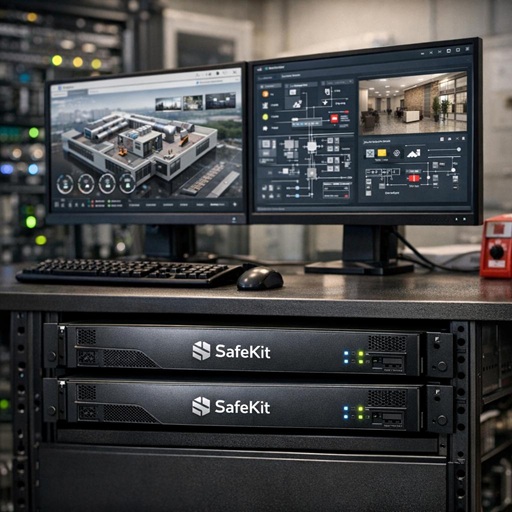
<p>Building Management Systems (BMS) are central to modern buildings, providing automated control of HVAC, electrical distribution, lighting, fire safety, and water systems. Any system outage can directly impact occupant safety, comfort, and building operations.</p>
<img src="/wp-content/uploads/2026/05/safekit-bms-512-512.jpg" alt="SafeKit for BMS">
<p>SafeKit safeguards building automation by allowing BMS services to continue running transparently in the event of a failure. It supports platforms such as <strong>Siemens Desigo CC, Bosch BIS</strong> , and related systems to maintain safe, efficient, and uninterrupted building operations.</p>
<h3 id="safekit-for-atc">SafeKit for ATC</h3>
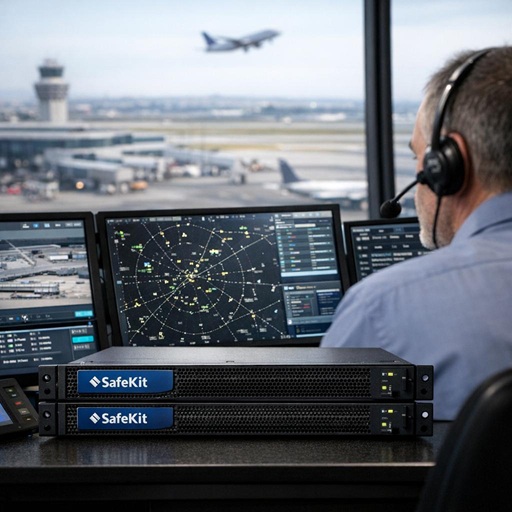
<p>Air Traffic Control (ATC) systems are critical to aviation safety, enabling real‑time monitoring and control of aircraft movements on the ground and in the air through surveillance, guidance, and control applications.</p>
<img src="/wp-content/uploads/2026/05/safekit-atc-512-512.jpg" alt="SafeKit for ATC">
<p>SafeKit reinforces ATC system resilience by guaranteeing uninterrupted controller access to critical airside applications. It is used with ATC and airport solutions such as <strong>ADB SafeGate</strong> to support safe, continuous air traffic operations under all conditions.</p>
<h3 id="safekit-for-occ">SafeKit for OCC</h3>
<p>Operations Control Centers (OCC) are at the heart of modern metro networks, centralizing supervision of train movements, power supply, signaling, passenger information, and incident management. In automated driverless metro lines, the OCC is the single point of control for operations.</p>
<img src="/wp-content/uploads/2026/05/safekit-occ-512-512.jpg" alt="SafeKit for OCC">
<p>SafeKit secures uninterrupted metro supervision by ensuring OCC applications remain available during failures. It supports Operations Control Centers for <strong>automated, driverless Paris metro lines</strong> , enabling continuous service and rapid incident response without reliance on onboard drivers.</p>
<h2 id="all-in-one-sanless-ha">Why an All-in-One SANless High Availability Product is Essential?</h2>
<p>In the world of business continuity, many organizations mistakenly believe that having a backup or a data replication tool is the same as having <strong>High Availability (HA)</strong>. In reality, these are only pieces of a much larger puzzle. To truly guarantee 100% uptime, you need an all-in-one solution that integrates every layer of the failover process.</p>
<p>Here is why a fragmented approach fails and why an integrated, all-in-one product like <strong>SafeKit</strong> —utilizing <strong>host-based replication at the file level</strong> —is required.</p>
<h3 id="is-host-based-replication-alone-sufficient-for-high-availability">Is host-based replication alone sufficient for High Availability?</h3>
<p>No. Data replication is simply the act of copying data from Server A to Server B. While critical, replication by itself does not provide availability. Without the other components of an HA stack, replication is just a &ldquo;passive copy&rdquo; that requires manual, time-consuming intervention to become useful:</p>
<ul>
<li>If Server A crashes, data replication software will not automatically point your users to Server B.</li>
<li>It will not detect that the application has stopped.</li>
<li>It will not restart the services.</li>
</ul>
<h3 id="the-hidden-risks-of-fragmented-solutions-why-siloed-ha-increases-failure">The Hidden Risks of Fragmented Solutions: Why Siloed HA Increases Failure</h3>
<p>Many vendors require you to &ldquo;bolt together&rdquo; several different products to achieve <strong>host-based replication</strong> , <strong>failover</strong> , and <strong>load balancing</strong>. This fragmented architecture is a dangerous strategy for mission-critical systems:</p>
<ul>
<li><strong>Fragile Integration:</strong> When you use product A for replication and product B for clustering, you create a &ldquo;house of cards.&rdquo; Every OS update or security patch risks breaking the fragile communication link between these separate engines.</li>
<li><strong>High Cognitive Load &amp; Human Error:</strong> Managing multiple interfaces increases the risk of mistakes. During a high-pressure system failure, jumping between different GUIs or using different CLI syntaxes to diagnose a problem leads to confusion and extended downtime.</li>
<li><strong>Vendor Finger-Pointing:</strong> If a failover fails, the replication vendor may blame the clustering tool, leaving you stuck in the middle with no clear path to resolution. An all-in-one solution provides a single point of accountability.</li>
<li><strong>Complex Maintenance:</strong> Fragmented systems require specialized skills for each separate component, making the solution harder to maintain and significantly more expensive over time.</li>
</ul>
<h3 id="beyond-data-what-specific-components-are-required-for-a-true-sanless-failover">Beyond data, what specific components are required for a true SANless failover?</h3>
<p>To automate recovery and eliminate downtime, an all-in-one product must manage several technical moving parts simultaneously:</p>
<ul>
<li><strong>Host-Based Replication:</strong> real-time, synchronous replication of critical application data between servers without relying on shared storage (SAN). This ensures zero data loss (RPO=0) and eliminates expensive hardware dependencies.</li>
<li><strong>Virtual IP Address (VIP):</strong> This provides a single entry point for users. When a failure occurs, the software moves the VIP from the failed node to the healthy one, so users don&rsquo;t have to change their configuration.</li>
<li><strong>Hardware and Software Error Detectors:</strong> The system must constantly &ldquo;heartbeat&rdquo; both the physical server and the specific software processes to identify a hang or a crash immediately.</li>
<li><strong>Customizable Restart Scripts:</strong> Not every application starts the same way. An all-in-one tool allows for custom scripts to ensure complex services start in the correct order.</li>
<li><strong>Automatic Failover:</strong> The intelligence to orchestrate the entire move from one server to another without human input.</li>
</ul>
<h3 id="why-must-the-failover-mechanism-be-synchronized-with-host-based-replication">Why must the failover mechanism be synchronized with host-based replication?</h3>
<p>If your failover manager and your data replication are two different products, they may not be &ldquo;in sync.&rdquo;</p>
<p><strong>The Danger:</strong> If a failover occurs but the replication hasn&rsquo;t finished sending the latest bits, Server B will start the application with outdated or corrupted data.</p>
<p>An <strong>all-in-one SANless HA solution</strong> ensures that the failover mechanism is aware of the replication state. It will only allow the application to start on the backup node if the data is guaranteed to be up-to-date, preventing conflicting active nodes and data loss.</p>
<h3 id="what-happens-when-the-failed-server-is-repaired-failback">What happens when the failed server is repaired (failback)?</h3>
<p>Often ignored in technical guides and poorly executed by traditional HA solutions, automatic failback remains the most critical requirement for true resilience. A true all-in-one product handles the &ldquo;Return to Normal&rdquo; as elegantly as the failure. When the failed server comes back online, it is behind in data. The HA software must:</p>
<ol>
<li><strong>Resynchronize data</strong> in the background from the active node to the recovered node.</li>
<li><strong>Maintain Uptime:</strong> This resynchronization must happen without interrupting the application currently running on the active node.</li>
<li><strong>Restore Redundancy:</strong> Once the data is mirrored again, the cluster automatically returns to a protected state, ready for the next event.</li>
</ol>
<h3 id="block-vs-file-level-replication-why-transparency-matters">Block vs. File Level Replication: Why Transparency Matters</h3>
<p>The technical method used for <strong>host-based replication</strong> significantly impacts how much you have to change your existing application setup.</p>
<ul>
<li><strong>The Challenge of Block-Level Replication:</strong> Most SANless solutions replicate at the disk/block level. This is <strong>not transparent</strong> for the application. It requires you to reconfigure the application entirely to move its data onto a specific, newly created &ldquo;replicated disk&rdquo; volume. This often involves complex migration and potential changes to application logic.</li>
<li><strong>The SafeKit File-Level Advantage:</strong> SafeKit performs <strong>host-based replication at the file level</strong> , which is completely transparent for the application. You do not need to move data to a special disk; you simply configure SafeKit to replicate the existing application folders. These folders can even remain on the <strong>system disk</strong> , allowing you to protect an application exactly where it is already installed.</li>
</ul>
<h2 id="safekit-ha-redundancy-choices">Choosing Your High Availability Strategy: VM HA vs. Application HA</h2>
<p>SafeKit offers two primary approaches to ensure business continuity: Virtual Machine HA (VM HA) and Application HA. While both methods provide automatic failover capabilities, they differ significantly in their scope, data replication mechanisms, recovery speed, and platform compatibility. This comparison breaks down these differences to help identify the optimal strategy for specific IT environments, whether the focus is on broad virtualization support or granular, high-speed application recovery.</p>
<p><strong>Feature Comparison: SafeKit VM HA vs. SafeKit Application HA Clustering</strong></p>
<table>
<thead>
<tr>
<th>Comparison Feature</th>
<th>VM HA with SafeKit Hyper-V or KVM Module</th>
<th>Application HA with SafeKit Application Modules</th>
</tr>
</thead>
<tbody>
<tr>
<td>Deployment Diagram</td>
<td></td>
<td></td>
</tr>
<tr>
<td>Failover Scope</td>
<td>SafeKit inside 2 hypervisors: replication and failover of the full VM.</td>
<td>SafeKit inside 2 virtual or physical machines: replication and failover at the application level.</td>
</tr>
<tr>
<td>Data Replicated</td>
<td>Replicates more data (Application + Operating System).</td>
<td>Replicates only application data, leading to smaller data volumes.</td>
</tr>
<tr>
<td>Recovery Process &amp; Speed (RTO)</td>
<td>Reboot of VM on hypervisor 2 if hypervisor 1 crashes. Recovery time depends on the OS reboot. VM checker and failover mechanism.</td>
<td>Quick recovery time with restart of App on OS2 if server 1 crashes. Typically around 1 minute or less (low RTO). Application checker and software failover.</td>
</tr>
<tr>
<td>Installation</td>
<td>Application is installed once in a single VM.</td>
<td>Application is installed on two nodes.</td>
</tr>
<tr>
<td>Configuration</td>
<td>Generic solution for any application / OS running in the VM. <br>• It does not require a technical understanding of the application installed within the VM.<br>• It is the best solution if you do not know how the application works.<br>• You only need to define the location of the VM files.</td>
<td>It requires a technical understanding of the application itself. <br>• Which services need to be restarted.<br>• The specific application folders that need real-time replication.<br>• The configuration of a virtual IP address for failover.</td>
</tr>
<tr>
<td>Platform Compatibility</td>
<td>Works with Windows/Hyper-V and Linux/KVM but is not compatible with VMware.</td>
<td>Platform agnostic; works with physical or virtual machines, cloud infrastructure, and any hypervisor, including VMware.</td>
</tr>
<tr>
<td>Ideal For</td>
<td>Ideal for managing complex environments with multiple applications across several VMs through a single HA policy.</td>
<td>Ideal for embedding high availability directly into a software solution, independent of the underlying hardware or hypervisor.</td>
</tr>
</tbody>
</table>
<h2 id="safekit-ha-limitations">SafeKit High Availability Limitations</h2>
<h3 id="why-a-replication-of-a-few-tera-bytes">Why a replication of a few Tera-bytes?</h3>
<p>Resynchronization time after a failure (<a href="/architectures/file-replication-byte-level-with-failover-mirror-cluster/#safekit-mirror-cluster">step 3</a>)</p>
<ul>
<li>1 Gb/s network ≈ 3 Hours for 1 Tera-bytes.</li>
<li>10 Gb/s network ≈ 1 Hour for 1 Tera-bytes or less depending on disk write performances.</li>
</ul>
<h4 id="alternative">Alternative</h4>
<ul>
<li>For a large volume of data, use <a href="/best-practises/san-vs-nas-shared-storage-for-a-failover-cluster/">external shared storage</a>.</li>
<li>More expensive, more complex.</li>
</ul>
<h3 id="why-a-replication-lt-1000000-files">Why a replication &lt; 1,000,000 files?</h3>
<ul>
<li>Resynchronization time performance after a failure (<a href="/architectures/file-replication-byte-level-with-failover-mirror-cluster/#safekit-mirror-cluster">step 3</a>).</li>
<li>Time to check each file between both nodes.</li>
</ul>
<h4 id="alternative-1">Alternative</h4>
<ul>
<li>Put the many files to replicate in a virtual hard disk / virtual machine.</li>
<li>Only the files representing the virtual hard disk / virtual machine will be replicated and resynchronized in this case.</li>
</ul>
<h3 id="why-a-failover--32-replicated-vms">Why a failover ≤ 32 replicated VMs?</h3>
<ul>
<li>Each VM runs in an independent mirror module.</li>
<li>Maximum of 32 mirror modules running on the same cluster.</li>
</ul>
<h4 id="alternative-2">Alternative</h4>
<ul>
<li>Use an external shared storage and another VM clustering solution.</li>
<li>More expensive, more complex.</li>
</ul>
<h3 id="why-a-lanvlan-network-between-remote-sites">Why a LAN/VLAN network between remote sites?</h3>
<ul>
<li>Automatic failover of the <a href="/best-practises/how-a-virtual-ip-address-works/">virtual IP address</a> with 2 nodes in the same subnet.</li>
<li>Good bandwidth for resynchronization (<a href="/architectures/file-replication-byte-level-with-failover-mirror-cluster/#safekit-mirror-cluster">step 3</a>) and good latency for <a href="/best-practises/synchronous-replication-vs-asynchronous-replication/">synchronous replication</a> (typically a round-trip of less than 2ms).</li>
</ul>
<h4 id="alternative-3">Alternative</h4>
<ul>
<li>Use a <a href="/best-practises/how-a-virtual-ip-address-works/">load balancer for the virtual IP address</a> if the 2 nodes are in 2 subnets (supported by SafeKit, especially in the cloud).</li>
<li>Use backup solutions with asynchronous replication for high latency network.</li>
</ul>
<h2 id="safekit-failover-tutorials">SafeKit Technical Failover Tutorials &amp; Demos</h2>
<h3 id="demo-webinar">SafeKit Video: Webinar (9:43)</h3>
<p>&amp;amp;amp;amp;amp;amp;lt;br /&amp;amp;amp;amp;amp;amp;gt;</p>
<h4 id="chapters">Chapters</h4>
<ol>
<li><a href="https://www.youtube.com/watch?v=UiLwzqsMxis&amp;amp;t=0s" target="_blank" rel="noopener">Introduction</a> (0:38)</li>
<li><a href="https://www.youtube.com/watch?v=UiLwzqsMxis&amp;amp;t=38s" target="_blank" rel="noopener">Demonstration of SafeKit</a> (1:41)</li>
<li><a href="https://www.youtube.com/watch?v=UiLwzqsMxis&amp;amp;t=139s" target="_blank" rel="noopener">Examples of redundancy and high availability solution</a> (2:00)</li>
<li><a href="https://www.youtube.com/watch?v=UiLwzqsMxis&amp;amp;t=259s" target="_blank" rel="noopener">SafeKit sold in many different countries with Milestone</a> (0:49)</li>
<li><a href="https://www.youtube.com/watch?v=UiLwzqsMxis&amp;amp;t=308s" target="_blank" rel="noopener">Choose between 2 solutions: virtual machine or application cluster</a> (2:29)</li>
<li><a href="https://www.youtube.com/watch?v=UiLwzqsMxis&amp;amp;t=457s" target="_blank" rel="noopener">Distinctive advantages</a> (2:06)</li>
</ol>
<p><a href="/resources/safekit-on-line-training/">All videos here</a></p>
<h3 id="safekit-hadr">SafeKit: How to Implement HADR (7:40)</h3>
<p>&amp;amp;amp;amp;amp;amp;lt;br /&amp;amp;amp;amp;amp;amp;gt;</p>
<h4 id="chapters-1">Chapters</h4>
<ol>
<li><a href="https://www.youtube.com/watch?v=g5zcTjiY7T4&amp;amp;t=0s" target="_blank" rel="noopener">Introduction to SafeKit HADR over Stretched VLANs</a> (1:06)</li>
<li><a href="https://www.youtube.com/watch?v=g5zcTjiY7T4&amp;amp;t=65s" target="_blank" rel="noopener">How Synchronous Mirroring &amp; Double-Acknowledgment Works (1:41)</a></li>
<li><a href="https://www.youtube.com/watch?v=g5zcTjiY7T4&amp;amp;t=166s" target="_blank" rel="noopener">Failover Mechanics: Gratuitous ARP (GARP) &amp; Virtual IP</a> (2:10)</li>
<li><a href="https://www.youtube.com/watch?v=g5zcTjiY7T4&amp;amp;t=296s" target="_blank" rel="noopener">Designing for Slow WAN: HA vs. Backup Strategies</a> (2:45)</li>
</ol>
<p><a href="/best-practises/high-availability-disaster-recovery-hadr/">Learn more about SafeKit HADR</a></p>
<h3 id="demo-hyperv">SafeKit Video: Virtual Machine-Level Clustering (5:15)</h3>
<p>&amp;amp;amp;amp;amp;amp;lt;br /&amp;amp;amp;amp;amp;amp;gt;</p>
<h4 id="chapters-2">Chapters</h4>
<ol>
<li><a href="https://www.youtube.com/watch?v=foo6YKg5Dmw&amp;amp;t=0s" target="_blank" rel="noopener">2 Hyper-V nodes and 2 virtual machines</a> (0:49)</li>
<li><a href="https://www.youtube.com/watch?v=foo6YKg5Dmw&amp;amp;t=49s" target="_blank" rel="noopener">Configure the cluster and two hyperv.safe modules</a> (1:59)</li>
<li><a href="https://www.youtube.com/watch?v=foo6YKg5Dmw&amp;amp;t=168s" target="_blank" rel="noopener">Start and test VM replication, migration, failover on crash</a> (2:26)</li>
</ol>
<p><a href="/quick-install/safekit-quick-installation-guide-with-hyper-v/">Free trial here</a></p>
<h3 id="demo-sql">SafeKit Video: Application-Level Clustering with SQL (8:47)</h3>
<p>&amp;amp;amp;amp;amp;amp;lt;br /&amp;amp;amp;amp;amp;amp;gt;</p>
<h4 id="chapters-3">Chapters</h4>
<ol>
<li><a href="https://www.youtube.com/watch?v=T_6PsS4f9OQ&amp;amp;t=0s" target="_blank" rel="noopener">2 nodes with SQL Server</a> (0:32)</li>
<li><a href="https://www.youtube.com/watch?v=T_6PsS4f9OQ&amp;amp;t=32s" target="_blank" rel="noopener">Configure the cluster and the mirror.safe module</a> (3:58)</li>
<li><a href="https://www.youtube.com/watch?v=T_6PsS4f9OQ&amp;amp;t=270s" target="_blank" rel="noopener">Start and test SQL replication, migration, failover on crash</a> (4:17)</li>
</ol>
<p><a href="/quick-install/safekit-quick-installation-guide-for-a-new-windows-application-with-real-time-replication-and-failover/">Free trial here</a></p>
<h3 id="demo-milestone">SafeKit Video: OEM High Availability Integration (4:22)</h3>
<p>&amp;amp;amp;amp;amp;amp;lt;br /&amp;amp;amp;amp;amp;amp;gt;</p>
<h4 id="chapters-4">Chapters</h4>
<ol>
<li><a href="https://www.youtube.com/watch?v=dxiPG5ILC-0&amp;amp;t=0s" target="_blank" rel="noopener">SafeKit for OEM Integration</a> (0:09)</li>
<li><a href="https://www.youtube.com/watch?v=dxiPG5ILC-0&amp;amp;t=9s" target="_blank" rel="noopener">OEM Setup Example: Milestone XProtect</a> (2:18)</li>
<li><a href="https://www.youtube.com/watch?v=dxiPG5ILC-0&amp;amp;t=138s" target="_blank" rel="noopener">Failover Scenarios Explained</a> (1:49)</li>
<li><a href="https://www.youtube.com/watch?v=dxiPG5ILC-0&amp;amp;t=247s" target="_blank" rel="noopener">Wrap-Up: Add OEM HA to Your Catalog</a> (0:15)</li>
</ol>
<p><a href="/quick-install/safekit-quick-installation-guide-for-a-new-windows-application-with-real-time-replication-and-failover/">Free trial here</a></p>
<h3 id="demo-farm">SafeKit Video: Network Load Balancing Clustering (5:03)</h3>
<p>&amp;amp;amp;amp;amp;amp;lt;br /&amp;amp;amp;amp;amp;amp;gt;</p>
<h4 id="chapters-5">Chapters</h4>
<ol>
<li><a href="https://www.youtube.com/watch?v=XSMV_eM-jgk&amp;amp;t=0s" target="_blank" rel="noopener">2 nodes with Apache</a> (0:13)</li>
<li><a href="https://www.youtube.com/watch?v=XSMV_eM-jgk&amp;amp;t=13s" target="_blank" rel="noopener">Configure the cluster and the farm.safe module</a> (2:20)</li>
<li><a href="https://www.youtube.com/watch?v=XSMV_eM-jgk&amp;amp;t=153s" target="_blank" rel="noopener">Start and test network load balancing, failover on crash</a> (2:30)</li>
</ol>
<p><a href="/quick-install/safekit-quick-installation-guide-for-a-new-windows-application-with-network-load-balancing-and-failover/">Free trial here</a></p>
<h3 id="demo-certification">SafeKit Video: Free Certification Platform Tutorial (6:11)</h3>
<p>&amp;amp;amp;amp;amp;amp;lt;br /&amp;amp;amp;amp;amp;amp;gt;</p>
<h4 id="chapters-6">Chapters</h4>
<ol>
<li><a href="https://www.youtube.com/watch?v=ijH4zXtn_3s&amp;amp;t=0s" target="_blank" rel="noopener">The Training and Certification Platform</a> (1:41)</li>
<li><a href="https://www.youtube.com/watch?v=ijH4zXtn_3s&amp;amp;t=101s" target="_blank" rel="noopener">What is a SafeKit Training Module?</a> (1:57)</li>
<li><a href="https://www.youtube.com/watch?v=ijH4zXtn_3s&amp;amp;t=218s" target="_blank" rel="noopener">How to Earn a SafeKit Certificate?</a> (1:40)</li>
<li><a href="https://www.youtube.com/watch?v=ijH4zXtn_3s&amp;amp;t=318s" target="_blank" rel="noopener">Share Your Certificate on LinkedIn</a> (0:53)</li>
</ol>
<p><a href="https://training.my.evidian.com/" target="_blank" rel="noopener">Training and certification platform here</a></p>
<h3 id="safekit-competition">SafeKit Video: Competition and Cluster Architectures (13:21)</h3>
<p>&amp;amp;amp;amp;amp;amp;lt;br /&amp;amp;amp;amp;amp;amp;gt;</p>
<h4 id="chapters-7">Chapters</h4>
<ol>
<li><a href="https://www.youtube.com/watch?v=DKra6YVLGZk&amp;amp;t=0s" target="_blank" rel="noopener">Introduction</a> (4:10)</li>
<li><a href="https://www.youtube.com/watch?v=DKra6YVLGZk&amp;amp;t=250s" target="_blank" rel="noopener">Cluster of virtual machines</a> (1:20)</li>
<li><a href="https://www.youtube.com/watch?v=DKra6YVLGZk&amp;amp;t=330s" target="_blank" rel="noopener">Mirror cluster</a> (6:04)</li>
<li><a href="https://www.youtube.com/watch?v=DKra6YVLGZk&amp;amp;t=694s" target="_blank" rel="noopener">Farm cluster</a> (1:46)</li>
</ol>
<p><a href="/#safekit-ha-comparison" title="Detailed comparison of SafeKit software vs traditional hardware-based HA clusters">See SafeKit vs. Traditional HA Cluster Comparison</a></p>
<h3 id="demo-console">SafeKit Video: Console on Smartphone (0:54)</h3>
<p>&amp;amp;amp;amp;amp;amp;lt;br /&amp;amp;amp;amp;amp;amp;gt;</p>
<h3 id="demo-notifications">SafeKit Video: Email Notifications on Failover (1:04)</h3>
<p>&amp;amp;amp;amp;amp;amp;lt;br /&amp;amp;amp;amp;amp;amp;gt;</p>
<h2 id="safekit-mirror-cluster">How the SafeKit mirror cluster works with Windows/Linux?</h2>
<h3 id="step1">Step 1. Real-time replication</h3>
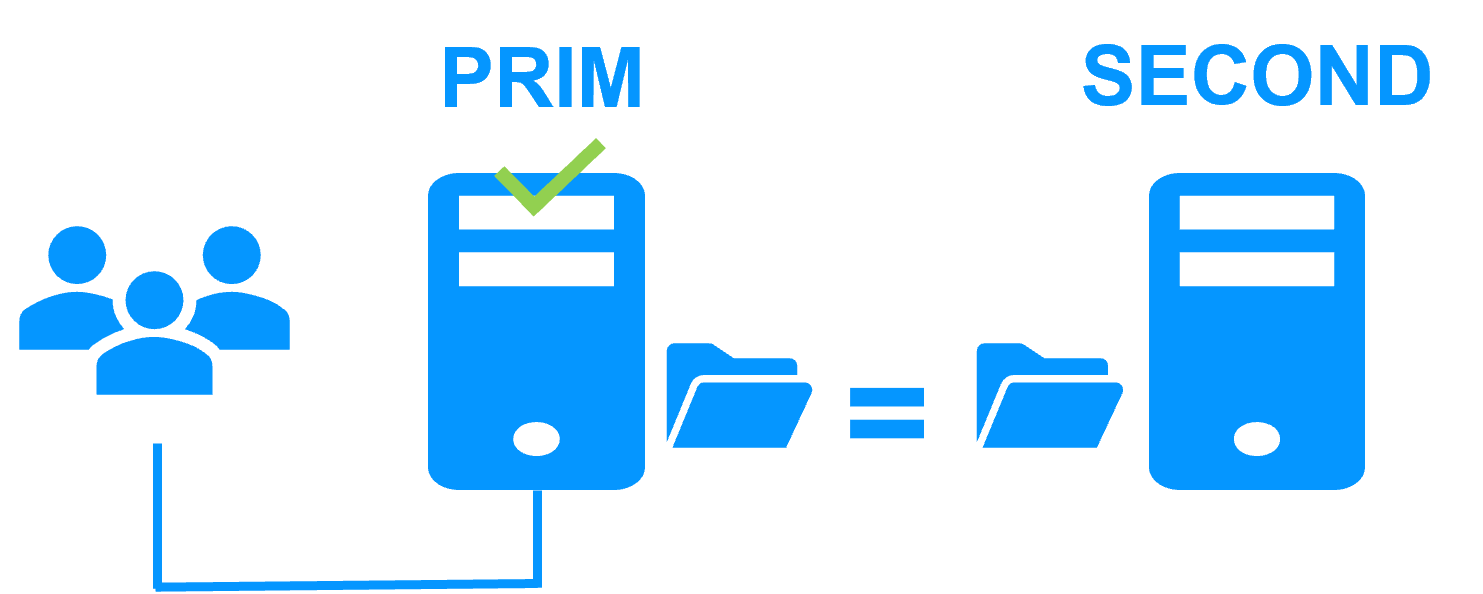
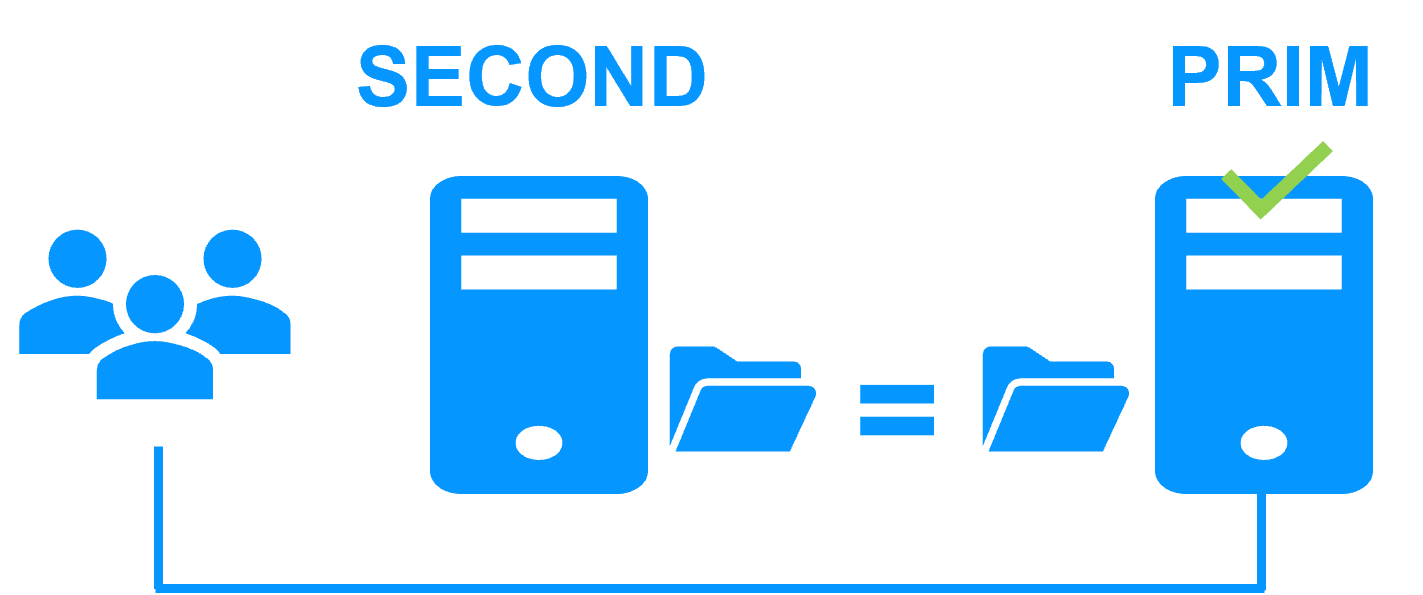
<p>Server 1 (PRIM) runs the Windows/Linux application. Clients are connected to a <a href="/best-practises/how-a-virtual-ip-address-works/">virtual IP address</a>. SafeKit replicates in real time modifications made inside files through the network.</p>
<img src="/wp-content/uploads/2023/02/safekit-prim-second-300.png" width="300" alt="File replication at byte level in a mirror Windows/Linux cluster">
<p>The replication is <a href="/best-practises/synchronous-replication-vs-asynchronous-replication/">synchronous</a> with no data loss on failure contrary to asynchronous replication.</p>
<p>You just have to configure the names of directories to replicate in SafeKit. There are no pre-requisites on disk organization. Directories may be located in the system disk.</p>
<h3 id="step2">Step 2. Automatic failover</h3>
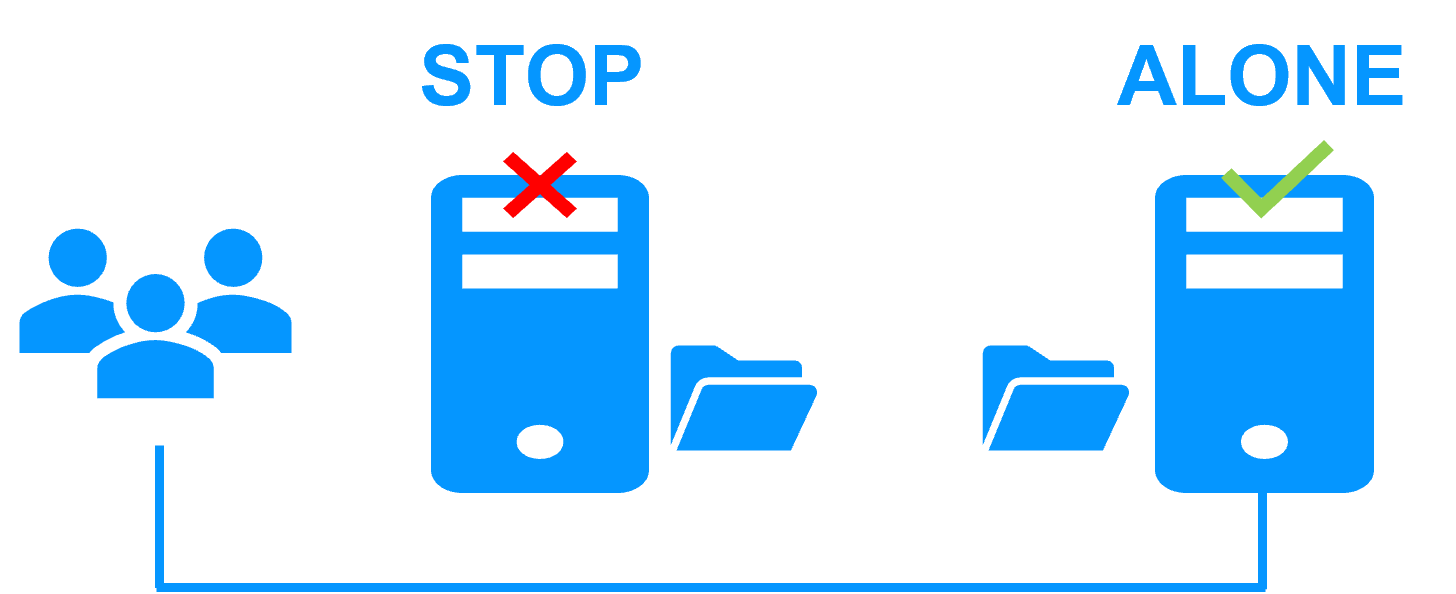
<p>When Server 1 fails, Server 2 takes over. SafeKit switches the virtual IP address and restarts the Windows/Linux application automatically on Server 2.</p>
<p>The application finds the files replicated by SafeKit uptodate on Server 2. The application continues to run on Server 2 by locally modifying its files that are no longer replicated to Server 1.</p>
<img src="/wp-content/uploads/2023/02/safekit-stop-alone-300.png" width="300" alt="Failover of Windows/Linux in a mirror cluster">
<p>The failover time is equal to the fault-detection time (30 seconds by default) plus the application start-up time.</p>
<h3 id="step3">Step 3. Automatic failback</h3>
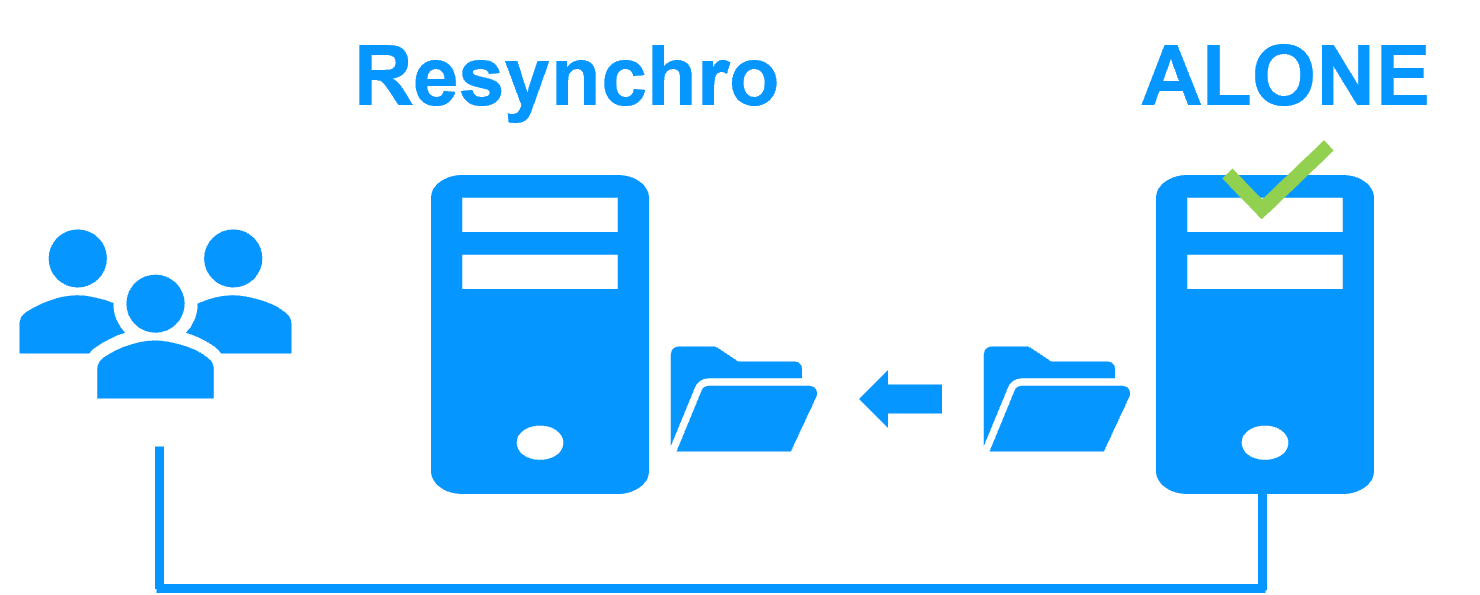
<p>Failback involves restarting Server 1 after fixing the problem that caused it to fail.</p>
<p>SafeKit automatically resynchronizes the files, updating only the files modified on Server 2 while Server 1 was halted.</p>
<img src="/wp-content/uploads/2023/02/safekit-resynchro-alone-300.png" width="300" alt="Failback in a mirror Windows/Linux cluster">
<p>Failback takes place without disturbing the Windows/Linux application, which can continue running on Server 2.</p>
<h3 id="step-4-back-to-normal">Step 4. Back to normal</h3>
<p>After reintegration, the files are once again in mirror mode, as in step 1. The system is back in high-availability mode, with the Windows/Linux application running on Server 2 and SafeKit replicating file updates to Server 1.</p>
<img src="/wp-content/uploads/2023/02/safekit-second-prim-300.png" width="300" alt="Return to normal operation in a mirror Windows/Linux cluster">
<p>If the administrator wishes the application to run on Server 1, this can be done manually through the web console at an appropriate time, or automatically through configuration.</p>
<h3 id="safekit-mirror-cluster-configure">How to configure a SafeKit Mirror Cluster for Windows/Linux?</h3>
<img src="/wp-content/uploads/2026/01/safekit-mirror-cluster-config.png" width="763" alt="SafeKit Web Console: High Availability configuration dashboard for Windows/Linux showing heartbeat networks, virtual IP setup, and real-time directory replication for a mirror cluster.">
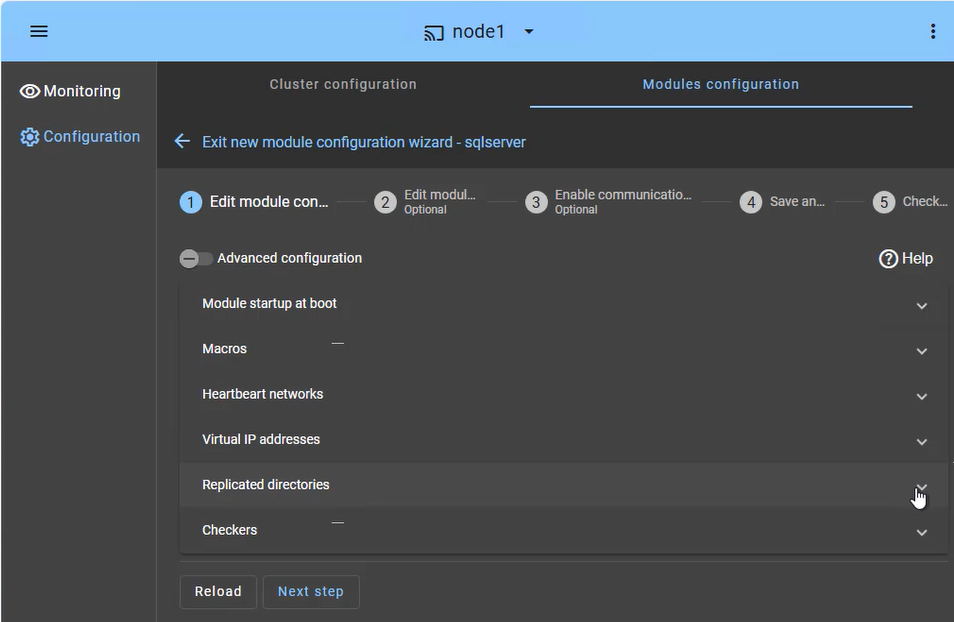
<p>The <strong>SafeKit web console</strong> provides an intuitive interface to orchestrate high availability for your critical applications. In just a few steps, you can configure a <strong>SafeKit mirror cluster</strong> to ensure business continuity:</p>
<ul>
<li><strong>Application Failover (Macros Tab):</strong> Define the specific application services to be automatically restarted in the event of a failure.</li>
<li><strong>Heartbeat network(s):</strong> Dedicated communication path(s) used by cluster nodes to continuously monitor each other&rsquo;s health and availability and synchronize failover decisions.</li>
<li><strong>Virtual IP Management:</strong> Set up the Virtual IP (VIP) for transparent client reconnection after a failover.</li>
<li><strong>Real-Time Replication:</strong> Select the critical directories for host-based, synchronous byte-level replication.</li>
<li><strong>Checkers:</strong> Monitor the application&rsquo;s health and trigger automatic recovery if a process failure is detected.</li>
</ul>
<p>The SafeKit cluster includes a dedicated split-brain checker to resolve network isolation issues without the need for a third witness machine or an additional heartbeat network. Learn more about <a href="/best-practises/heartbeat-failover-quorum-windows-linux-cluster/">heartbeat, failover and quorum in a cluster</a>.</p>
<h3 id="safekit-mirror-cluster-monitoring">How to monitor a SafeKit mirror cluster for Windows/Linux?</h3>
<img src="/wp-content/uploads/2026/05/mirror-monitoring-prim-second.png" width="604" alt="SafeKit Web Console: Real-time monitoring of a 2-node mirror cluster for Windows/Linux showing PRIM and SECOND states with active data replication.">
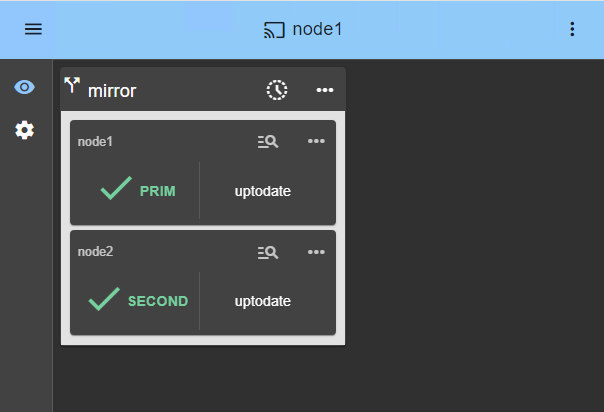
<p>The <strong>SafeKit management console</strong> offers a unified view of your high availability infrastructure. It allows administrators to monitor the <strong>operational state</strong> of the cluster and track data synchronization in real-time.</p>
<p>For a 2-node mirror cluster, the console clearly displays the roles of each server:</p>
<ul>
<li><strong>PRIM (Primary):</strong> The active node currently running the application and managing the Virtual IP. It performs writes to the local storage and real-time replication to the secondary node.</li>
<li><strong>SECOND (Secondary):</strong> The standby node receiving synchronous byte-level updates. It is ready to take over instantly if the Primary fails.</li>
<li><strong>ALONE State:</strong> Visually alerts you when the cluster is running on a single node (e.g., during maintenance or after a failure), indicating that redundancy is temporarily lost.</li>
<li><strong>Resynchronization Progress:</strong> When a failed node recovers, its status turns orange during background data reintegration, ensuring no downtime during the &ldquo;return to normal&rdquo; phase.</li>
</ul>
<p>Beyond simple status icons, the interface provides <strong>one-click failover orchestration</strong> , allowing you to manually reassign the primary role for planned maintenance while ensuring continuous availability for user activity.</p>
<h2 id="safekit-farm-cluster">How the SafeKit cluster in farm mode works with Windows/Linux?</h2>
<h3 id="virtual-ip-address-farm">Virtual IP address in a farm-mode cluster</h3>
<img src="/wp-content/uploads/2023/02/safekit-up-up-up-300.png" width="300" alt="How the SafeKit cluster in farm mode implements Windows/Linux network load balancing and failover">
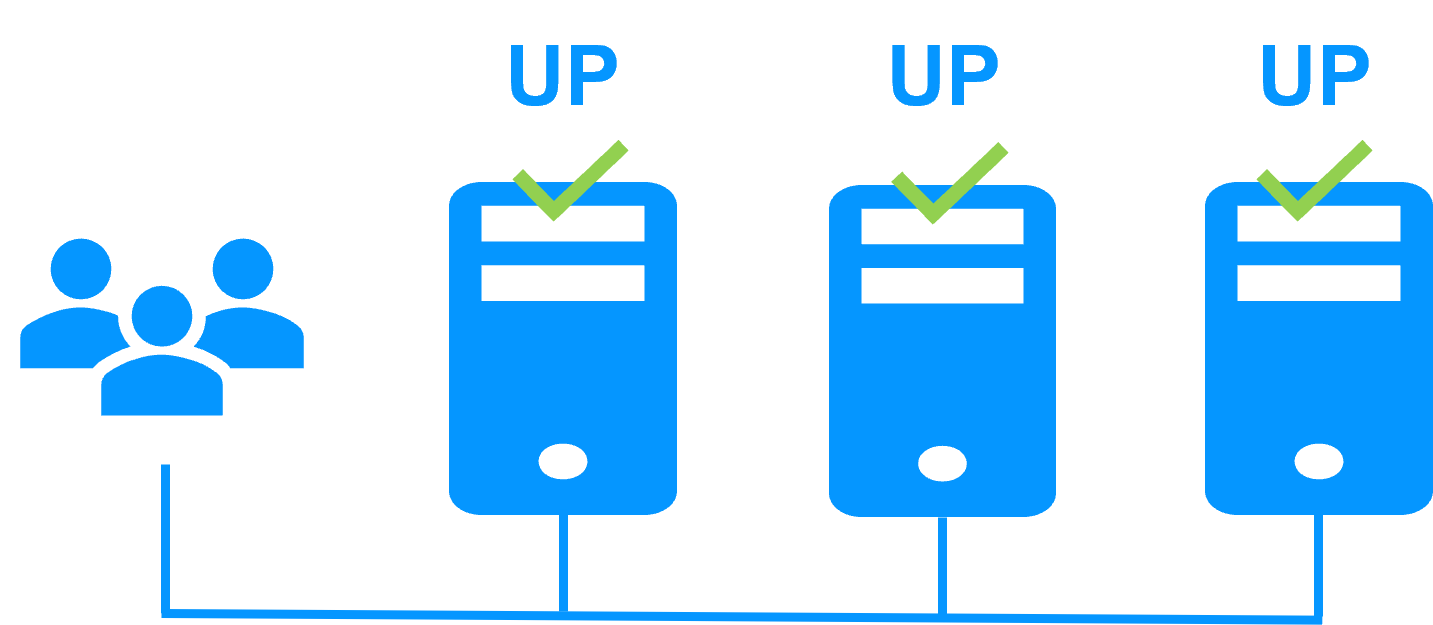
<p>On the previous figure, the Windows/Linux application is running on the 3 servers (3 is an example, it can be 2 or more). Users are connected to a virtual IP address.</p>
<p>The <a href="/best-practises/how-a-virtual-ip-address-works/">virtual IP address</a> is configured locally on each server in the farm-mode cluster.<br>
The input traffic to the virtual IP address is received by all the servers and split among them by a network filter inside each server&rsquo;s kernel.</p>
<p>SafeKit detects hardware and software failures, reconfigures network filters in the event of a failure, and offers configurable application checkers and recovery scripts.</p>
<h3 id="network-load-balancing">Load balancing in a network filter</h3>
<p>The network load balancing algorithm inside the network filter is based on the identity of the client packets (client IP address, client TCP port). Depending on the identity of the client packet input, only one filter in a server accepts the packet; the other filters in other servers reject it.</p>
<p>Once a packet is accepted by the filter on a server, only the CPU and memory of this server are used by the Windows/Linux application that responds to the request of the client. The output messages are sent directly from the application server to the client.</p>
<p>If a server fails, the farm heartbeat protocol reconfigures the filters in the network load balancing cluster to re-balance the traffic on the remaining available servers.</p>
<h3 id="stateful-stateless">Stateful or stateless applications</h3>
<p>With a stateful Windows/Linux application, there is session affinity. The same client must be connected to the same server on multiple TCP sessions to retrieve its context on the server. In this case, the SafeKit load balancing rule is configured on the client IP address. Thus, the same client is always connected to the same server on multiple TCP sessions. And different clients are distributed across different servers in the farm.</p>
<p>With a stateless Windows/Linux application, there is no session affinity. The same client can be connected to different servers in the farm on multiple TCP sessions. There is no context stored locally on a server from one session to another. In this case, the SafeKit load balancing rule is configured on the TCP client session identity. This configuration is the one which is the best for distributing sessions between servers, but it requires a TCP service without session affinity.</p>
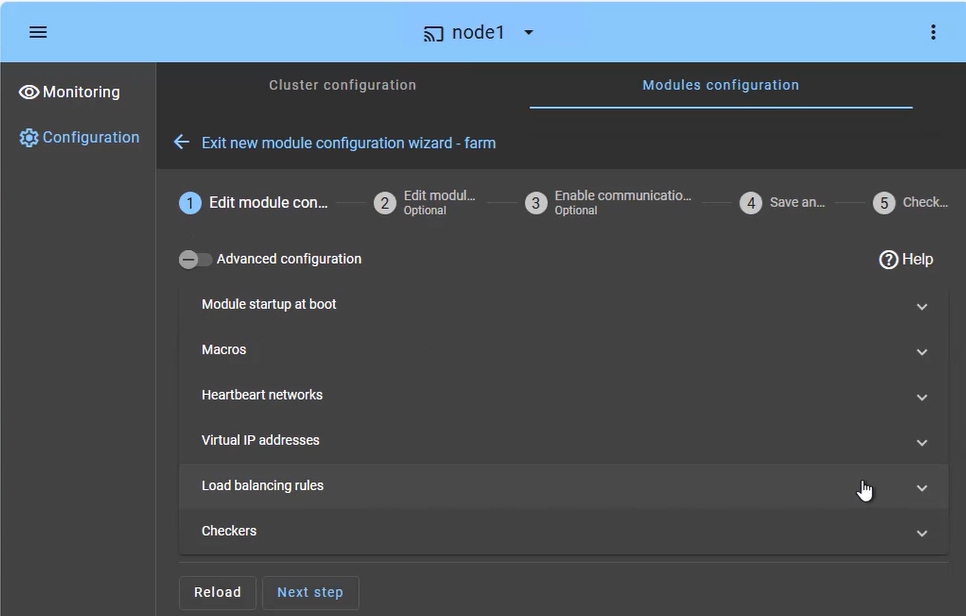
<h3 id="safekit-farm-cluster-configuration">How to configure a SafeKit cluster in farm mode for Windows/Linux?</h3>
<img src="/wp-content/uploads/2026/01/safekit-farm-cluster-config.png" width="966" alt="SafeKit Web Console: Farm-mode cluster configuration for Windows/Linux network load balancing and virtual IP management.">
<p>The <strong>SafeKit cluster in farm mode</strong> is designed for high availability and scalability of services. The configuration focuses on distributing incoming traffic across both nodes simultaneously:</p>
<ul>
<li><strong>Load Balanced Services (Macros tab):</strong> Define the specific application services (e.g., Apache, IIS, Nginx) to be kept active on all nodes.</li>
<li><strong>Heartbeat network(s):</strong> Communication path(s) used to detect if a node has left the farm, triggering an immediate redistribution of the load.</li>
<li><strong>Virtual IP (Farm VIP):</strong> Unlike a mirror cluster, the Farm VIP is shared between nodes using kernel filtering algorithm to distribute network traffic.</li>
<li><strong>Load Balancing Rules:</strong> Define the traffic distribution policy based on the source IP address or port.</li>
<li><strong>Checkers:</strong> Monitor the application&rsquo;s health and trigger automatic restart if a process failure is detected.</li>
</ul>
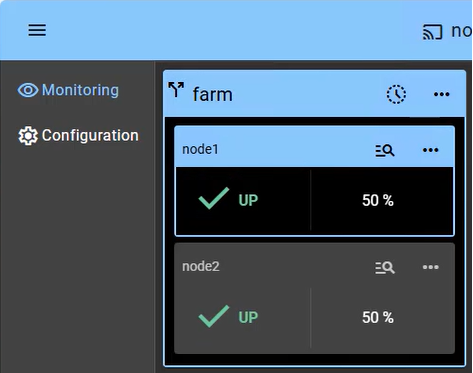
<h3 id="safekit-farm-cluster-monitoring">How to monitor a SafeKit cluster in farm mode for Windows/Linux?</h3>
<img src="/wp-content/uploads/2026/01/safekit-farm-cluster-monitor.png" width="473" alt="SafeKit Console: Monitoring a 2-node farm-mode cluster showing both Windows/Linux nodes in UP state with active load balancing.">
<p>Monitoring a cluster in farm mode provides visibility into the <strong>Active-Active</strong> nature of the infrastructure, where all nodes contribute to the application&rsquo;s performance (showing 2 nodes in this example):</p>
<ul>
<li><strong>UP State (50% on 2 nodes):</strong> In a healthy farm, both nodes are in the &ldquo;UP&rdquo; (50%) state, meaning they are both actively receiving and processing client requests via the shared Virtual IP.</li>
<li><strong>Automatic Re-balancing:</strong> If one node fails, the console visually shows the remaining node taking 100% of the traffic. There is no &ldquo;failover&rdquo; delay, as the surviving node is already active (aside from a detection time of a few seconds).</li>
<li><strong>Node Insertion:</strong> When a repaired node is restarted, it transitions from &ldquo;STOP&rdquo; to &ldquo;UP&rdquo; and automatically starts receiving its portion of the load without administrator intervention.</li>
<li><strong>No Data Sync:</strong> Note that in a farm-mode cluster, there is no &ldquo;Orange&rdquo; resynchronization state, as nodes are expected to be stateless or share a backend database (which can be protected separately in a mirror cluster).</li>
</ul>
<p>Beyond simple status icons, the interface provides one-click node management, allowing you to manually stop or start a node for planned maintenance while the shared Virtual IP automatically redistributes traffic without interrupting user activity.</p>
<h2 id="safekit-ha-comparison">Comparison of SafeKit with Traditional High Availability (HA) Clusters</h2>
<p>This comparison highlights the fundamental differences between SafeKit and traditional High Availability (HA) cluster solutions like Failover Clusters, Virtualization HA, and SQL Always-On. SafeKit is designed as a low-complexity, software-only solution for generic application redundancy, contrasting with the high complexity and specific storage requirements (shared storage, SAN) typical of traditional HA mechanisms.</p>
<p><strong>Comparison of SafeKit with traditional High Availability (HA) clusters</strong></p>
<table>
<thead>
<tr>
<th>Solutions</th>
<th>Complexity</th>
<th>Comments</th>
</tr>
</thead>
<tbody>
<tr>
<td>Failover Cluster (Microsoft)</td>
<td>High</td>
<td>Specific Storage (shared storage, SAN)</td>
</tr>
<tr>
<td>Virtualization (VMware HA)</td>
<td>High</td>
<td>Specific Storage (shared storage, SAN, vSAN)</td>
</tr>
<tr>
<td>SQL Always-On (Microsoft)</td>
<td>High</td>
<td>Only SQL is redundant, requires SQL Enterprise Edition</td>
</tr>
<tr>
<td>SafeKit</td>
<td>Low</td>
<td>Simplest, generic and software-only. Unsuitable for large data replication.</td>
</tr>
</tbody>
</table>
<p><strong>In summary</strong> , SafeKit achieves its low-complexity High Availability through a simple, software-based mirroring mechanism that eliminates the need for expensive, dedicated hardware like a SAN (Storage Area Network). This makes it a highly accessible solution for quickly implementing application redundancy without complex infrastructure changes.</p>
<h2 id="ha-arch-diff">Architectural Differentiators: SafeKit Software-Defined vs. Hardware HA Clusters</h2>
<p>Choosing the right High Availability (HA) solution is critical for ensuring business continuity and minimizing downtime. This comparison provides a direct, technical review of two major architectural approaches: SafeKit&rsquo;s software-defined, shared-nothing clustering versus Traditional HA methods that typically rely on hardware, shared disks (like a SAN), and complex configurations. These distinctions cover deployment simplicity, data replication methods, recovery speed (RTO/RPO), and operational complexity. The table below details the core differences across key high availability topics.</p>
<p><strong>High Availability Comparison: SafeKit Software Clustering vs. Traditional HA / Hardware Clustering</strong></p>
<table>
<thead>
<tr>
<th>Topic</th>
<th>SafeKit (Software Clustering / Primary Approach)</th>
<th>Traditional HA / Hardware Clustering</th>
</tr>
</thead>
<tbody>
<tr>
<td><strong><a href="/best-practises/clustering-software-vs-hardware-clustering/">Software Clustering vs. Hardware Clustering</a></strong></td>
<td>• A simple software cluster with the SafeKit package just installed on two servers</td>
<td>• Complex hardware clustering with external storage or network load balancers</td>
</tr>
<tr>
<td><strong><a href="/best-practises/shared-nothing-architecture-vs-shared-disk-architecture/">Shared Nothing vs. a Shared Disk Cluster</a></strong></td>
<td>• SafeKit is a shared-nothing cluster: easy to deploy even in remote sites</td>
<td>• A shared disk cluster is complex to deploy</td>
</tr>
<tr>
<td><strong><a href="/best-practises/vm-ha-vs-application-ha/">Application High Availability vs. Full Virtual Machine High Availability</a></strong></td>
<td>• Application HA supports hardware failure and software failure with application checkers.<br>• Quick recovery time by restarting only the application (RTO around 1 mn or less).<br>• Application HA requires to define restart scripts per application and folders to replicate (SafeKit application modules).</td>
<td>• Full virtual machines HA supports hardware failure and some software failures like a frozen VM.<br>• VM reboot on failure and recovery time depending on the OS reboot.<br>• No restart scripts to define with full virtual machines HA (SafeKithyperv.safeorkvm.safemodules). Hypervisors are active/active with just multiple virtual machines.</td>
</tr>
<tr>
<td><strong><a href="/best-practises/high-availability-cluster-vs-fault-tolerant-system/">High Availability vs. Fault Tolerance</a></strong></td>
<td>• No dedicated server with SafeKit. Eachserver can be the failover server of the other one.<br>• Software failure with restart in another OS environment.<br>• Smooth upgrade of application and OS possible server by server (version N and N+1 can coexist)</td>
<td>• Secondary server dedicated to the execution of the same application synchronized at the instruction level.<br>• Software exception on both servers at the same time.<br>• Smooth upgrade not possible<br>• Specific fault-tolerant hardware or hypervisors</td>
</tr>
<tr>
<td><strong><a href="/best-practises/synchronous-replication-vs-asynchronous-replication/">Synchronous Replication vs. Asynchronous Replication</a></strong></td>
<td>• SafeKit implements real-time synchronous replication with no data loss in case of failure<br>• Prerequisite for high availability</td>
<td>• With asynchronous replication, there is data loss on failure<br>• Not suited for high availability but for backup solutions</td>
</tr>
<tr>
<td><strong><a href="/best-practises/byte-level-file-replication-vs-block-level-disk-replication/">Byte-level File Replication vs. Block-level Disk Replication</a></strong></td>
<td>• SafeKit implements real-time byte-level file replication and is simply configured with application directories to replicate even in the system disk</td>
<td>• Block-level disk replication is complex to configure and requires to put application data in a special disk</td>
</tr>
<tr>
<td><strong><a href="/best-practises/heartbeat-failover-quorum-windows-linux-cluster/">Heartbeat, Failover, and Quorum to Avoid 2 Master Nodes</a></strong></td>
<td>• To avoid 2 masters, SafeKit proposes a simple split brain checker configured on a router</td>
<td>• To avoid 2 masters, other clusters require a complex configuration with a third machine, a special quorum disk, a special interconnect</td>
</tr>
<tr>
<td><strong><a href="/best-practises/how-a-virtual-ip-address-works/">Virtual IP Address: Primary/Secondary, Network Load Balancing, Failover</a></strong></td>
<td>• No dedicated proxy servers and no special network configuration are required in a SafeKit cluster for virtual IP addresses</td>
<td>• Special network configuration is required in other clusters for virtual IP addresses. Note that SafeKit offers a health check adapted to load balancers</td>
</tr>
</tbody>
</table>
<p><strong>In summary</strong> , the architectural choice between software clustering (like SafeKit) and hardware clustering (traditional shared-disk/SAN) significantly impacts deployment complexity, operational costs, and recovery effectiveness. The key takeaway from this comparison is the shift toward shared-nothing, application-level HA which prioritizes rapid application recovery (low RTO) and deployment flexibility (even across remote sites), often resulting in a more streamlined and resilient solution than highly complex, hardware-dependent cluster configurations. For maximum business continuity with simplified management, evaluating a software-based approach is essential.</p>
<h2 id="safemirr-diff">Key Differentiators of the SafeKit Mirror Cluster</h2>
<p>Choosing the right data replication approach is critical for ensuring business continuity. This comparison highlights the key differentiators of SafeKit&rsquo;s mirror cluster with real-time file replication against traditional alternatives such as database-level replication, disk replication, shared disk solutions, and fault-tolerant systems.</p>
<p><strong>SafeKit mirror cluster: advantages over alternative replication and clustering approaches</strong></p>
<table>
<thead>
<tr>
<th>Feature</th>
<th>SafeKit advantage</th>
<th>Limitation of alternatives</th>
</tr>
</thead>
<tbody>
<tr>
<td><strong><a href="/best-practises/clustering-software-vs-hardware-clustering/">3 products in 1</a></strong></td>
<td>Saves on Windows and Linux the cost of external shared/replicated storage, load balancing boxes, and enterprise editions of OS and databases. Includes all clustering features: synchronous real-time file replication, failure monitoring, automatic restart, virtual IP failover.</td>
<td>Traditional approaches require separate products for storage replication, load balancing, and clustering — increasing cost and complexity.</td>
</tr>
<tr>
<td><strong><a href="/solutions/">Very simple configuration</a></strong></td>
<td>Configuration via application modules. New services and replicated directories can be added easily. All managed through a centralized web console. No domain controller or Active Directory required.</td>
<td>Microsoft cluster and similar solutions require complex Active Directory configuration and domain controllers.</td>
</tr>
<tr>
<td><strong><a href="/best-practises/synchronous-replication-vs-asynchronous-replication/">Synchronous replication</a></strong></td>
<td>Real-time replication is synchronous with no data loss on failure (RPO = 0).</td>
<td>Asynchronous replication can lose recent transactions that were not yet replicated at failure time.</td>
</tr>
<tr>
<td><strong><a href="/architectures/file-replication-byte-level-with-failover-mirror-cluster/#step3">Fully automated failback</a></strong></td>
<td>After failure, when a server reboots, the replication failback is fully automatic. The failed server reintegrates the cluster without stopping the application on the remaining server.</td>
<td>Most replication solutions (especially database-level) require manual resynchronization. The application may even be stopped during failback.</td>
</tr>
<tr>
<td><strong><a href="/architectures/file-replication-byte-level-with-failover-mirror-cluster/#step1">Replication of any type of data</a></strong></td>
<td>Replication works for databases and for any files that need to be replicated.</td>
<td>Database-level replication only protects the database, not configuration files, logs, or other application data.</td>
</tr>
<tr>
<td><strong><a href="/best-practises/byte-level-file-replication-vs-block-level-disk-replication/">File replication vs disk replication</a></strong></td>
<td>Replication is based on file directories that can be located anywhere, even on the system disk.</td>
<td>Disk replication requires a dedicated disk partition and special application configuration to store data there.</td>
</tr>
<tr>
<td><strong><a href="/best-practises/shared-nothing-architecture-vs-shared-disk-architecture/">File replication vs shared disk</a></strong></td>
<td>Servers can be deployed in two remote sites with no shared infrastructure.</td>
<td>Shared disk solutions require physical proximity and cannot span remote sites.</td>
</tr>
<tr>
<td><strong><a href="/best-practises/how-a-virtual-ip-address-works/">Remote sites and virtual IP</a></strong></td>
<td>All clustering features work for 2 servers in remote sites. Extended LAN enables level-2 VIP rerouting. For different IP networks, VIP is managed via a load balancer with SafeKit health check.</td>
<td>Many clustering solutions do not support remote site failover or require complex DNS redirection with unpredictable recovery times.</td>
</tr>
<tr>
<td><strong><a href="/best-practises/heartbeat-failover-quorum-windows-linux-cluster/">Quorum and split brain</a></strong></td>
<td>Works with only 2 servers. A simple split brain checker to a router handles network isolation between sites.</td>
<td>Most clustering solutions require a 3rd server for quorum management.</td>
</tr>
<tr>
<td><strong><a href="/architectures/active-active-cluster-real-time-replication/">Active/active cluster</a></strong></td>
<td>The secondary server is not dedicated. The cluster can run active/active with 2 different mirror modules.</td>
<td><a href="/best-practises/high-availability-cluster-vs-fault-tolerant-system/">Fault-tolerant systems</a> dedicate the secondary to execute the same application synchronized at instruction level.</td>
</tr>
<tr>
<td><strong><a href="/architectures/clustering-software-load-balancing-mirroring/">Uniform HA solution</a></strong></td>
<td>SafeKit implements both mirror cluster (replication + failover) and <a href="/architectures/network-load-balancing-cluster/">farm cluster (load balancing + failover)</a>. A N-tier architecture can be made HA with one solution on Windows and Linux.</td>
<td>Typical architectures mix different technologies for load balancing, replication, and failover — increasing operational complexity.</td>
</tr>
<tr>
<td><strong><a href="/best-practises/what-is-rpo-and-rto-with-examples/">RTO / RPO</a></strong></td>
<td>Quick application restart in case of failure: around 1 minute or less. Zero data loss (synchronous replication).</td>
<td><a href="/best-practises/vm-ha-vs-application-ha/">Full VM replication</a> (VMware HA, Hyper-V cluster) requires rebooting the entire OS on a new hypervisor, resulting in longer recovery times.</td>
</tr>
</tbody>
</table>
<p><strong>In summary</strong> , SafeKit&rsquo;s mirror cluster provides a unified, cost-effective high availability solution that combines synchronous file replication, automatic failover and failback, load balancing, and remote site support — all without requiring dedicated hardware, shared storage, or a third quorum server. This simplicity makes it particularly suited for software editors and organizations needing reliable HA on standard Windows and Linux servers.</p>
<h2 id="safefarm-diff">Key Differentiators of the SafeKit Farm Cluster</h2>
<p>The SafeKit Farm Cluster is a high availability solution specifically designed for scalable application environments where load distribution and rapid failover are essential. Unlike traditional methods that require dedicated hardware load balancers or complex network configurations, SafeKit provides an integrated, software-defined clustering solution installed directly on the application servers. The table below details the core features and unique advantages of the SafeKit Farm Cluster, focusing on how it simplifies network load balancing and ensures continuous service availability across Windows and Linux platforms.</p>
<p><strong>Key Differentiators of SafeKit Farm Cluster with Load Balancing and Failover</strong></p>
<table>
<thead>
<tr>
<th>Advantage</th>
<th>Detailed Benefit and Mechanism</th>
</tr>
</thead>
<tbody>
<tr>
<td><a href="/best-practises/how-a-virtual-ip-address-works/">No load balancer or dedicated proxy servers or special multicast Ethernet address</a></td>
<td>• The solution does not require load balancers or dedicated proxy servers above the farm for implementing load balancing. SafeKit is installed directly on the application servers in the farm. The load balancing is based on a standard virtual IP address/Ethernet MAC address and is working with physical servers or virtual machines on Windows and Linux without special network configuration<br>• This is not the case with network load balancers<br>• This is not the case with dedicated proxies on Linux<br>• This is not the case with aspecific multicast Ethernet addresson Windows</td>
</tr>
<tr>
<td><a href="/architectures/network-load-balancing-cluster/">All clustering features</a></td>
<td>• The solution includes all clustering features: virtual IP address, load balancing on client IP address or on sessions, monitoring of server / network / software failures, automatic application restart with a quick recovery time and areplication option with a mirror module<br>• This is not the case with other load balancing solutions. They are able to make load balancing but they do not include a full clustering solution with restart scripts and automatic application restart in case of failure. They do not offer a replication option<br>• The cluster configuration is very simple and made by means ofapplication modules. There is no domain controller or active directory to configure on Windows. The solution works on Windows and Linux</td>
</tr>
<tr>
<td><a href="/best-practises/how-a-virtual-ip-address-works/">Remote sites and virtual IP address</a></td>
<td>• If servers are connected to the same IP network through an extended LAN between remote sites, thevirtual IP addressof SafeKit is working with load balancing at level 2<br>• If servers are connected to different IP networks between remote sites, the virtual IP address can be configured at the level of a load balancer with the help of the SafeKit health check. Thus you can implement load balancing but also all the clustering features of SafeKit, in particular monitoring and automatic recovery of the critical application on application servers</td>
</tr>
<tr>
<td><a href="/architectures/clustering-software-load-balancing-mirroring/">Uniform high availability solution</a></td>
<td>• SafeKit implements a farm cluster with load balancing and failover. But it implements also amirror cluster with replication and failover.<br>• Thus a N-tiers architecture can be made highly available and load balanced with the same solution on Windows and Linux (same installation, configuration, administration with the SafeKit console or with the command line interface). This is unique on the market<br>• This is not the case with an architecture mixing different technologies for load balancing, replication and failover</td>
</tr>
</tbody>
</table>
<p><strong>In summary</strong> , the SafeKit Farm Cluster provides a unified, software-based approach to load balancing and high availability that dramatically lowers complexity and cost. By embedding load balancing and failover directly into the application server layer using a standard virtual IP address, it avoids the need for external network hardware (load balancers or proxies) and specialized multicast configurations. This integrated approach, coupled with its ability to combine with the mirror cluster for full N-tiers HA, makes SafeKit a uniquely simple and comprehensive solution for achieving scalable and resilient application delivery across diverse environments.</p>
<h2 id="safe-vmha-diff">VM High Availability: SafeKit&rsquo;s SAN-Less vs. Hyper-V/VMware HA</h2>
<p>When implementing high availability, a key decision is whether to protect at the <strong>virtual machine (VM) level</strong> or at the <strong>application level</strong>. VM-level HA replicates and fails over entire virtual machines, providing a generic solution for any application. Application-level HA targets only the application data and services, resulting in faster recovery times and lower resource usage. SafeKit uniquely offers <strong>both approaches</strong> — without requiring shared storage (SAN) in either case — allowing you to choose the best fit for your infrastructure and recovery requirements.</p>
<p><strong>SafeKit VM HA vs Application HA vs Traditional Hyper-V Cluster &amp; VMware HA</strong></p>
<table>
<thead>
<tr>
<th>Criteria</th>
<th>VM HA with SafeKit Hyper-V or KVM module</th>
<th>Application HA with SafeKit application modules</th>
<th>Microsoft Hyper-V Cluster &amp; VMware HA</th>
</tr>
</thead>
<tbody>
<tr>
<td><strong>Architecture</strong></td>
<td>SafeKit installed inside 2 hypervisors. Replication and failover of the full VM.</td>
<td>SafeKit installed inside 2 virtual or physical machines. Replication and failover at application level.</td>
<td>Hypervisor cluster with shared storage. VM restart on another host if the hypervisor fails.</td>
</tr>
<tr>
<td><strong>Storage</strong></td>
<td>No shared disk — <a href="/best-practises/synchronous-replication-vs-asynchronous-replication/">synchronous real-time replication with no data loss</a></td>
<td>No shared disk — synchronous replication of application data only</td>
<td>Requires a shared disk and a specific external bay of disks</td>
</tr>
<tr>
<td><strong>Data replicated</strong></td>
<td>Replicates more data (application + OS)</td>
<td>Replicates only application data</td>
<td>No replication — shared storage accessed by all hosts</td>
</tr>
<tr>
<td><strong>Recovery time</strong></td>
<td>Reboot of the VM on hypervisor 2 if hypervisor 1 crashes. Recovery time = time to reboot the VM. Failover if the VM crashes.</td>
<td>Quick recovery with restart of the application on server 2. Around 1 minute or less (<a href="/best-practises/what-is-rpo-and-rto-with-examples/">see RTO/RPO here</a>). Advanced application checker and software failover.</td>
<td>Full VM reboot on a new hypervisor. Recovery time depends on OS reboot + application startup.</td>
</tr>
<tr>
<td><strong>Disaster recovery / Remote sites</strong></td>
<td>No SAN needed — replication built into SafeKit across remote sites</td>
<td>Requires replicated bays of disks across a SAN or vSAN</td>
</tr>
<tr>
<td><strong>Configuration</strong></td>
<td>Define the location of the VM files folder where the application is installed. Generic solution for any application/OS.</td>
<td>Define services to restart, application folders to replicate, and a virtual IP address for failover inside an <a href="/solutions/">application module</a>.</td>
<td>Specific IT skills required to configure the system</td>
</tr>
<tr>
<td><strong>Supported platforms</strong></td>
<td>Works with <a href="/solutions/hyper-v-replication-automatic-failover-load-balancing/">Hyper-V</a> and <a href="/solutions/linux-kvm-high-availability-replication-automatic-failover-load-balancing/">KVM</a> (not VMware directly, except by nesting Hyper-V or KVM inside VMware).</td>
<td>Works in any infrastructure: physical servers, VMware, Hyper-V, KVM virtual machines, cloud.</td>
<td>Limited to VMware vSphere or Microsoft Hyper-V environments</td>
</tr>
<tr>
<td><strong>IT skills</strong></td>
<td>No specific IT skill required. Automatic failover.</td>
<td>Specific IT skills required to configure the system</td>
</tr>
</tbody>
</table>
<p><strong>In summary</strong> , SafeKit is the only solution that provides <strong>both VM-level and application-level high availability without shared storage</strong>. For maximum flexibility and fastest recovery times (around 1 minute), application-level HA is the preferred approach — it works on any platform (physical, virtual, or cloud) and replicates only the data that matters. For environments where protecting the entire VM is simpler, SafeKit&rsquo;s Hyper-V/KVM module offers a generic, SAN-less alternative to traditional Microsoft Hyper-V Cluster or VMware HA — eliminating the cost and complexity of shared storage infrastructure while still guaranteeing zero data loss through synchronous real-time replication.</p>
<p>Note that SafeKit solutions are the simplest to implement but are <strong>limited to replication of <a href="/#safekit-ha-limitations">a few Tera-bytes</a> and failover of <a href="/#safekit-ha-limitations">32 VMs</a></strong>.</p>
<h2 id="safekit-ha-technical-resources">SafeKit HA Free Trial &amp; Technical Documentation</h2>
<p>💡 To kickstart your high availability journey with SafeKit, <strong><a href="/quick-install/">begin with the Quick Installation Guides</a></strong>.</p>
<h3 id="-safekits-ha-software-packages---version-82">📦 SafeKit&rsquo;s HA Software Packages - Version 8.2</h3>
<p>This table provides the SafeKit installation files for the current version, organized by operating system and installer type.</p>
<table>
<thead>
<tr>
<th>OS / Platform</th>
<th>Installer Type</th>
<th>Key Benefit / Documentation</th>
<th>Download Link</th>
</tr>
</thead>
<tbody>
<tr>
<td><strong>All Platforms</strong></td>
<td><strong>PDF Document</strong></td>
<td><strong>Official Software Release Bulletin (OS Support &amp; Fixes)</strong></td>
<td><a href="https://github.com/FR-LES-SAFEKIT-DEV/safekit-packages/releases/download/v8.2/SafeKit_8.2_Software_Release_Bulletin.pdf" title="Official bulletin detailing supported OS and recent fixes for SafeKit 8.2." target="_blank" rel="noopener">📄 View SafeKit 8.2 SRB</a></td>
</tr>
<tr>
<td><strong>Windows (Intel 64-bit)</strong></td>
<td><strong>.exe Installer</strong></td>
<td>Includes Microsoft VC++ Redistributable</td>
<td><a href="https://github.com/FR-LES-SAFEKIT-DEV/safekit-packages/releases/download/v8.2/safekit_windows_x86_64_8_2_6_5.exe" title="Download SafeKit 8.2 for Windows \(EXE installer with VC&#43;&#43; Redistributable\)" target="_blank" rel="noopener" download>⬇️ Download SafeKit 8.2 Windows EXE</a></td>
</tr>
<tr>
<td><strong>Windows (Intel 64-bit)</strong></td>
<td><strong>.msi Installer</strong></td>
<td><em>Does not</em> include Microsoft VC++ Redistributable</td>
<td><a href="https://github.com/FR-LES-SAFEKIT-DEV/safekit-packages/releases/download/v8.2/safekit_windows_x86_64_8_2_6_5.msi" title="Download SafeKit 8.2 for Windows \(MSI installer without VC&#43;&#43; Redistributable\)" target="_blank" rel="noopener" download>⬇️ Download SafeKit 8.2 Windows MSI</a></td>
</tr>
<tr>
<td><strong>Linux (Intel 64-bit)</strong></td>
<td><strong>Auto-extractable .BIN</strong></td>
<td>Includes Linux package and installation script</td>
<td><a href="https://github.com/FR-LES-SAFEKIT-DEV/safekit-packages/releases/download/v8.2/safekitlinux_x86_64_8_2_6_4.bin" title="Download SafeKit 8.2 for Linux \(Autoextractable BIN file with a standard Linux package and an installation script\)" target="_blank" rel="noopener" download>⬇️ Download SafeKit 8.2 Linux BIN File (Intel)</a></td>
</tr>
<tr>
<td><strong>Linux (ARM 64-bit)</strong></td>
<td><strong>Auto-extractable .BIN</strong></td>
<td>Includes Linux package and installation script</td>
<td><a href="https://github.com/FR-LES-SAFEKIT-DEV/safekit-packages/releases/download/v8.2/safekitlinux_aarch64_8_2_5_4.bin" title="Download SafeKit 8.2 for Linux \(Autoextractable BIN file with a standard Linux package and an installation script\)" target="_blank" rel="noopener" download>⬇️ Download SafeKit 8.2 Linux BIN File (ARM)</a></td>
</tr>
</tbody>
</table>
<h3 id="-safekits-ha-trial-key">🔑 SafeKit&rsquo;s HA Trial Key</h3>
<p>The following link provides access to a full-featured trial designed for testing and setting up a High Availability cluster with SafeKit.</p>
<p>➡️ <a href="https://safekit.eviden.com/resources/safekit-free-trial-licence-key-high-availability/" title="Request your free 30-day SafeKit&#39;s High Availability trial licence key" target="_blank" rel="noopener">Get Your Free 1-Month Trial Key to Test SafeKit&rsquo;s High Availability</a></p>
<h3 id="config-guides-heading">📚 SafeKit Configuration Guides for Your HA Cluster</h3>
<p>Essential documentation for setting up and managing your SafeKit&rsquo;s High Availability Cluster.</p>
<ul>
<li><a href="/quick-install/" title="Get up and running fast with Quick Installation Guides for SafeKit.">SafeKit Quick Installation Guides</a></li>
<li><a href="/resources/safekit-user-guide-82/" title="View the comprehensive user manual for SafeKit version 8.2 \(HTML\).">HTML SafeKit User&rsquo;s Guide (Version 8.2)</a> / <a href="https://github.com/FR-LES-SAFEKIT-DEV/safekit-packages/releases/download/v8.2/SafeKit_8.2_User_Guide.pdf" title="View the comprehensive user manual for SafeKit version 8.2 \(PDF\)." target="_blank" rel="noopener">Download PDF</a></li>
<li><a href="/resources/safekit-release-notes-8-2/" title="See what&#39;s new, changes, and fixes in SafeKit version 8.2 \(HTML\).">HTML SafeKit Release Notes (Version 8.2)</a> / <a href="https://github.com/FR-LES-SAFEKIT-DEV/safekit-packages/releases/download/v8.2/SafeKit_8.2_Release_Notes.pdf" title="See what&#39;s new, changes, and fixes in SafeKit version 8.2 \(PDF\)." target="_blank" rel="noopener">Download PDF</a></li>
<li><a href="https://github.com/FR-LES-SAFEKIT-DEV/safekit-packages/releases/download/v8.2/SafeKit_8.2_Software_Release_Bulletin.pdf" title="Official bulletin detailing supported OS and recent fixes for SafeKit 8.2." target="_blank" rel="noopener">SafeKit 8.2 Software Release Bulletin (SRB)</a></li>
<li><a href="https://github.com/FR-LES-SAFEKIT-DEV/safekit-packages/releases/download/v8.2/SafeKit_8.2_Knowledge_Base.pdf" title="SafeKit Knowledge Base: troubleshooting tips and answers to common questions." target="_blank" rel="noopener">SafeKit Knowledge Base</a></li>
</ul>
<h3 id="support">📞/🤖 SafeKit Support</h3>
<ul>
<li>📞 <a href="/resources/safekit-support/#standard-support">Paid support</a> / 🤖 <a href="/resources/safekit-support/#ai-support">Free support</a></li>
</ul>
<h3 id="-free-training-and-certification-on-safekit">🎓 Free Training and Certification on SafeKit</h3>
<p>Gain valuable expertise in High Availability (HA) with our free certification program.</p>
<ul>
<li><a href="https://training.my.evidian.com/mod/page/view.php?id=712" target="_blank" rel="noopener">Earn your SafeKit Certification in High Availability for Free</a></li>
</ul>
<h3 id="ℹ-product-marketing-documentation">ℹ️ Product Marketing Documentation</h3>
<p>Explore our product marketing documentation for SafeKit HA software, which includes a detailed data sheet, product white paper, and technical overview.</p>
<ul>
<li><a href="/wp-content/uploads/documents/high-availability-overview.pdf" target="_blank" rel="noopener">SafeKit High Availability Cluster Data Sheet (PDF)</a></li>
<li><a href="/wp-content/uploads/documents/wp-safekit-en.pdf" target="_blank" rel="noopener">High Availability Cluster Technology White Paper (PDF)</a></li>
<li><a href="/wp-content/uploads/documents/wp-hadecision-en.pdf" target="_blank" rel="noopener">White Paper - High Availability Guide (PDF)</a></li>
<li><a href="/resources/high-availability-technical-reference-for-rfi-and-rfp-preparation/">Technical Reference for RFI and RFP</a></li>
</ul>
<h2 id="safekit-ha-application-modules">SafeKit Application Module Library: Ready-to-Use HA Solutions</h2>
<p>This table presents the SafeKit High Availability (HA) solutions, categorized by application and operating environment (Databases, Web Servers, VMs, Containers, Cloud). Identify the specific pre‑configured <code>.safe</code> module (e.g., <code>mirror.safe</code>, <code>farm.safe</code>, and others) required for real‑time replication, load balancing, and automatic failover of critical business applications on Windows or Linux. Simplify your HA cluster setup with direct links to quick installation guides.</p>
<p>A SafeKit <code>.safe</code> module is essentially a pre‑configured High Availability (HA) template that defines how a specific application will be clustered and protected by the SafeKit software. In practice, it is a zip file which contains a configuration file (<code>userconfig.xml</code>) and restart scripts.</p>
<p><strong>⚠️ Note:</strong> * <code>mirror.safe</code> and <code>farm.safe</code> modules are included by default in the SafeKit installation package.</p>
<p><strong>SafeKit High Availability (HA) Solutions: Quick Installation Guides (with downloadable .safe modules)</strong></p>
<table>
<thead>
<tr>
<th>Application Category</th>
<th>Solutions</th>
<th>Quick Installation Guide</th>
<th>Application Module</th>
</tr>
</thead>
<tbody>
<tr>
<td>New Applications</td>
<td><a href="/solutions/windows-high-availability-software-synchronous-replication-failover/" title="How it works: Windows Real-Time Replication">Windows Mirror Cluster Architecture</a></td>
<td><a href="/quick-install/safekit-quick-installation-guide-for-a-new-windows-application-with-real-time-replication-and-failover/" title="Quick HA Installation Guide Windows Real-Time Replication \(mirror.safe\)">Quick Installation Guide for Windows</a></td>
<td>mirror.safe (Windows)*</td>
</tr>
<tr>
<td>New Applications</td>
<td><a href="/solutions/linux-high-availability-software-synchronous-replication-failover/" title="How it works: Linux Real-Time Replication">Linux Mirror Cluster Architecture</a></td>
<td><a href="/quick-install/safekit-quick-installation-guide-for-a-new-linux-application-with-real-time-replication-and-failover/" title="Quick HA Installation Guide Linux Real-Time Replication \(mirror.safe\)">Quick Installation Guide for Linux</a></td>
<td>mirror.safe (Linux)*</td>
</tr>
<tr>
<td>New Applications</td>
<td><a href="/solutions/windows-load-balancing-failover/" title="How it works: Windows Network Load Balancing">Windows Load Balancing Architecture</a></td>
<td><a href="/quick-install/safekit-quick-installation-guide-for-a-new-windows-application-with-network-load-balancing-and-failover/" title="Quick HA Installation Guide Windows Network Load Balancing \(farm.safe\)">Quick Installation Guide for Windows</a></td>
<td>farm.safe (Windows)*</td>
</tr>
<tr>
<td>New Applications</td>
<td><a href="/solutions/linux-load-balancing-failover/" title="How it works: Linux Network Load Balancing">Linux Load Balancing Architecture</a></td>
<td><a href="/quick-install/safekit-quick-installation-guide-for-a-new-linux-application-with-network-load-balancing-and-failover/" title="Quick HA Installation Guide Linux Network Load Balancing \(farm.safe\)">Quick Installation Guide for Linux</a></td>
<td>farm.safe (Linux)*</td>
</tr>
<tr>
<td>Databases</td>
<td><a href="/solutions/sql-server-high-availability-synchronous-replication-failover/" title="How it works: SQL Server Mirroring">Microsoft SQL Server Mirror Cluster Architecture</a></td>
<td><a href="/quick-install/safekit-quick-installation-guide-with-microsoft-sql-server/" title="Quick HA Installation Guide SQL Server Cluster">Quick Installation Guide for Microsoft SQL Server</a></td>
<td><a class="btn-download" href="/wp-content/uploads/downloads_safekit/version-82/modules_windows/sqlserver.safe" download="sqlserver.safe">⬇️ sqlserver.safe</a> (Windows)</td>
</tr>
<tr>
<td>Databases</td>
<td><a href="/solutions/postgresql-high-availability-synchronous-replication-failover/" title="How it works: PostgreSQL Replication">PostgreSQL Mirror Cluster Architecture</a></td>
<td><a href="/quick-install/safekit-quick-installation-guide-with-postgresql/" title="Quick HA Installation Guide PostgreSQL Replication">Quick Installation Guide for PostgreSQL</a></td>
<td><a class="btn-download" href="/wp-content/uploads/downloads_safekit/version-82/modules_windows/postgresql.safe" download="postgresql.safe">⬇️ postgresql.safe</a> (Windows)<br> <a class="btn-download" href="/wp-content/uploads/downloads_safekit/version-82/modules_linux/postgresql.safe" download="postgresql.safe">⬇️ postgresql.safe</a> (Linux)</td>
</tr>
<tr>
<td>Databases</td>
<td><a href="/solutions/mysql-high-availability-synchronous-replication-failover/" title="How it works: MySQL Cluster">MySQL Mirror Cluster Architecture</a></td>
<td><a href="/quick-install/safekit-quick-installation-guide-with-mysql/" title="Quick HA Installation Guide MySQL Cluster">Quick Installation Guide for MySQL</a></td>
<td><a class="btn-download" href="/wp-content/uploads/downloads_safekit/version-82/modules_windows/mysql.safe" download="mysql.safe">⬇️ mysql.safe</a> (Windows)<br> <a class="btn-download" href="/wp-content/uploads/downloads_safekit/version-82/modules_linux/mysql.safe" download="mysql.safe">⬇️ mysql.safe</a> (Linux)</td>
</tr>
<tr>
<td>Databases</td>
<td><a href="/solutions/mariadb-simplest-high-availability-cluster-synchronous-replication-failover-redundant-servers/" title="How it works: MariaDB Cluster">MariaDB Mirror Cluster Architecture</a></td>
<td><a href="/quick-install/safekit-quick-installation-guide-with-mariadb/" title="Quick HA Installation Guide MariaDB Cluster">Quick Installation Guide for MariaDB</a></td>
<td><a class="btn-download" href="/wp-content/uploads/downloads_safekit/version-82/modules_windows/mysql.safe" download="mysql.safe">⬇️ mysql.safe</a> (Windows)<br> <a class="btn-download" href="/wp-content/uploads/downloads_safekit/version-82/modules_linux/mysql.safe" download="mysql.safe">⬇️ mysql.safe</a> (Linux)</td>
</tr>
<tr>
<td>Databases</td>
<td><a href="/solutions/oracle-high-availability-synchronous-replication-failover/" title="How it works: Oracle Failover">Oracle Mirror Cluster Architecture</a></td>
<td><a href="/quick-install/safekit-quick-installation-guide-with-oracle/" title="Quick HA Installation Guide Oracle Failover Cluster">Quick Installation Guide for Oracle</a></td>
<td><a class="btn-download" href="/wp-content/uploads/downloads_safekit/version-82/modules_windows/oracle.safe" download="oracle.safe">⬇️ oracle.safe</a> (Windows)<br> <a class="btn-download" href="/wp-content/uploads/downloads_safekit/version-82/modules_linux/oracle.safe" download="oracle.safe">⬇️ oracle.safe</a> (Linux)</td>
</tr>
<tr>
<td>Databases</td>
<td><a href="/solutions/firebird-high-availability-synchronous-replication-failover/" title="How it works: Firebird HA">Firebird Mirror Cluster Architecture</a></td>
<td><a href="/quick-install/safekit-quick-installation-guide-with-firebird/" title="Quick HA Installation Guide Firebird">Quick Installation Guide for Firebird</a></td>
<td><a class="btn-download" href="/wp-content/uploads/downloads_safekit/version-82/modules_windows/firebird.safe" download="firebird.safe">⬇️ firebird.safe</a> (Windows)<br> <a class="btn-download" href="/wp-content/uploads/downloads_safekit/version-82/modules_linux/firebird.safe" download="firebird.safe">⬇️ firebird.safe</a> (Linux)</td>
</tr>
<tr>
<td>Web Servers</td>
<td><a href="/solutions/apache-load-balancing-failover-2/" title="How it works: Apache Load Balancing">Apache Load Balancing Architecture</a></td>
<td><a href="/quick-install/safekit-quick-installation-guide-with-network-load-balancing-and-failover/" title="Quick HA Guide Apache Load Balancing &amp;amp; Failover">Quick Installation Guide for Apache</a></td>
<td><a class="btn-download" href="/wp-content/uploads/downloads_safekit/version-82/modules_windows/apache_farm.safe" download="apache_farm.safe">⬇️ apache_farm.safe</a> (Windows)<br> <a class="btn-download" href="/wp-content/uploads/downloads_safekit/version-82/modules_linux/apache_farm.safe" download="apache_farm.safe">⬇️ apache_farm.safe</a> (Linux)</td>
</tr>
<tr>
<td>Web Servers</td>
<td><a href="/solutions/iis-load-balancing-failover/" title="How it works: IIS Load Balancing">IIS Load Balancing Architecture</a></td>
<td><a href="/quick-install/safekit-quick-installation-guide-with-iis-with-network-load-balancing-and-failover/" title="Quick HA Guide IIS Load Balancing &amp;amp; Failover">Quick Installation Guide for IIS</a></td>
<td><a class="btn-download" href="/wp-content/uploads/downloads_safekit/version-82/modules_windows/iis_farm.safe" download="iis_farm.safe">⬇️ iis_farm.safe</a> (Windows)</td>
</tr>
<tr>
<td>Web Servers</td>
<td><a href="/solutions/nginx-the-simplest-load-balancing-cluster-with-failover/" title="How it works: NGINX Load Balancing">NGINX Load Balancing Architecture</a></td>
<td><a href="/quick-install/safekit-quick-installation-guide-with-nginx-with-network-load-balancing-and-failover/" title="Quick HA Guide NGINX Load Balancing &amp;amp; Failover">Quick Installation Guide for NGINX</a></td>
<td>farm.safe (Windows &amp; Linux)*</td>
</tr>
<tr>
<td>VMs and Containers</td>
<td><a href="/solutions/hyper-v-replication-automatic-failover-load-balancing/" title="How it works: Hyper-V Replication">Hyper-V VM HA Architecture</a></td>
<td><a href="/quick-install/safekit-quick-installation-guide-with-hyper-v/" title="Quick HA Installation Guide Hyper-V VM Replication">Quick Installation Guide for Hyper-V</a></td>
<td><a class="btn-download" href="/wp-content/uploads/downloads_safekit/version-82/modules_windows/hyperv.safe" download="hyperv.safe">⬇️ hyperv.safe</a> (Windows)</td>
</tr>
<tr>
<td>VMs and Containers</td>
<td><a href="/solutions/linux-kvm-high-availability-replication-automatic-failover-load-balancing/" title="How it works: KVM Replication">KVM VM HA Architecture</a></td>
<td><a href="/quick-install/safekit-quick-installation-guide-with-kvm/" title="Quick HA Installation Guide KVM VM Replication">Quick Installation Guide for KVM</a></td>
<td><a class="btn-download" href="/wp-content/uploads/downloads_safekit/version-82/modules_linux/kvm.safe" download="kvm.safe">⬇️ kvm.safe</a> (Linux)</td>
</tr>
<tr>
<td>VMs and Containers</td>
<td><a href="/solutions/docker-container-high-availability-cluster-synchronous-replication-failover/" title="How it works: Docker Failover">Docker Container HA Architecture</a></td>
<td><a href="/quick-install/safekit-quick-installation-guide-with-docker/" title="Quick HA Guide Docker Container Failover">Quick Installation Guide for Docker</a></td>
<td>mirror.safe (Linux)*</td>
</tr>
<tr>
<td>VMs and Containers</td>
<td><a href="/solutions/podman-the-simplest-high-availability-cluster-between-two-redundant-servers/" title="How it works: Podman Failover">Podman Container HA Architecture</a></td>
<td><a href="/quick-install/safekit-quick-installation-guide-with-podman/" title="Quick HA Guide Podman Container Failover">Quick Installation Guide for Podman</a></td>
<td>mirror.safe (Linux)*</td>
</tr>
<tr>
<td>VMs and Containers</td>
<td><a href="/solutions/kubernetes-k3s-the-simplest-high-availability-cluster-with-synchronous-replication-and-failover-between-two-redundant-servers/" title="How it works: Kubernetes K3S">Kubernetes K3S Cluster Architecture</a></td>
<td><a href="/quick-install/safekit-quick-installation-guide-with-kubernetes/" title="Quick HA Guide Kubernetes K3S Replication">Quick Installation Guide for Kubernetes K3S</a></td>
<td><a class="btn-download" href="/wp-content/uploads/downloads_safekit/version-82/modules_linux/k3s.safe" download="k3s.safe">⬇️ k3s.safe</a> (Linux)</td>
</tr>
<tr>
<td>AWS Cloud</td>
<td><a href="/solutions/aws-high-availability-cluster-synchronous-replication-failover/" title="How it works: AWS Replication Cluster">AWS Mirror Cluster Architecture</a></td>
<td><a href="/quick-install/safekit-quick-installation-guide-in-aws-mirror-safe-module-for-real-time-replication-and-failover/" title="Quick HA Guide AWS Replication Cluster \(mirror.safe\)">Quick Installation Guide for AWS</a></td>
<td>mirror.safe (Windows &amp; Linux)*</td>
</tr>
<tr>
<td>AWS Cloud</td>
<td><a href="/solutions/aws-load-balancing-cluster-failover/" title="How it works: AWS Load Balancing">AWS Load Balancing Architecture</a></td>
<td><a href="/quick-install/safekit-quick-installation-guide-in-aws-with-network-load-balancing-and-failover/" title="Quick HA Guide AWS Load Balancing Cluster \(farm.safe\)">Quick Installation Guide for AWS</a></td>
<td>farm.safe (Windows &amp; Linux)*</td>
</tr>
<tr>
<td>GCP Cloud</td>
<td><a href="/solutions/gcp-high-availability-cluster-synchronous-replication-failover/" title="How it works: GCP Replication Cluster">GCP Mirror Cluster Architecture</a></td>
<td><a href="/quick-install/safekit-quick-installation-guide-in-gcp-with-real-time-replication-and-failover/" title="Quick HA Guide GCP Replication Cluster \(mirror.safe\)">Quick Installation Guide for GCP</a></td>
<td>mirror.safe (Windows &amp; Linux)*</td>
</tr>
<tr>
<td>GCP Cloud</td>
<td><a href="/solutions/gcp-load-balancing-cluster-failover/" title="How it works: GCP Load Balancing">GCP Load Balancing Architecture</a></td>
<td><a href="/quick-install/safekit-quick-installation-guide-in-gcp-with-network-load-balancing-and-failover/" title="Quick HA Guide GCP Load Balancing Cluster \(farm.safe\)">Quick Installation Guide for GCP</a></td>
<td>farm.safe (Windows &amp; Linux)*</td>
</tr>
<tr>
<td>Azure Cloud</td>
<td><a href="/solutions/azure-high-availability-cluster-synchronous-replication-failover/" title="How it works: Azure Replication Cluster">Azure Mirror Cluster Architecture</a></td>
<td><a href="/quick-install/safekit-quick-installation-guide-in-azure-with-real-time-replication-and-failover/" title="Quick HA Guide Azure Replication Cluster \(mirror.safe\)">Quick Installation Guide for Azure</a></td>
<td>mirror.safe (Windows &amp; Linux)*</td>
</tr>
<tr>
<td>Azure Cloud</td>
<td><a href="/solutions/azure-load-balancing-cluster-failover/" title="How it works: Azure Load Balancing">Azure Load Balancing Architecture</a></td>
<td><a href="/quick-install/safekit-quick-installation-guide-in-azure-with-network-load-balancing-and-failover/" title="Quick HA Guide Azure Load Balancing Cluster \(farm.safe\)">Quick Installation Guide for Azure</a></td>
<td>farm.safe (Windows &amp; Linux)*</td>
</tr>
<tr>
<td>Cloud</td>
<td><a href="/solutions/cloud-high-availability-cluster-synchronous-replication-failover/" title="How it works: Cloud Replication Cluster">Cloud Mirror Cluster Architecture</a></td>
<td><a href="/quick-install/safekit-quick-installation-guide-in-cloud-with-real-time-replication-and-failover/" title="Quick HA Guide Cloud Replication Cluster \(mirror.safe\)">Quick Installation Guide for Cloud</a></td>
<td>mirror.safe (Windows &amp; Linux)*</td>
</tr>
<tr>
<td>Cloud</td>
<td><a href="/solutions/cloud-load-balancing-cluster-failover/" title="How it works: Cloud Load Balancing">Cloud Load Balancing Architecture</a></td>
<td><a href="/quick-install/safekit-quick-installation-guide-in-cloud-with-network-load-balancing-and-failover/" title="Quick HA Guide Cloud Load Balancing Cluster \(farm.safe\)">Quick Installation Guide for Cloud</a></td>
<td>farm.safe (Windows &amp; Linux)*</td>
</tr>
<tr>
<td>Physical Security / VMS</td>
<td><a href="/solutions/milestone-xprotect-corporate-high-availability-synchronous-replication-failover/" title="How it works: Milestone XProtect Failover">Milestone XProtect Mirror Cluster Architecture</a></td>
<td><a href="/quick-install/safekit-quick-installation-guide-with-milestone-xprotect-management-server/" title="Quick HA Guide Milestone XProtect Management Server Failover">Quick Installation Guide for Milestone XProtect</a></td>
<td><a class="btn-download" href="/wp-content/uploads/downloads_safekit/version-82/modules_windows/milestone.safe" download="milestone.safe">⬇️ milestone.safe</a> (Windows)</td>
</tr>
<tr>
<td>Physical Security / VMS</td>
<td><a href="/solutions/nedap-high-availability-synchronous-replication-failover/" title="How it works: Nedap AEOS Failover">Nedap AEOS Mirror Cluster Architecture</a></td>
<td><a href="/quick-install/safekit-quick-installation-guide-with-nedap/" title="Quick HA Guide Nedap AEOS Failover">Quick Installation Guide for Nedap AEOS</a></td>
<td><a class="btn-download" href="/wp-content/uploads/downloads_safekit/version-82/modules_windows/nedap.safe" download="nedap.safe">⬇️ nedap.safe</a> (Windows)</td>
</tr>
<tr>
<td>Physical Security / VMS</td>
<td><a href="/solutions/sql-server-high-availability-synchronous-replication-failover/" title="How it works: Genetec SQL Failover">Genetec SQL Mirror Cluster Architecture</a></td>
<td><a href="/quick-install/safekit-quick-installation-guide-with-microsoft-sql-server/" title="Quick HA Guide Genetec SQL Server Failover">Quick Installation Guide for Genetec (SQL Server)</a></td>
<td><a class="btn-download" href="/wp-content/uploads/downloads_safekit/version-82/modules_windows/sqlserver.safe" download="sqlserver.safe">⬇️ sqlserver.safe</a> (Windows)</td>
</tr>
<tr>
<td>Physical Security / VMS</td>
<td><a href="/solutions/bosch-ams-the-simplest-high-availability-cluster-between-two-redundant-servers-without-shared-disk/" title="How it works: Bosch AMS HA">Bosch AMS VM HA Architecture</a></td>
<td><a href="/quick-install/safekit-quick-installation-guide-with-hyper-v/" title="Quick HA Guide Bosch AMS Hyper-V Failover">Quick Installation Guide for Bosch AMS</a></td>
<td><a class="btn-download" href="/wp-content/uploads/downloads_safekit/version-82/modules_windows/hyperv.safe" download="hyperv.safe">⬇️ hyperv.safe</a> (Windows)</td>
</tr>
<tr>
<td>Physical Security / VMS</td>
<td><a href="/solutions/bosch-bis-the-simplest-high-availability-cluster-between-two-redundant-servers-without-shared-disk/" title="How it works: Bosch BIS HA">Bosch BIS VM HA Architecture</a></td>
<td><a href="/quick-install/safekit-quick-installation-guide-with-hyper-v/" title="Quick HA Guide Bosch BIS Hyper-V Failover">Quick Installation Guide for Bosch BIS</a></td>
<td><a class="btn-download" href="/wp-content/uploads/downloads_safekit/version-82/modules_windows/hyperv.safe" download="hyperv.safe">⬇️ hyperv.safe</a> (Windows)</td>
</tr>
<tr>
<td>Physical Security / VMS</td>
<td><a href="/solutions/bosch-bvms-the-simplest-high-availability-cluster-between-two-redundant-servers-without-shared-disk/" title="How it works: Bosch BVMS HA">Bosch BVMS VM HA Architecture</a></td>
<td><a href="/quick-install/safekit-quick-installation-guide-with-hyper-v/" title="Quick HA Guide Bosch BVMS Hyper-V Failover">Quick Installation Guide for Bosch BVMS</a></td>
<td><a class="btn-download" href="/wp-content/uploads/downloads_safekit/version-82/modules_windows/hyperv.safe" download="hyperv.safe">⬇️ hyperv.safe</a> (Windows)</td>
</tr>
<tr>
<td>Physical Security / VMS</td>
<td><a href="/solutions/hanwha-vision-cluster-without-shared-storage-on-a-san/" title="How it works: Hanwha Vision HA">Hanwha Vision VM HA Architecture</a></td>
<td><a href="/quick-install/safekit-quick-installation-guide-with-hyper-v/" title="Quick HA Guide Hanwha Vision Hyper-V Failover">Quick Installation Guide for Hanwha Vision</a></td>
<td><a class="btn-download" href="/wp-content/uploads/downloads_safekit/version-82/modules_windows/hyperv.safe" download="hyperv.safe">⬇️ hyperv.safe</a> (Windows)</td>
</tr>
<tr>
<td>Physical Security / VMS</td>
<td><a href="/solutions/hanwha-wisenet-wave-the-simplest-high-availability-cluster-between-two-redundant-servers-without-shared-disk/" title="How it works: Hanwha Wisenet HA">Hanwha Wisenet VM HA Architecture</a></td>
<td><a href="/quick-install/safekit-quick-installation-guide-with-hyper-v/" title="Quick HA Guide Hanwha Wisenet Hyper-V Failover">Quick Installation Guide for Hanwha Wisenet</a></td>
<td><a class="btn-download" href="/wp-content/uploads/downloads_safekit/version-82/modules_windows/hyperv.safe" download="hyperv.safe">⬇️ hyperv.safe</a> (Windows)</td>
</tr>
<tr>
<td>Siemens Products</td>
<td><a href="/solutions/siemens-siveillance-redundancy-high-availability-cluster-active-active/" title="How it works: Siemens Siveillance suite HA">Siemens Siveillance VM HA Architecture</a></td>
<td><a href="/quick-install/safekit-quick-installation-guide-with-hyper-v/" title="Quick HA Guide Siemens Siveillance suite Hyper-V Failover">Quick Installation Guide for Siemens Siveillance suite</a></td>
<td><a class="btn-download" href="/wp-content/uploads/downloads_safekit/version-82/modules_windows/hyperv.safe" download="hyperv.safe">⬇️ hyperv.safe</a> (Windows)</td>
</tr>
<tr>
<td>Siemens Products</td>
<td><a href="/solutions/siemens-desigo-cc-redundancy-high-availability-cluster-active-active/" title="How it works: Siemens Desigo CC HA">Siemens Desigo CC VM HA Architecture</a></td>
<td><a href="/quick-install/safekit-quick-installation-guide-with-hyper-v/" title="Quick HA Guide Siemens Desigo CC Hyper-V Failover">Quick Installation Guide for Siemens Desigo CC</a></td>
<td><a class="btn-download" href="/wp-content/uploads/downloads_safekit/version-82/modules_windows/hyperv.safe" download="hyperv.safe">⬇️ hyperv.safe</a> (Windows)</td>
</tr>
<tr>
<td>Siemens Products</td>
<td><a href="/solutions/siemens-siveillance-vms-the-simplest-high-availability-cluster-between-two-redundant-servers/" title="How it works: Siemens Siveillance VMS Failover">Siemens Siveillance Mirror Cluster Architecture</a></td>
<td><a href="/solutions/siemens-siveillance-vms-the-simplest-high-availability-cluster-between-two-redundant-servers/" title="Quick HA Guide Siemens Siveillance VMS Failover">Quick Installation Guide for Siemens Siveillance VMS</a></td>
<td><a class="btn-download" href="/wp-content/uploads/downloads_safekit/version-82/modules_windows/SiveillanceVMS.safe" download="SiveillanceVMS.safe">⬇️ SiveillanceVMS.safe</a> (Windows)</td>
</tr>
<tr>
<td>Siemens Products</td>
<td><a href="/solutions/siemens-sipass-redundancy-high-availability-cluster-active-active/" title="How it works: Siemens SiPass HA">Siemens SiPass VM HA Architecture</a></td>
<td><a href="/quick-install/safekit-quick-installation-guide-with-hyper-v/" title="Quick HA Guide Siemens SiPass Hyper-V Failover">Quick Installation Guide for Siemens SiPass</a></td>
<td><a class="btn-download" href="/wp-content/uploads/downloads_safekit/version-82/modules_windows/hyperv.safe" download="hyperv.safe">⬇️ hyperv.safe</a> (Windows)</td>
</tr>
<tr>
<td>Siemens Products</td>
<td><a href="/solutions/siemens-siport-redundancy-high-availability-cluster-active-active/" title="How it works: Siemens SIPORT HA">Siemens SIPORT VM HA Architecture</a></td>
<td><a href="/quick-install/safekit-quick-installation-guide-with-hyper-v/" title="Quick HA Guide Siemens SIPORT Hyper-V Failover">Quick Installation Guide for Siemens SIPORT</a></td>
<td><a class="btn-download" href="/wp-content/uploads/downloads_safekit/version-82/modules_windows/hyperv.safe" download="hyperv.safe">⬇️ hyperv.safe</a> (Windows)</td>
</tr>
<tr>
<td>Siemens Products</td>
<td><a href="/solutions/siemens-simatic-pcs-7-redundancy-high-availability-cluster-active-active/" title="How it works: Siemens SIMATIC PCS 7 HA">SIMATIC PCS 7 VM HA Architecture</a></td>
<td><a href="/quick-install/safekit-quick-installation-guide-with-hyper-v/" title="Quick HA Guide Siemens SIMATIC PCS 7 Hyper-V Failover">Quick Installation Guide for Siemens SIMATIC PCS 7</a></td>
<td><a class="btn-download" href="/wp-content/uploads/downloads_safekit/version-82/modules_windows/hyperv.safe" download="hyperv.safe">⬇️ hyperv.safe</a> (Windows)</td>
</tr>
<tr>
<td>Siemens Products</td>
<td><a href="/solutions/siemens-simatic-wincc-redundancy-high-availability-cluster-active-active/" title="How it works: Siemens SIMATIC WinCC HA">SIMATIC WinCC VM HA Architecture</a></td>
<td><a href="/quick-install/safekit-quick-installation-guide-with-hyper-v/" title="Quick HA Guide Siemens SIMATIC WinCC Hyper-V Failover">Quick Installation Guide for Siemens SIMATIC WinCC</a></td>
<td><a class="btn-download" href="/wp-content/uploads/downloads_safekit/version-82/modules_windows/hyperv.safe" download="hyperv.safe">⬇️ hyperv.safe</a> (Windows)</td>
</tr>
</tbody>
</table>
<div class="button-row">
  <a class="btn-action" href="https://safekit.eviden.com/contact-us-for-safekit/">🧑 Contact us</a>
  <a class="btn-action" href="/resources/safekit-free-trial/">🎁 SafeKit free trial</a>
  <a class="btn-action" href="https://training.my.evidian.com/mod/page/view.php?id=712">🏅 Free certification</a>
  <a class="btn-action" href="https://safekit.eviden.com/get-a-quote-safekit/">💰 Perpetual license cost</a>
</div>