How a Virtual IP Address (VIP) Works in High Availability Clustering?
What is a virtual IP address in a high availability cluster?
- Definition: A Virtual IP (VIP) address is a floating network address used in high availability clustering to ensure continuous application access. Unlike standard IPs, a VIP is not bound to a specific physical hardware interface but shifts between cluster nodes to maintain a single, persistent entry point for clients.
- No Hardware Required: SafeKit manages the VIP at the software level using Gratuitous ARP (GARP) , eliminating the need for external load balancers in same-subnet environments.
- Application Transparency: By binding to a local VIP, applications remain unaware of failover events, preserving client source IPs and existing security configurations.
- Disaster Recovery: Using an Extended LAN allows the same VIP to be used across remote datacenters, simplifying site-to-site failover compared to complex DNS rerouting and TTL caching delays.
Virtual IP Implementation in SafeKit
- Mirror Clusters: Features a floating IP active only on the primary server to facilitate real-time replication and failover.
- Farm Clusters: Enables network load balancing by maintaining the VIP across all nodes simultaneously.
Key Benefit: By utilizing Gratuitous ARP (Address Resolution Protocol) or MAC Address Takeover , the VIP allows for seamless application failover without manual client reconfiguration, ensuring 24/7 business continuity.
- Cloud & Multi-Subnet: Managed via external load balancer health checks (AWS, Azure, GCP) to redirect traffic across different subnets.
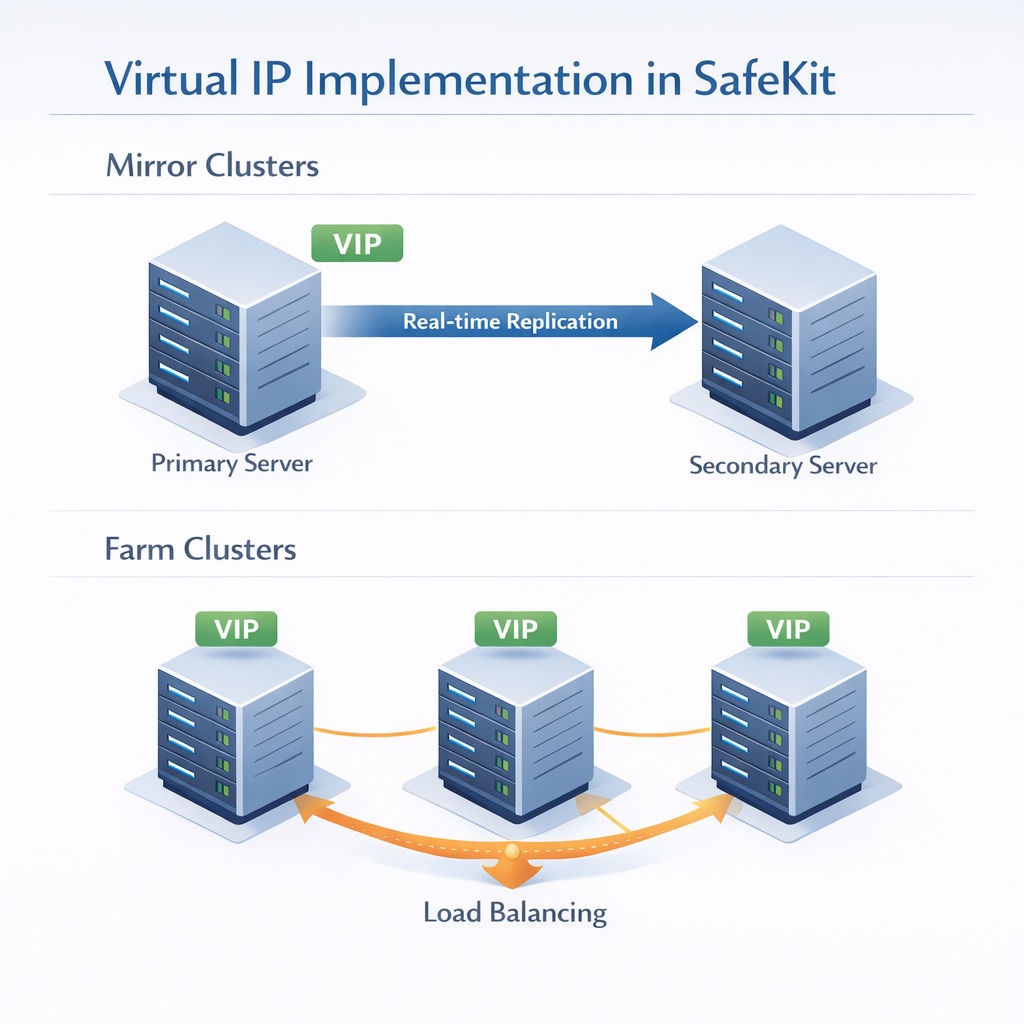
Virtual IP implementation strategies for Mirror and Farm clusters in SafeKit.
Table of Contents
- How a Virtual IP Address (VIP) Works in a Same-Subnet Failover (Mirror Cluster)
- How a Virtual IP (VIP) Works Across Different Subnets (Mirror Cluster)
- How a Load Balanced Virtual IP Works in a Same-Subnet Farm (Farm Cluster)
- How a Load Balanced Virtual IP Works Across Different Subnets (Farm Cluster)
- Virtual IP vs. DNS Redirection: Why DNS Failover Often Fails
- Comparison: Virtual IP Implementation, Latency, and Application Transparency
- Configuring a Virtual IP Address for Network Loadbalancing and High Availability
- Frequently Asked Questions on Virtual IP (VIP)
- 🔍 SafeKit High Availability Navigation Hub
How a Virtual IP Address (VIP) Works in a Same-Subnet Failover (Mirror Cluster)
Automated Failover & Network Rerouting in a Local Subnet
For organizations requiring seamless business continuity within a local infrastructure, SafeKit Software-Defined High Availability for Local Network Clusters provides a robust, automated solution for managing Virtual IP addresses and real-time application failover.
Local Mirror Cluster: Seamless 2-Node Windows or Linux Failover
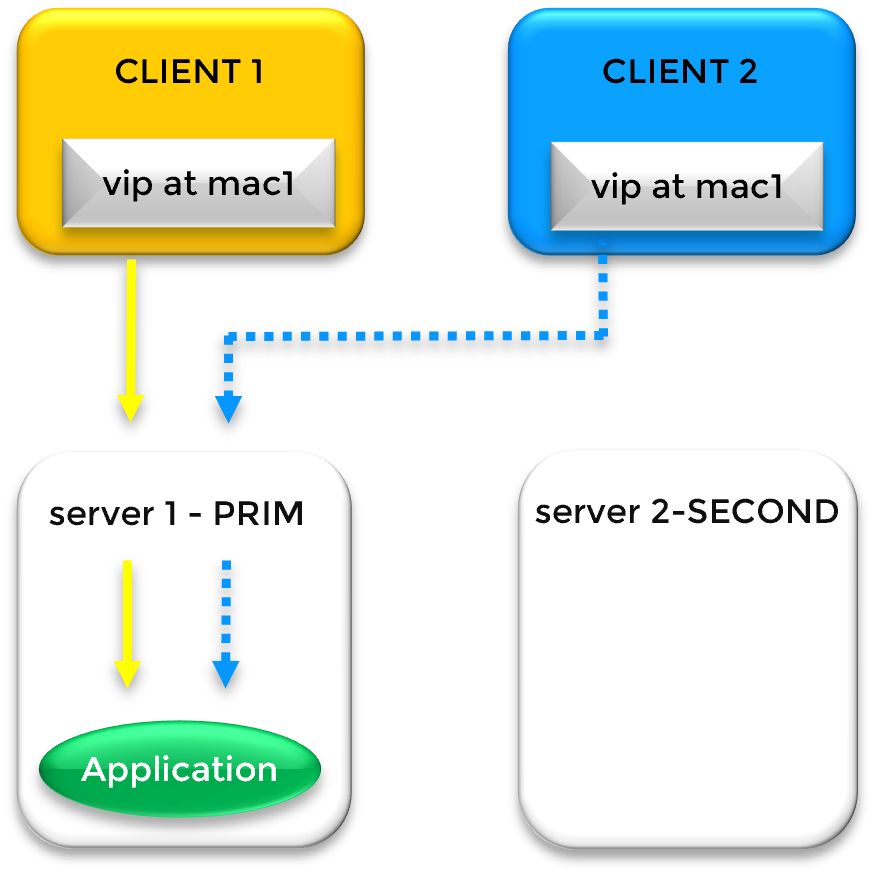
SafeKit VIP Aliasing and MAC Address Mapping In a standard SafeKit mirror cluster where both nodes reside in the same local subnet, high availability is achieved through a software-defined Virtual IP (VIP). Unlike hardware-based solutions, SafeKit manages this VIP directly within the OS networking stack. This VIP acts as a persistent logical entry point for clients, layered on top of the unique physical IP addresses of Server 1 and Server 2 via IP aliasing.
SafeKit’s Advanced IP Aliasing & Multiple VIP Support
A key advantage of the SafeKit solution is its flexibility in managing network identities. The VIP is a third IP address that “floats” between the nodes. Notably, SafeKit is capable of managing multiple virtual IP addresses within a single cluster. These can be assigned to the same primary Ethernet card or distributed across different physical cards, allowing for complex configurations where different services are bound to specific virtual identities.
The Failover Mechanism: Gratuitous ARP (GARP)
SafeKit ensures zero manual intervention during a hardware failure. Under normal operations, the VIP is mapped to Server 1’s MAC address (mac1). If SafeKit detects a heartbeat failure on Server 1, it executes a two-step recovery:
- Application Recovery: SafeKit automatically restarts the critical application services on Server 2.
- Network Rerouting: SafeKit instantly broadcasts a Gratuitous ARP (GARP) message. This force-updates the ARP caches of all network switches and connected clients, remapping the VIP to Server 2’s MAC address (mac2).
Remote Data Centers & Extended VLANs
While typically used for local clusters, SafeKit’s same-subnet algorithm is the preferred choice for Disaster Recovery (DR) across remote sites connected via an extended LAN or stretched VLAN. This “stretched” architecture allows you to maintain a single subnet across geographical distances, significantly simplifying your network topology and avoiding the overhead of complex routing protocols.
⚠️ Note: Layer 2 rerouting via Gratuitous ARP is the most transparent solution for applications. Unlike Layer 3 rerouting with a Load Balancer, it avoids Source/Destination IP Translation (SNAT/DNAT). The application receives traffic directly with the original client IP, and the Virtual IP is configured locally. Many applications prefer seeing the Virtual IP locally and receiving the original client IP directly. Without this transparency, they might not work as expected due to complex network translations.
How a Virtual IP (VIP) Works Across Different Subnets (Mirror Cluster)
Cloud-Ready Traffic Orchestration via Load Balancer Integration
By leveraging external network infrastructure, SafeKit Software-Defined High Availability for Multi-AZ and Cloud Clusters integrates seamlessly with a Network Load Balancer to orchestrate traffic failover across separate subnets and availability zones.
Cross-Subnet Mirror Clusters: Windows & Linux Implementation
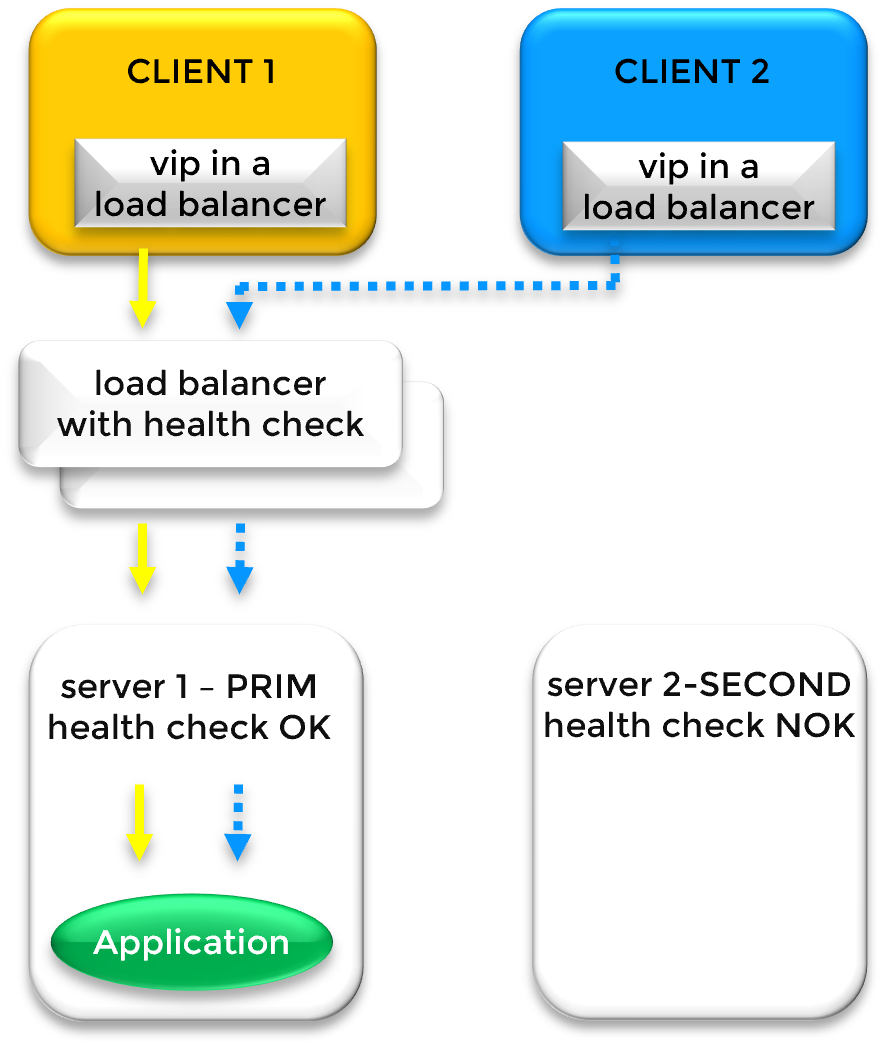
Multi-Subnet Traffic Routing via Load Balancer Health Checks When cluster nodes reside in different subnets , standard ARP-based failover is not possible. In this scenario, the Virtual IP (VIP) is hosted on a Load Balancer (LB) rather than the server’s Ethernet card. The Load Balancer acts as the gateway, directing traffic to the physical IP addresses of the primary and secondary nodes based on real-time availability.
Dynamic Routing via SafeKit Health Checks
SafeKit manages traffic steering by providing a dedicated Health Check URL on each node. The Load Balancer queries these URLs to determine the cluster state:
- Primary Node (PRIM): The health check returns
HTTP 200 OK. The Load Balancer directs all traffic here. - Secondary Node (SECOND): The health check returns
HTTP 404 NOT FOUND. The Load Balancer sends no traffic to this node.
During a failover event , SafeKit instantly toggles the health check responses, triggering the Load Balancer to reroute client traffic to the new primary server.
⚠️ Note: SafeKit provides the health check logic; the physical or virtual Load Balancer must be provided by your network infrastructure.
Cloud Integration: AWS, Azure, and GCP
This “Load Balancer + Health Check” model is the industry standard for Cloud High Availability. It is essential for implementing SafeKit in environments such as:
- Amazon AWS (AWS Network Load Balancer)
- Microsoft Azure (Azure Load Balancer)
- Google Cloud (GCP) (Google Cloud Load Balancing)
Network Considerations: Load Balancer vs. Extended LAN
If a load balancer is not desired, consult your network team about implementing an Extended LAN (VLAN stretching) between subnets. This allows you to revert to the simpler “Same Subnet” VIP model.
⚠️ Note: When opting for a Load Balancer, verify that your application is compatible with Source/Destination IP Translation (SNAT/DNAT). With a Load Balancer, the application may lose track of the original user’s identity or fail to start because it no longer sees the Virtual IP configured directly on its own network interface.
How a Load Balanced Virtual IP Works in a Same-Subnet Farm (Farm Cluster)
Scalable Performance: Kernel-Level Load Balancing & Redundancy
For high-traffic environments, the Architecture Guide: Scalable High Availability with Multi-Node Farm Clusters explains how SafeKit distributes workloads across multiple active servers while maintaining total redundancy.
Farm Cluster Architecture: Load Balancing Across Windows or Linux Nodes
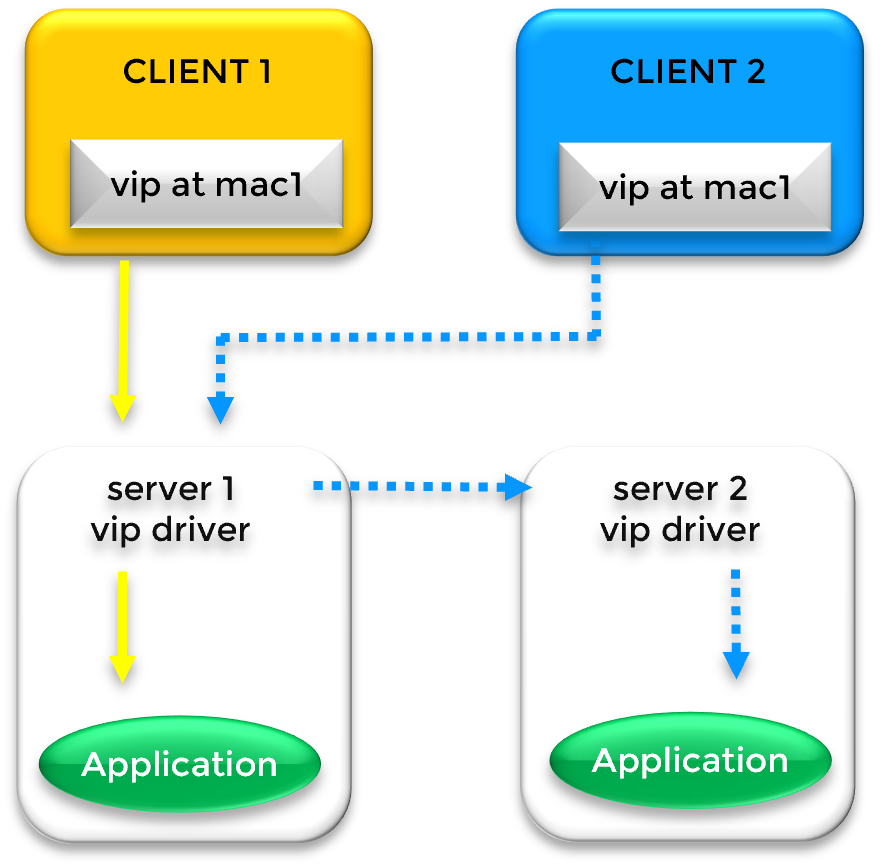
Distributed Traffic Processing via Kernel Filtering In a load-balancing farm cluster , a Virtual IP (VIP) address is used to distribute client requests across multiple servers simultaneously. While this example features two nodes, the architecture scales to support larger server farms. In a same-subnet configuration, the VIP is configured on the Ethernet card of every server in the cluster via IP aliasing.
Traffic Distribution: The Kernel-Level Filter
Unlike a simple failover cluster, a farm cluster manages traffic through a specialized kernel-level filter. The process works as follows:
- ARP Mapping: In the clients’ ARP caches, the VIP is initially associated with a single hardware address (e.g.,
mac1of Server 1). - Packet Splitting: When Server 1 receives the traffic, the SafeKit kernel filter analyzes the identity of the incoming packets (based on Client IP or TCP Port).
- Load Sharing: The filter determines which packets should be processed locally and which should be redirected to other nodes (e.g., Server 2) for processing, ensuring a balanced workload.
Failover and Rerouting with Gratuitous ARP
If the primary node (Server 1) fails, the cluster maintains availability through Gratuitous ARP (GARP). SafeKit broadcasts a GARP message to update client ARP caches with mac2 of Server 2. This ensures that even if the primary “entry point” fails, clients are immediately rerouted to the surviving nodes in the farm.
Deployment in Remote Sites
For organizations operating across remote data centers , this load-balancing algorithm remains functional provided the sites are linked via an extended LAN or VLAN. This creates a virtual “same-subnet” environment, which is the most efficient configuration for geographically distributed farm clusters.
How a Load Balanced Virtual IP Works Across Different Subnets (Farm Cluster)
Multi-Zone Scaling: Orchestrating Traffic Across Cloud Subnets
The Architecture Guide: Scaling Farm Clusters in Multi-Zone and Cloud Environments provides the blueprint for distributing application workloads across separate availability zones and subnets.
Cross-Subnet Farm Clusters: Multi-Node Windows & Linux Scalability
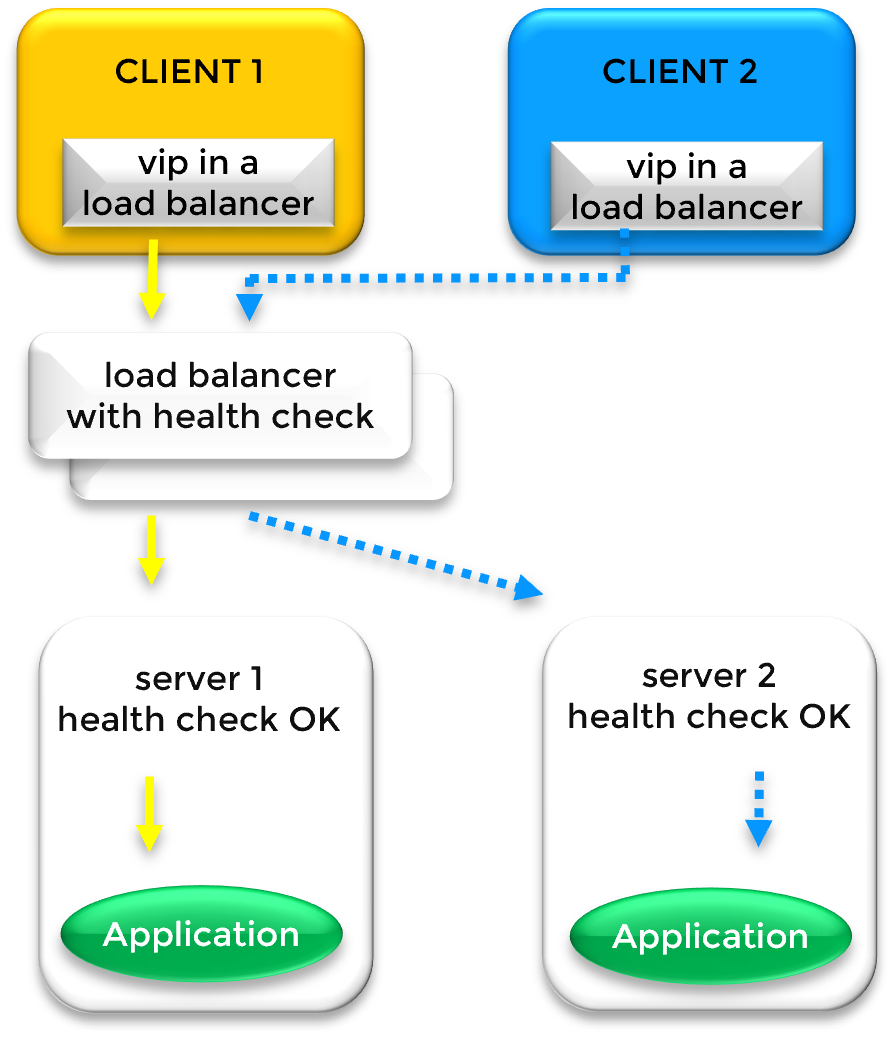
Global Traffic Distribution via External Load Balancing When farm nodes are distributed across different subnets (common in Multi-AZ cloud deployments), the Virtual IP (VIP) is managed by an external Load Balancer (LB). The LB holds the VIP and directs incoming traffic to the physical IP addresses of the servers located in their respective subnets.
Intelligent Traffic Routing & Load Balancing Rules
The Load Balancer distributes client requests based on two primary factors:
- Distribution Rules: Traffic is split according to session affinity or load-balancing algorithms (e.g., analyzing Client IP address or Client TCP port).
- Node Availability: Traffic is only routed to healthy nodes as determined by the SafeKit health check.
⚠️ Note: SafeKit provides the health check logic; the physical or virtual Load Balancer must be provided by your network infrastructure.
SafeKit Health Check Mechanism
SafeKit provides a real-time Health Check URL on every server in the farm to communicate its operational status to the Load Balancer:
- Node UP: The health check returns
HTTP 200 OK. The Load Balancer includes this server in the active rotation. - Node DOWN/Failover: If a server or application fails, SafeKit returns
HTTP 404 NOT FOUND(or the service becomes unreachable). The Load Balancer immediately stops sending traffic to the failed node.
Cloud Deployment Standards: AWS, Azure, and GCP
This architecture is the foundational model for Cloud Farm clusters , ensuring that if an entire subnet or zone goes offline, the remaining nodes continue to handle the load. This is natively supported by:
- Amazon AWS (AWS Network Load Balancer)
- Microsoft Azure (Azure Load Balancer)
- Google Cloud (GCP) (Google Cloud Load Balancing)
Virtual IP vs. DNS Redirection: Why DNS Failover Often Fails
The DNS Propagation Trap: Why VIPs Outperform DNS Redirection
Relying on DNS for failover often creates a false sense of security in high-availability architectures. While modifying a DNS record to point to a backup server seems like a straightforward recovery path, it introduces a critical variable: unpredictable latency. Because DNS-based redirection relies on an uncontrolled ecosystem of intermediate recursive resolvers to acknowledge and propagate the change, it is fundamentally incompatible with the “zero-downtime” requirements of modern enterprise services.
The Technical Scenario: DNS Resolution and the “Stuck” Client
In a standard networking setup, a Virtual Name (the DNS Name) acts as the human-readable entry point for users. However, for data to travel across the network, that name must be resolved to a specific Physical IP address.
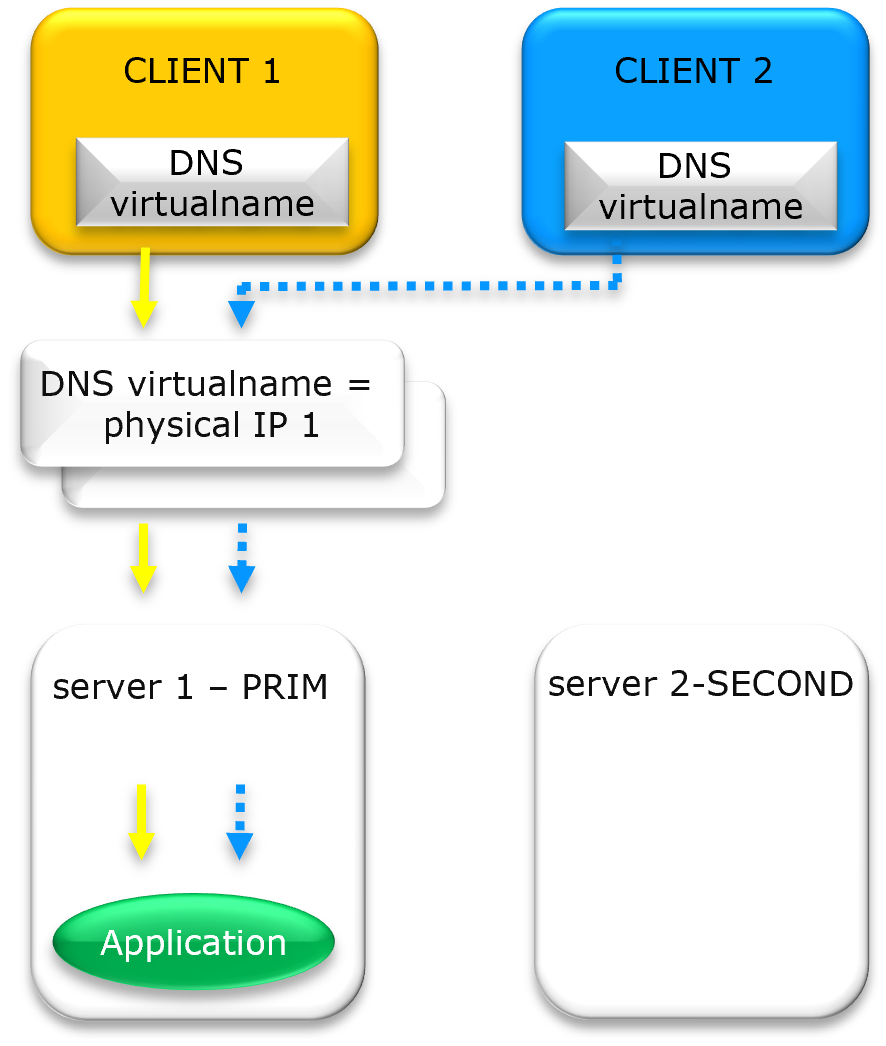
DNS Resolution and “Stuck” Clients on Physical IP 1 in a High Availability Cluster
Current State: Resolution to Physical IP 1
Initially, Client 1 and Client 2 query the DNS system for the Virtual Name. The system returns Physical IP 1. The clients then establish a direct network connection (socket) to that specific hardware address.
The Failover Challenge: Rerouting to Physical IP 2
If the server at Physical IP 1 fails, an administrator updates the DNS record to point to Physical IP 2. To successfully reroute the clients, a “perfect” sequence must occur:
- The Time to Live (TTL) must expire on all intermediate ISP and corporate resolvers.
- The local DNS cache on both Client 1 and Client 2 must be flushed.
- The application must close its existing socket and initiate a new DNS lookup.
If any of these steps are missed, Client 1 and Client 2 will remain “stuck” attempting to communicate with the dead Physical IP 1, resulting in service downtime despite the update in the DNS records.
The Two “Black Boxes” of DNS Redirection
- Recursive Caching: Many Internet Service Providers (ISPs) and corporate DNS resolvers ignore low TTL settings to reduce traffic, often caching the “old” Physical IP 1 for minutes or even hours beyond the requested expiration.
- Application Persistence: Modern applications (such as Java-based microservices or web browsers) often perform a DNS lookup only once at startup. Even if the DNS record is updated to Physical IP 2, the application continues to use the initial IP stored in its internal memory.
Conclusion
DNS redirection is an inconsistent solution for a high availability solution. For instantaneous failover within a local or regional environment, a software-defined Virtual IP (VIP) is the only way to ensure guaranteed zero-downtime persistence.
Comparison: Virtual IP Implementation, Latency, and Application Transparency
Technical comparison of Virtual IP (VIP) redirection methods versus DNS rerouting for High Availability and Disaster Recovery.
| Environment & Use Case | High Availability Type | Redirection Mechanism | Network Latency | Application Transparency & IP Locality |
|---|---|---|---|---|
| Primary/Backup (High Availability) | Mirror Cluster | Gratuitous ARP / MAC Takeover | Very low: Time to detect and send broadcast GARP | Full Transparency: Virtual IP is local on the active node. Client IP is preserved. |
| Load Balancing (Active/Active) | Farm Cluster | Kernel-Level Network Filter / GARP | Very Low: Time to detect and reconfigure network filters | Full Transparency: Virtual IP is local on all nodes. Client IP is preserved. |
| Same Subnet / Extended LAN (VLAN Stretching) | Disaster Recovery (remote datacenters) | Standard IP Aliasing / GARP | Low: Depends on stretched VLAN RTT (Round Trip Time) | Full Transparency: Virtual IP is local on the nodes. Client IP is preserved. |
| Different Subnets | Disaster Recovery (remote datacenters / Cloud) | External Load Balancer | Moderate: Higher failover latency due to Load Balancer health check intervals | ⚠️ Partial Transparency: Uses SNAT/DNAT. Virtual IP is NOT local on the nodes. Client IP is NOT preserved. Application must support it. |
| DNS rerouting: No VIP | Disaster Recovery (remote datacenters) | DNS Record Update (name / physical IP) | High/Unpredictable: Dependent on DNS TTL (Time To Live) and Client DNS Caching. | ⚠️ Unreliable: Client must re-resolve DNS. Most often, clients continue using the stale IP resolved at startup and are not rerouted after a failover. |
Configuring a Virtual IP Address for Network Loadbalancing and High Availability
SafeKit Video: Network Load Balancing and Virtual IP Management (5:03)
In this video, learn how to implement a virtual IP address to provide a single entry point for a 2-node cluster. SafeKit simplifies network load balancing by automatically managing the virtual IP, ensuring that client traffic is distributed across nodes and redirected instantly during a failover. Although this demonstration uses Apache on Windows, the solution works identically with other applications.
Chapters
- Architecture: Preparing 2 nodes for a shared Virtual IP (0:13)
- Configuration: Setting up the farm.safe module and Virtual IP address (2:20)
- Validation: Failover testing and Virtual IP redirection on server crash (2:30)
Step-by-Step Implementation
- Read the guide on setting up a farm cluster on Windows
- Read the guide on setting up a farm cluster on Linux
<br />
Frequently Asked Questions on Virtual IP (VIP)
Virtual IP (VIP) & Networking
What is a Virtual IP (VIP) and how does it differ from a physical IP?
While a physical IP address is bound to a specific network interface, a Virtual IP (VIP) is a “floating” address independent of hardware. In a SafeKit cluster, the VIP acts as a persistent entry point; if the primary server fails, the VIP automatically migrates to a healthy secondary node, ensuring zero client reconfiguration.
Do I need a hardware load balancer to use a Virtual IP?
No. SafeKit High Availability software manages the Virtual IP at the software level. In same-subnet architectures, it utilizes IP aliasing and Gratuitous ARP (GARP) to redirect traffic. This eliminates the cost and complexity of external hardware load balancers or dedicated proxy servers.
What is Gratuitous ARP (GARP) and why is it used?
Gratuitous ARP (GARP) is a network broadcast that updates the ARP tables of network switches and routers. During a failover, the new primary server sends a GARP packet to announce that the Virtual IP is now mapped to its MAC address, forcing immediate traffic rerouting across the network fabric.
Can I associate a DNS name with a Virtual IP?
Yes. You can associate a DNS name with a VIP by creating a standard A record. The key benefit is that redirection is managed at the VIP level (via ARP or network redirection) and not at the DNS level. This ensures application transparency by avoiding delays associated with DNS propagation and TTL expiration.
Cloud & Advanced Architectures
How does a Virtual IP work in the Cloud (AWS, Azure, GCP)?
In cloud environments where Layer 2 (ARP) is restricted, SafeKit integrates with Cloud Load Balancers (AWS ELB, Azure LB, or Google GCLB). SafeKit provides a Health Check URL that the platform monitors to route traffic to the active node using SNAT/DNAT.
Is an Extended LAN better than a Load Balancer for Disaster Recovery?
Yes. For remote datacenters, an Extended LAN (stretched VLAN) is often superior because it maintains application transparency across sites. By keeping the same Virtual IP , the application and its clients continue to communicate using the same identity, making the transition between data centers completely seamless.
What are the limitations of DNS rerouting vs. Virtual IP?
DNS rerouting is limited by TTL (Time to Live) and client-side caching, which can delay recovery for hours. A major drawback is that clients which do not re-resolve their DNS name remain stuck attempting to connect to the failed server. In contrast, a Virtual IP provides instantaneous Layer 2 failover that reroutes all traffic immediately, ensuring connectivity regardless of client-side DNS cache status.
Transparency & Security
Why is a local Virtual IP important for application transparency?
A local Virtual IP (VIP) ensures application transparency by allowing the software to bind to a persistent VIP. SafeKit handles redirection at the kernel level , keeping the application unaware of cluster failovers, unlike DNAT solutions where the binded IP changes.
Does using a Virtual IP preserve the client’s original IP address?
Yes. SafeKit avoids Source Network Address Translation (SNAT). Because the VIP is local to the active server, the application receives the original Client IP , which is critical for security auditing, session persistence, and regulatory logging.
🔍 SafeKit High Availability Navigation Hub
Explore SafeKit: Features, technical videos, documentation, and free trial
| Resource Type | Description | Direct Link |
|---|---|---|
| Key Features | Why Choose SafeKit for Simple and Cost-Effective High Availability? | See Why Choose SafeKit for High Availability |
| Use Cases | Explore How SafeKit Ensures the High Availability of Critical Infrastructure | See All Use Cases (OEM Software, Edge Servers, SCADA, and more) |
| Deployment Model | All-in-One SANless HA: Shared-Nothing Software Clustering | See SafeKit All-in-One SANless HA |
| HA Strategies | SafeKit: Infrastructure (VM) vs. Application-Level High Availability | See SafeKit HA & Redundancy: VM vs. Application Level |
| Technical Specifications | Technical Limitations for SafeKit Clustering | See SafeKit High Availability Limitations |
| Proof of Concept | SafeKit: High Availability Configuration & Failover Demos | See SafeKit Failover Tutorials |
| Architecture | How the SafeKit Mirror Cluster works (Real-Time Replication & Failover) | See SafeKit Mirror Cluster: Real-Time Replication & Failover |
| Architecture | How the SafeKit Farm Cluster works (Network Load Balancing & Failover) | See SafeKit Farm Cluster: Network Load Balancing & Failover |
| Competitive Advantages | Comparison: SafeKit vs. Traditional High Availability (HA) Clusters | See SafeKit vs. Traditional HA Cluster Comparison |
| Technical Resources | SafeKit High Availability: Documentation, Downloads & Trial | See SafeKit HA Free Trial & Technical Documentation |
| Pre-configured Solutions | SafeKit Application Module Library: Ready-to-Use HA Solutions | See SafeKit High Availability Application Modules |