SafeKit: Docker High Availability & Real-Time Data Replication Software
How the SANless SafeKit Mirror Cluster Works with Docker
SafeKit offers a lightweight, “just-enough” HA solution tailored for organizations that find Kubernetes too resource-intensive, complex, or over-engineered for localized or edge-computing container workloads.
SafeKit provides a streamlined, all-in-one 2-node high-availability cluster for Docker on Linux. It serves as a seamless, integrated alternative to the complex “Do It Yourself” (DIY) Linux HA stack—eliminating the technical burden of manually configuring Corosync for node membership, Pacemaker for resource orchestration, and DRBD for block-level replication.
By utilizing real-time synchronous replication and an automatically switched Virtual IP address , SafeKit creates a robust SANless cluster that removes the requirement for expensive shared storage. This architecture ensures transparent client reconnection, rapid automatic failover, and a zero data loss guarantee (RPO=0) for containerized applications.
- ✅ Kubernetes Alternative: High availability for containers without the overhead of K8s networking (Ingress/Load Balancers) and orchestration.
- ✅ Simplified Architecture: Replaces the Corosync/Pacemaker/DRBD stack with a single software package.
- ✅ No Shared Storage Required: SANless architecture using local disks and byte-level replication.
- ✅ Automatic Virtual IP (VIP) Failover: Ensures transparent client reconnection during a switch.
- ✅ Synchronous Data Replication: Guaranteed zero data loss (RPO=0) between nodes.
- ✅ Automated Failover and Failback: Rapid application restart on the redundant node without manual scripts.
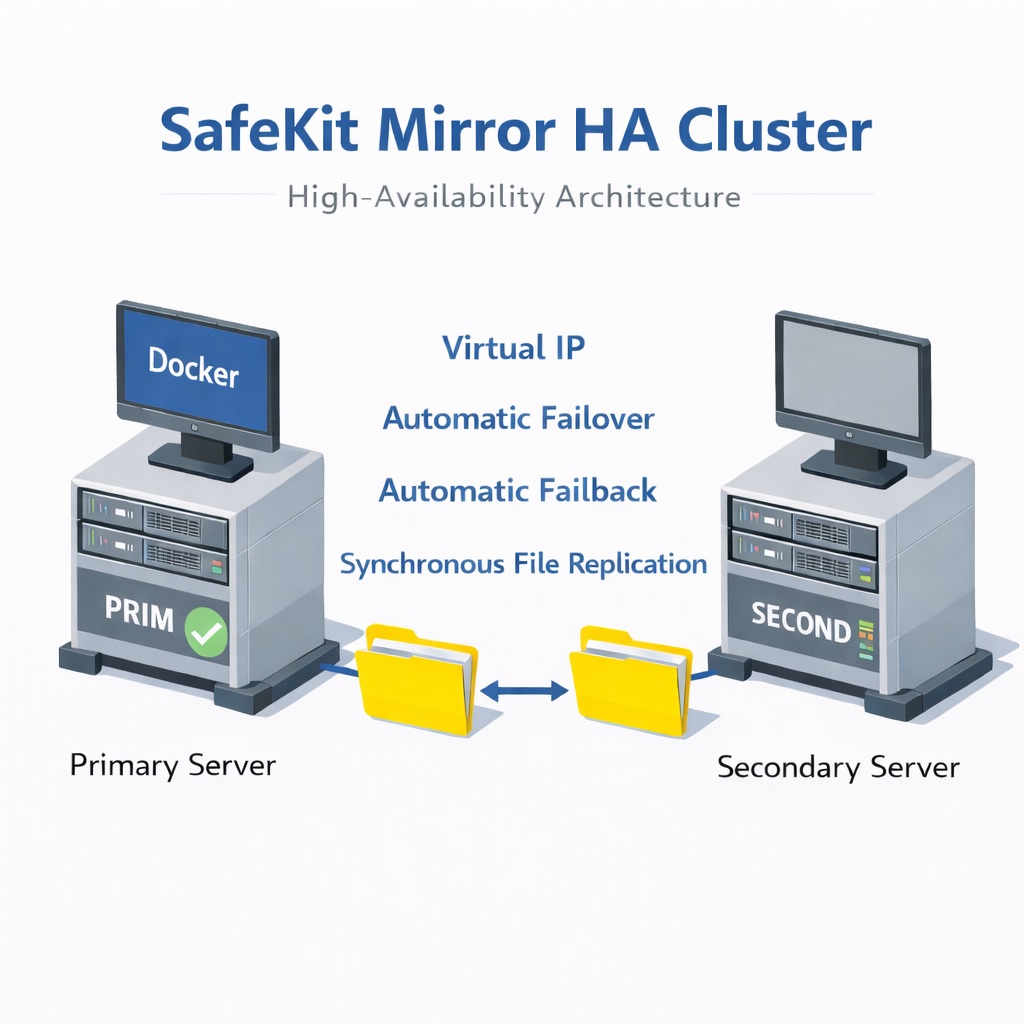
A high-availability (HA) solution for Docker containers using SafeKit’s SANless architecture.
⚡ Quick HA installation guide for Docker >
Table of Contents
- How the SafeKit software simply implements a Docker high availability cluster?
- How the SafeKit mirror cluster works with Docker?
- SafeKit High Availability Limitations
- Comparison: SafeKit SANless Cluster vs. Traditional Docker HA
- Comparison: SafeKit vs. Open-Source Linux HA (Pacemaker/Corosync/DRBD)
- Docker High Availability Summary
- 🔍 SafeKit High Availability Navigation Hub
How the SafeKit software simply implements a Docker high availability cluster?
How can I achieve high availability for Docker on two servers?
SafeKit provides a high-availability solution for Docker between two redundant servers without requiring a shared disk. The system works by configuring real-time replication of directories associated with Docker’s persistent data. In the event of a failure, SafeKit manages the automatic failover and restarts your containers on the secondary node in seconds.
How does automatic network failover work for Docker containers?
SafeKit implements an automatically switched Virtual IP (VIP) address. This VIP serves as a single entry point for client applications. If the primary server fails, SafeKit moves the Virtual IP to the redundant server using Gratuitous ARP. This ensures that clients reconnect transparently to the same IP address where the Docker application has been restarted.
What is a “SANless” cluster for Docker?
A SANless cluster for Docker is an architecture that provides high availability without the need for an expensive Storage Area Network (SAN) or Network Attached Storage (NAS). SafeKit uses host-based synchronous replication to mirror data between the local disks of two servers. This eliminates shared storage as a single point of failure and ensures a Recovery Point Objective (RPO) of zero , meaning no data loss occurs during a failover.
Is it possible to set up a Docker cluster without Kubernetes skills?
Yes. This article explains how to quickly implement a Docker cluster without specialized clustering skills or complex Kubernetes orchestration. By using SafeKit’s automatic restart scripts to handle the start and stop of Docker applications, you get a robust redundancy solution that is much simpler to deploy and maintain than K8s.
How does SafeKit replication differ from block-level solutions like DRBD for Docker?
Unlike most SANless solutions that use block-level replication (such as DRBD), SafeKit performs host-based replication at the file level. This approach is completely transparent for the Docker application because it does not require you to migrate data to a specific, newly created “replicated disk” volume. Instead, you simply configure SafeKit to replicate existing application folders—even those on the system disk. This allows you to implement high availability for Docker exactly where it is already installed, without complex disk reconfiguration or application changes.
Can SafeKit provide high availability for applications beyond Docker?
Yes. SafeKit is a highly versatile, generic high-availability software compatible with both Windows and Linux. Beyond Docker, SafeKit can be used to implement real-time replication and automatic failover for any file directory, service, or database. It supports a wide range of technologies, including Hyper-V and KVM virtual machines , Docker , K3s , and various Cloud applications. This makes SafeKit a universal clustering solution for protecting critical workloads across diverse IT environments without requiring specialized hardware.
How the SafeKit mirror cluster works with Windows/Linux?
Step 1. Real-time replication
Server 1 (PRIM) runs the Windows/Linux application. Clients are connected to a virtual IP address. SafeKit replicates in real time modifications made inside files through the network.
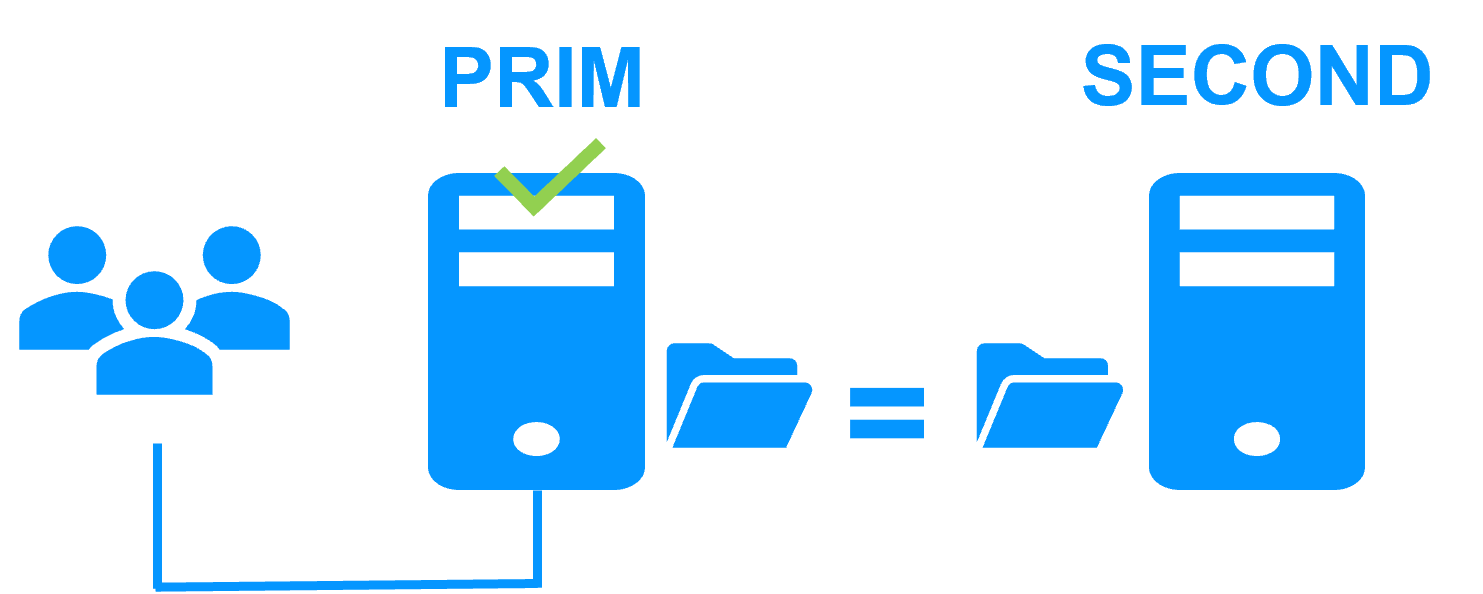
The replication is synchronous with no data loss on failure contrary to asynchronous replication.
You just have to configure the names of directories to replicate in SafeKit. There are no pre-requisites on disk organization. Directories may be located in the system disk.
Step 2. Automatic failover
When Server 1 fails, Server 2 takes over. SafeKit switches the virtual IP address and restarts the Windows/Linux application automatically on Server 2.
The application finds the files replicated by SafeKit uptodate on Server 2. The application continues to run on Server 2 by locally modifying its files that are no longer replicated to Server 1.
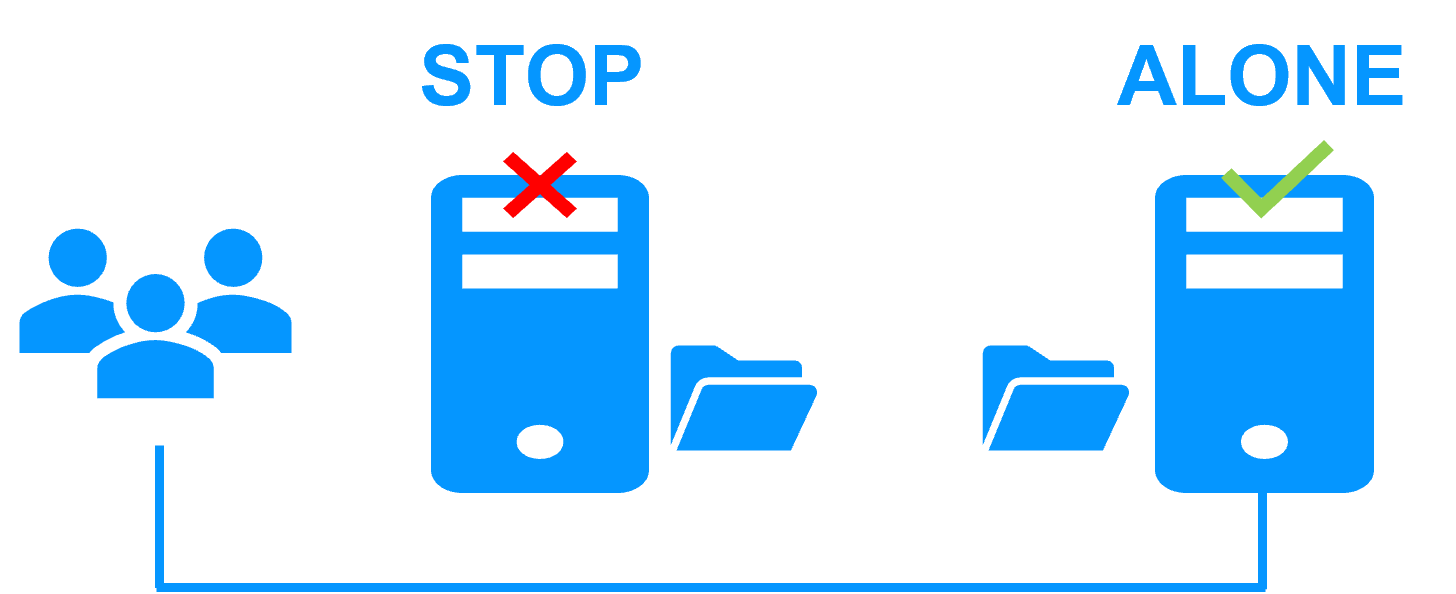
The failover time is equal to the fault-detection time (30 seconds by default) plus the application start-up time.
Step 3. Automatic failback
Failback involves restarting Server 1 after fixing the problem that caused it to fail.
SafeKit automatically resynchronizes the files, updating only the files modified on Server 2 while Server 1 was halted.
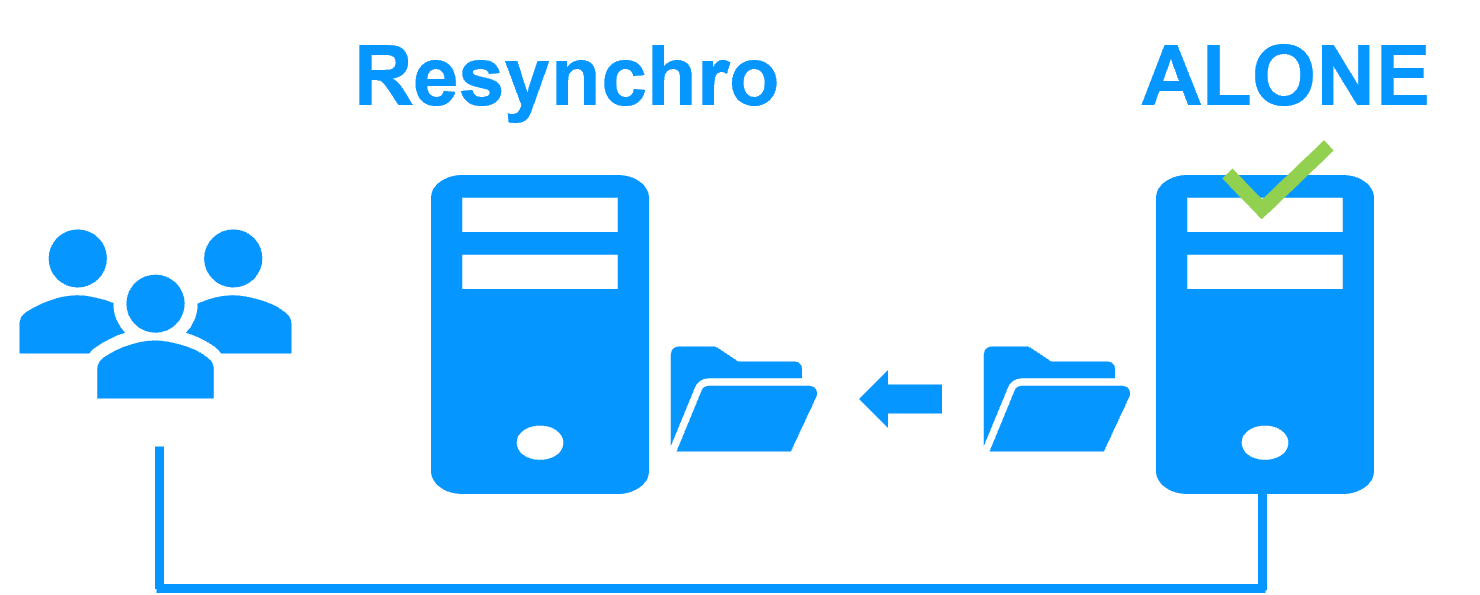
Failback takes place without disturbing the Windows/Linux application, which can continue running on Server 2.
Step 4. Back to normal
After reintegration, the files are once again in mirror mode, as in step 1. The system is back in high-availability mode, with the Windows/Linux application running on Server 2 and SafeKit replicating file updates to Server 1.
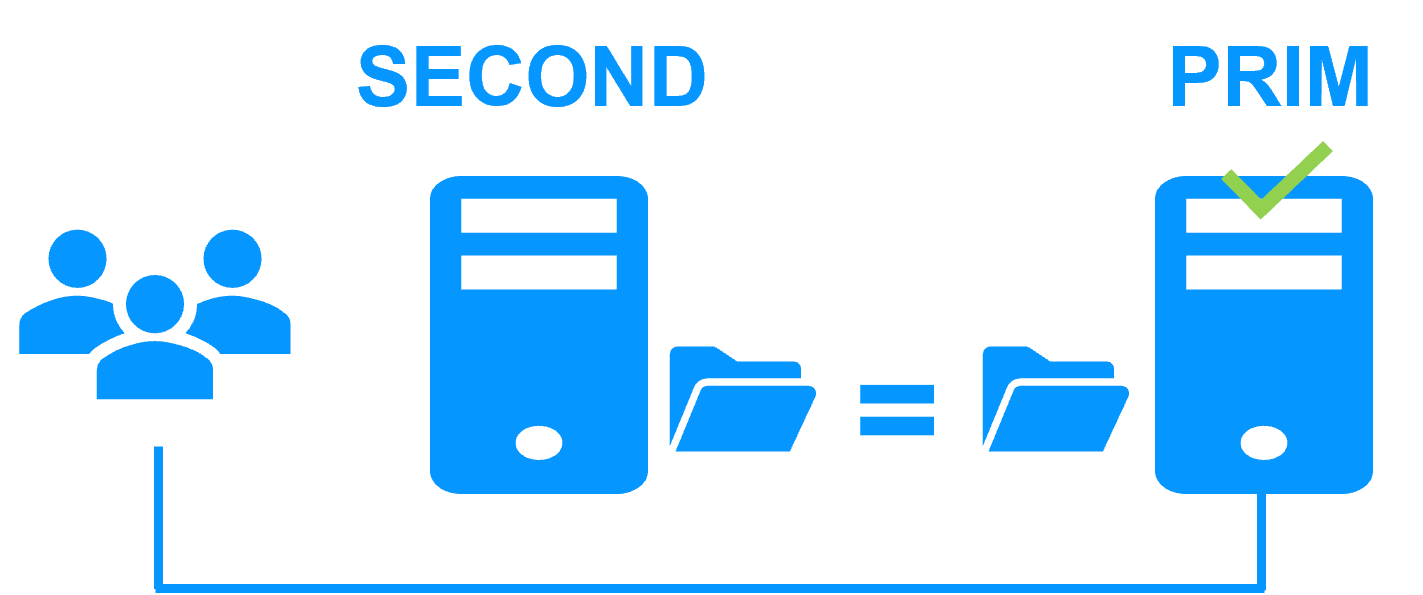
If the administrator wishes the application to run on Server 1, this can be done manually through the web console at an appropriate time, or automatically through configuration.
How to configure a SafeKit Mirror Cluster for Windows/Linux?
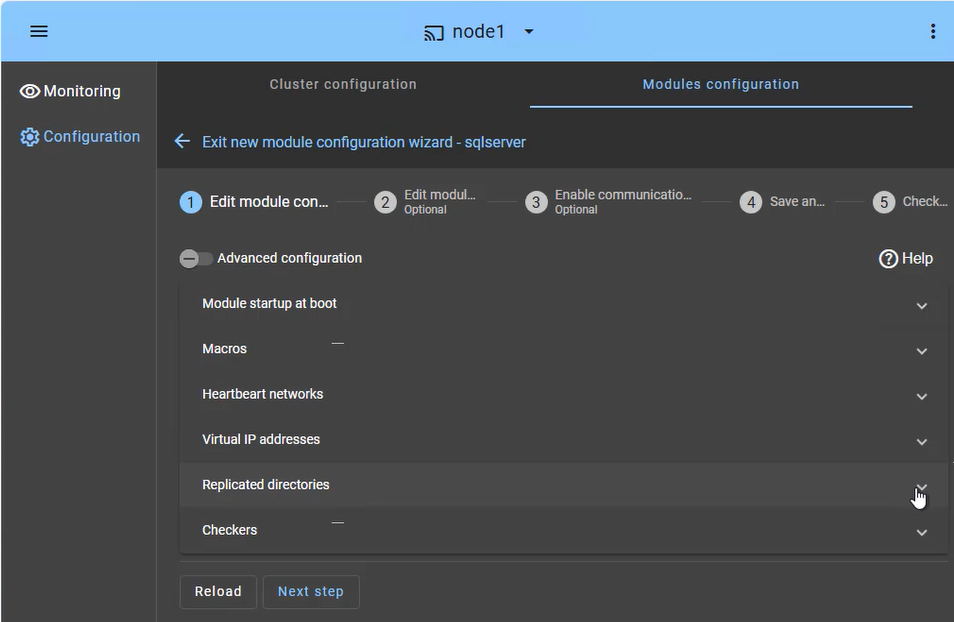
The SafeKit web console provides an intuitive interface to orchestrate high availability for your critical applications. In just a few steps, you can configure a SafeKit mirror cluster to ensure business continuity:
- Application Failover (Macros Tab): Define the specific application services to be automatically restarted in the event of a failure.
- Heartbeat network(s): Dedicated communication path(s) used by cluster nodes to continuously monitor each other’s health and availability and synchronize failover decisions.
- Virtual IP Management: Set up the Virtual IP (VIP) for transparent client reconnection after a failover.
- Real-Time Replication: Select the critical directories for host-based, synchronous byte-level replication.
- Checkers: Monitor the application’s health and trigger automatic recovery if a process failure is detected.
The SafeKit cluster includes a dedicated split-brain checker to resolve network isolation issues without the need for a third witness machine or an additional heartbeat network. Learn more about heartbeat, failover and quorum in a cluster.
How to monitor a SafeKit mirror cluster for Windows/Linux?
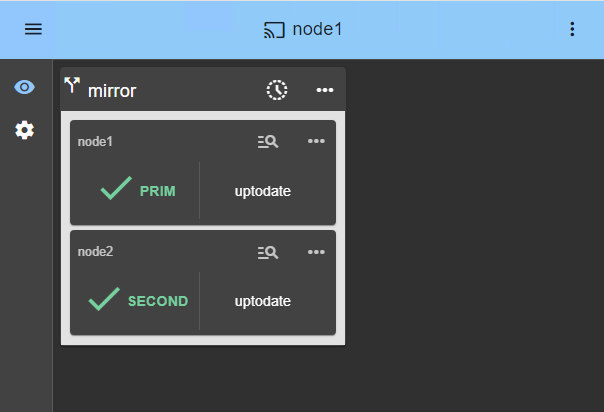
The SafeKit management console offers a unified view of your high availability infrastructure. It allows administrators to monitor the operational state of the cluster and track data synchronization in real-time.
For a 2-node mirror cluster, the console clearly displays the roles of each server:
- PRIM (Primary): The active node currently running the application and managing the Virtual IP. It performs writes to the local storage and real-time replication to the secondary node.
- SECOND (Secondary): The standby node receiving synchronous byte-level updates. It is ready to take over instantly if the Primary fails.
- ALONE State: Visually alerts you when the cluster is running on a single node (e.g., during maintenance or after a failure), indicating that redundancy is temporarily lost.
- Resynchronization Progress: When a failed node recovers, its status turns orange during background data reintegration, ensuring no downtime during the “return to normal” phase.
Beyond simple status icons, the interface provides one-click failover orchestration , allowing you to manually reassign the primary role for planned maintenance while ensuring continuous availability for user activity.
SafeKit High Availability Limitations
Why a replication of a few Tera-bytes?
Resynchronization time after a failure (step 3)
- 1 Gb/s network ≈ 3 Hours for 1 Tera-bytes.
- 10 Gb/s network ≈ 1 Hour for 1 Tera-bytes or less depending on disk write performances.
Alternative
- For a large volume of data, use external shared storage.
- More expensive, more complex.
Why a replication < 1,000,000 files?
- Resynchronization time performance after a failure (step 3).
- Time to check each file between both nodes.
Alternative
- Put the many files to replicate in a virtual hard disk / virtual machine.
- Only the files representing the virtual hard disk / virtual machine will be replicated and resynchronized in this case.
Why a failover ≤ 32 replicated VMs?
- Each VM runs in an independent mirror module.
- Maximum of 32 mirror modules running on the same cluster.
Alternative
- Use an external shared storage and another VM clustering solution.
- More expensive, more complex.
Why a LAN/VLAN network between remote sites?
- Automatic failover of the virtual IP address with 2 nodes in the same subnet.
- Good bandwidth for resynchronization (step 3) and good latency for synchronous replication (typically a round-trip of less than 2ms).
Alternative
- Use a load balancer for the virtual IP address if the 2 nodes are in 2 subnets (supported by SafeKit, especially in the cloud).
- Use backup solutions with asynchronous replication for high latency network.
Comparison: SafeKit SANless Cluster vs. Traditional Docker HA
| Feature | Traditional HA (K8s / Shared Storage) | SafeKit (SANless Mirror) |
|---|---|---|
| Storage Architecture | Requires expensive SAN or NAS (Shared Disk) | Shared-Nothing : Uses local disks only |
| Replication Type | Often Block-level (Complex to configure) | Byte-level File Replication (Transparent) |
| Data Consistency | Depends on external storage reliability | Synchronous Replication (RPO = 0) |
| Network Setup | Complex (Load balancers, Ingress, etc.) | Automatic Virtual IP (VIP) failover |
| Skill Requirement | Expert (Kubernetes/Clustering specialists) | Simple : No specialized skills required |
| Failback Process | Manual or complex re-syncing | Automatic Resynchronization of modified data |
Comparison: SafeKit vs. Open-Source Linux HA (Pacemaker/Corosync/DRBD)
| Feature | Linux HA Stack (Pacemaker + Corosync + DRBD) | SafeKit (SANless Mirror) |
|---|---|---|
| Architecture | Modular: Requires managing 3+ distinct tools and kernel modules. | All-in-One: Single integrated software for replication and failover. |
| Replication Level | Block-level (DRBD): Replicates the entire partition/disk volume. | Byte-level (SafeKit): Replicates only modified data inside specific files. |
| Ease of Configuration | Complex: Requires CLI (Command Line Interface) expertise to manually program ordering constraints (Virtual IP, mounts), application recovery scripts, and quorum/fencing rules. | Simple: Intuitive web console and ready-to-use application modules. |
| Fencing (STONITH) | Mandatory to prevent corruption: STONITH (Shoot The Other Node In The Head) requires a specialized hardware (IPMI/iDRAC) to literally cut the power or reboot the failing server. | Software-based: Intelligent split-brain resolution without extra hardware. |
| Failback Process | Manual/Technical: Risk of data divergence or “split-brain” during re-sync. | Automatic & Transparent: Background resynchronization with safe failback. |
| Maintenance | Requires high specialized skills to update/troubleshoot individual components. | Easy to maintain by general system administrators via web dashboard. |
Docker High Availability Summary
SafeKit provides a simple 2-node HA cluster for Docker , offering a lightweight Kubernetes alternative for mission-critical workloads. By replacing the complex Corosync, Pacemaker, and DRBD stack, SafeKit eliminates the need for expensive SAN/NAS shared storage.
Through real-time synchronous replication and an automatic Virtual IP (VIP) failover , SafeKit ensures zero data loss (RPO=0) and transparent application recovery. It is the ideal solution for organizations requiring robust, SANless high availability with minimal configuration and administrative overhead.
🔍 SafeKit High Availability Navigation Hub
Explore SafeKit: Features, technical videos, documentation, and free trial
| Resource Type | Description | Direct Link |
|---|---|---|
| Key Features | Why Choose SafeKit for Simple and Cost-Effective High Availability? | See Why Choose SafeKit for High Availability |
| Use Cases | Explore How SafeKit Ensures the High Availability of Critical Infrastructure | See All Use Cases (OEM Software, Edge Servers, SCADA, and more) |
| Deployment Model | All-in-One SANless HA: Shared-Nothing Software Clustering | See SafeKit All-in-One SANless HA |
| HA Strategies | SafeKit: Infrastructure (VM) vs. Application-Level High Availability | See SafeKit HA & Redundancy: VM vs. Application Level |
| Technical Specifications | Technical Limitations for SafeKit Clustering | See SafeKit High Availability Limitations |
| Proof of Concept | SafeKit: High Availability Configuration & Failover Demos | See SafeKit Failover Tutorials |
| Architecture | How the SafeKit Mirror Cluster works (Real-Time Replication & Failover) | See SafeKit Mirror Cluster: Real-Time Replication & Failover |
| Architecture | How the SafeKit Farm Cluster works (Network Load Balancing & Failover) | See SafeKit Farm Cluster: Network Load Balancing & Failover |
| Competitive Advantages | Comparison: SafeKit vs. Traditional High Availability (HA) Clusters | See SafeKit vs. Traditional HA Cluster Comparison |
| Technical Resources | SafeKit High Availability: Documentation, Downloads & Trial | See SafeKit HA Free Trial & Technical Documentation |
| Pre-configured Solutions | SafeKit Application Module Library: Ready-to-Use HA Solutions | See SafeKit High Availability Application Modules |