---
title: "Simple Hyper-V High Availability Without Shared Storage (SAN)"
description: "Simple Hyper-V High Availability Without Shared Storage (SAN)"
canonical: "https://safekit.eviden.com/solutions/hyper-v-replication-automatic-failover-load-balancing/"
topics: "SafeKit for Hyper-V: 2-Node SANless Hyper-V Cluster, Table of Contents, How the SafeKit software simply implements a Hyper-V high availability cluster without shared storage on a SAN?, How the SafeKit Hyper-V cluster works?, SafeKit High Availability Limitations, Comparison: SafeKit for Hyper-V vs. Native Hyper-V Clustering, Video Guide: Configuring a SafeKit HA cluster for Hyper-V, 🔍 SafeKit High Availability Navigation Hub"
category: "solutions"
lang: "en"
---

<h1 id="simple-hyper-v-high-availability-without-shared-storage-san">Simple Hyper-V High Availability Without Shared Storage (SAN)</h1>
<h2 id="safekit-hyperv-tco">SafeKit for Hyper-V: 2-Node SANless Hyper-V Cluster</h2>
<p><strong>SafeKit for Hyper-V</strong> delivers seamless <strong>High Availability</strong> while significantly reducing TCO (Total Cost of Ownership). By eliminating the hardware and operational overhead of traditional clustering, SafeKit offers a lean, 2-node HA alternative to complex virtualization stacks.</p>
<ul>
<li><strong>Zero SAN Investment for HA:</strong> Achieve full redundancy using shared-nothing architecture. It works with standard local disks, removing the need for expensive SAN hardware, fiber channel switches, and specialized storage maintenance usually required for High Availability.</li>
<li><strong>Hardware-Agnostic Redundancy:</strong> Avoid vendor lock-in. Build your High Availability cluster using any server brand or internal storage type, extending the lifecycle of existing hardware and lowering replacement costs.</li>
<li><strong>Simplified HA Operations:</strong> No specialized &ldquo;clustering expert&rdquo; is required to maintain uptime. SafeKit’s plug-and-play modules and unified web console reduce the man-hours needed for HA deployment and daily monitoring.</li>
<li><strong>Cost-Predictable Licensing:</strong> Unlike subscription-heavy models, SafeKit provides High Availability via a one-time perpetual license. This ensures predictable budgeting and eliminates the risk of annual price hikes for critical infrastructure.</li>
<li><strong>True 2-Node HA Efficiency:</strong> Most High Availability solutions require a third &ldquo;witness&rdquo; node to prevent split-brain. SafeKit delivers a robust 2-node cluster, saving 33% on hardware, power, and rack space from day one.</li>
</ul>
<p>By consolidating <strong>High Availability</strong> into a lightweight software layer, SafeKit delivers enterprise-grade redundancy and business continuity at a fraction of the cost of traditional virtualization suites.</p>
<img src="/wp-content/uploads/2026/01/safekit-vm-repli-720-720.jpg" width="512" alt="SafeKit High Availability Hyper-V Cluster Architecture">
<p><strong>SafeKit HA Cluster for Hyper-V</strong></p>
<p><a class="btn-quick-install" href="/quick-install/safekit-quick-installation-guide-with-hyper-v/">⚡ Quick Hyper-V HA cluster installation guide &gt;</a></p>
<h2 id="toc">Table of Contents</h2>
<ul>
<li><a href="#safekit-hyperv-ha-cluster">How the SafeKit software simply implements a Hyper-V high availability cluster without shared storage on a SAN?</a></li>
<li><a href="#safekit-hyperv-ha-how-it-works">How the SafeKit Hyper-V cluster works?</a></li>
<li><a href="#safekit-ha-limitations">SafeKit High Availability Limitations</a></li>
<li><a href="#safekit-hyperv-ha-comparison">Comparison: SafeKit for Hyper-V vs. Native Hyper-V Clustering</a></li>
<li><a href="#videoguide-safekit-hyperv-cluster">SafeKit video guide for Hyper-V</a></li>
<li><a href="#hub">🔍 SafeKit High Availability Navigation Hub</a></li>
</ul>
<h2 id="safekit-hyperv-ha-cluster">How the SafeKit software simply implements a Hyper-V high availability cluster without shared storage on a SAN?</h2>
<h3 id="what-is-the-safekit-ha-solution-for-hyper-v">What is the SafeKit HA solution for Hyper-V?</h3>
<p>SafeKit brings high availability to Hyper-V between two servers of any brand.</p>
<p>This article explains how to implement quickly a Hyper-V cluster without shared storage on a SAN and without specific skills.</p>
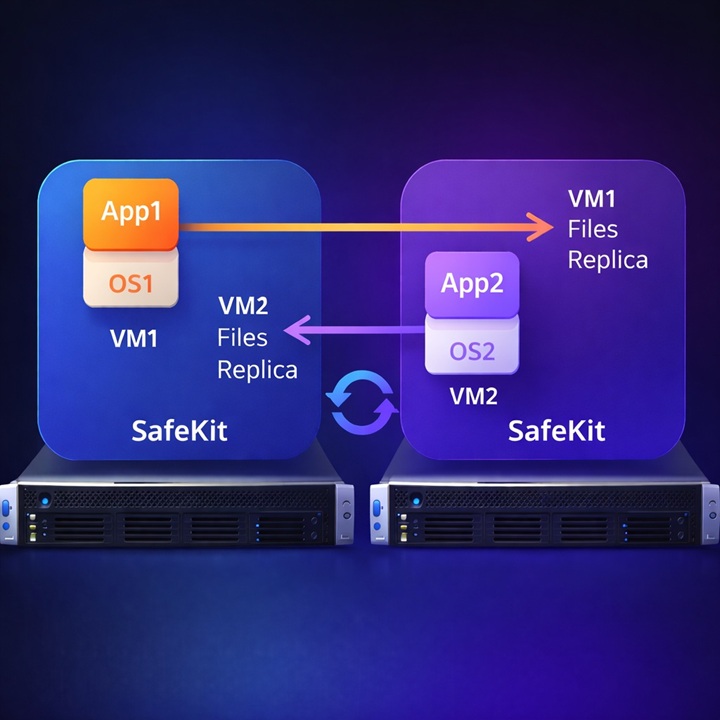
<p>The principle of the solution is to put the critical application in a virtual machine under Hyper-V. SafeKit implements <strong>real-time replication and automatic failover of the virtual machine</strong>.</p>
<p>Note that Hyper-V is the free hypervisor included in all Windows versions (even Windows for PC).</p>
<h3 id="how-can-i-run-multiple-applications-in-a-high-availability-hyper-v-cluster-without-a-san">How can I run multiple applications in a high-availability Hyper-V cluster without a SAN?</h3>
<p>Several applications can be put in <strong>several virtual machines replicated and restarted by SafeKit</strong>. You have the possibility to migrate each virtual machine between both servers with the SafeKit console and thus balance the load in an <strong>active-active cluster</strong>.</p>
<h3 id="should-i-choose-high-availability-at-the-application-level-or-the-virtual-machine-vm-level">Should I choose high availability at the application level or the virtual machine (VM) level?</h3>
<p>With SafeKit, you have the flexibility to choose the redundancy model that fits your needs.</p>
<p><strong>VM-level redundancy</strong> (for Hyper-V or KVM) is the simplest to implement as it replicates the entire virtual machine, requiring no knowledge of the internal application.</p>
<p>Alternatively, <strong>application-level redundancy</strong> is more granular; it only replicates specific data folders and restarts the application services rather than the entire OS.</p>
<p>While VM-level HA is easier to set up, application-level HA is hypervisor-agnostic and can run across physical, virtual, or cloud environments.</p>
<h3 id="what-are-the-distinctive-advantages-of-safekit-for-hyper-v-high-availability-compared-to-competitors">What are the distinctive advantages of SafeKit for Hyper-V high availability compared to competitors?</h3>
<p>SafeKit differentiates itself from traditional Hyper-V clustering solutions through its <strong>shared-nothing architecture</strong> and simplified management. While most competitors require a central SAN or vSAN to manage VM failover, SafeKit provides:</p>
<ul>
<li><strong>Integrated Real-Time Replication:</strong> Data synchronization is built directly into the solution, ensuring that Hyper-V virtual machines are mirrored synchronously without the overhead of managing a separate storage layer.</li>
<li><strong>Simplified 2-Node Clustering:</strong> Unlike enterprise stacks that recommend a 3-node &ldquo;witness&rdquo; quorum, SafeKit delivers full high availability with just two redundant servers. <a href="/best-practises/heartbeat-failover-quorum-windows-linux-cluster/">Learn more about our heartbeat and quorum mechanism</a>.</li>
<li><strong>Unified Management:</strong> Administrators can manage VM failover, replication, and load balancing through a single SafeKit console , making it accessible to teams without specialized clustering expertise.</li>
<li><strong>Custom Checkers:</strong> SafeKit goes beyond hardware monitoring; it utilizes <strong>custom checkers</strong> to detect if a VM has crashed, automatically triggering a local restart or a failover to the redundant node. The system is also highly extensible, allowing for the easy integration of new, user-defined custom checkers tailored to your specific environment.</li>
</ul>
<h3 id="how-does-safekit-reduce-the-tco-total-cost-of-ownership-compared-to-vmware-type-solutions">How does SafeKit reduce the TCO (Total Cost of Ownership) compared to VMware-type solutions?</h3>
<p>Unlike most high-availability solutions on the market, SafeKit is designed to operate with the <strong>absolute minimum hardware overhead</strong> , without compromising security or reliability. Key savings compared to VMware or complex open-source alternatives include:</p>
<ul>
<li><strong>True 2-Node Efficiency:</strong> While most enterprise stacks or open-source solutions require a 3-node &ldquo;witness&rdquo; quorum to prevent split-brain, SafeKit delivers full high availability with just <strong>two redundant servers</strong>.</li>
<li><strong>Zero Storage Costs:</strong> SafeKit uses a shared-nothing architecture that works with local disks, removing the need for expensive SAN or vSAN hardware and specialized storage networking.</li>
<li><strong>No Forced Subscriptions:</strong> Unlike modern subscription-only models, SafeKit offers a <strong>perpetual license</strong>. You own your software, avoiding the &ldquo;subscription trap&rdquo; and unpredictable annual price hikes.</li>
<li><strong>Low Operational Expense (OPEX):</strong> As a plug-and-play solution, it requires no specialized training or expensive external consultancy for maintenance, unlike complex open-source clustering tools.</li>
<li><strong>CPU-Independent Pricing:</strong> Licensing is independent of the number of CPUs or cores. With just two licenses for two nodes, you can protect multiple Hyper-V virtual machines.</li>
</ul>
<h3 id="is-it-possible-to-set-up-a-hyper-v-cluster-without-san-or-complex-clustering-skills">Is it possible to set up a Hyper-V cluster without SAN or complex clustering skills?</h3>
<p>Yes. This article explains how to <a href="/quick-install/safekit-quick-installation-guide-with-hyper-v/"><strong>quickly implement a Hyper-V cluster</strong></a> without the need for specialized SAN management or complex HA clustering skills. By using SafeKit’s <strong>automated failover scripts</strong> to handle the replication and restart of <strong>Hyper-V</strong> virtual machines, you get a robust redundancy solution that is significantly simpler to deploy and maintain than traditional enterprise virtualization stacks.</p>
<h3 id="beyond-hyper-v-which-applications-and-environments-can-safekit-protect">Beyond Hyper-V, which applications and environments can SafeKit protect?</h3>
<p>SafeKit is a versatile high-availability solution that extends far beyond standard virtual machine failover. It enables <strong>synchronous real-time replication</strong> and automatic failover for a wide range of critical workloads, including:</p>
<ul>
<li><strong>Virtual &amp; Physical Environments:</strong> Complete Hyper-V or KVM virtual machines.</li>
<li><strong>Container Orchestration:</strong> Docker, Podman, and K3s (Kubernetes) environments.</li>
<li><strong>Data &amp; Services:</strong> Individual file directories, services, and various databases.</li>
<li><strong>Cloud Infrastructure:</strong> High availability for Cloud applications.</li>
</ul>
<p>SafeKit also provides <strong>Farm Clusters</strong> with native <strong>Network Load Balancing and Failover</strong> for stateless applications like <strong>Web Servers</strong>.</p>
<p><a href="/solutions/">Explore the full list of supported HA solutions here.</a></p>
<h2 id="safekit-hyperv-ha-how-it-works">How the SafeKit Hyper-V cluster works?</h2>
<p>The following steps are described for one Hyper-V virtual machine inside one mirror module. Each replicated virtual machine runs in an independent mirror module (with a maximum of 32 virtual machines) with a primary server that can be either the Hyper-V server 1 or the Hyper-V server 2.</p>
<h3 id="1-how-does-real-time-replication-work-for-hyper-v">1. How does real-time replication work for Hyper-V?</h3>
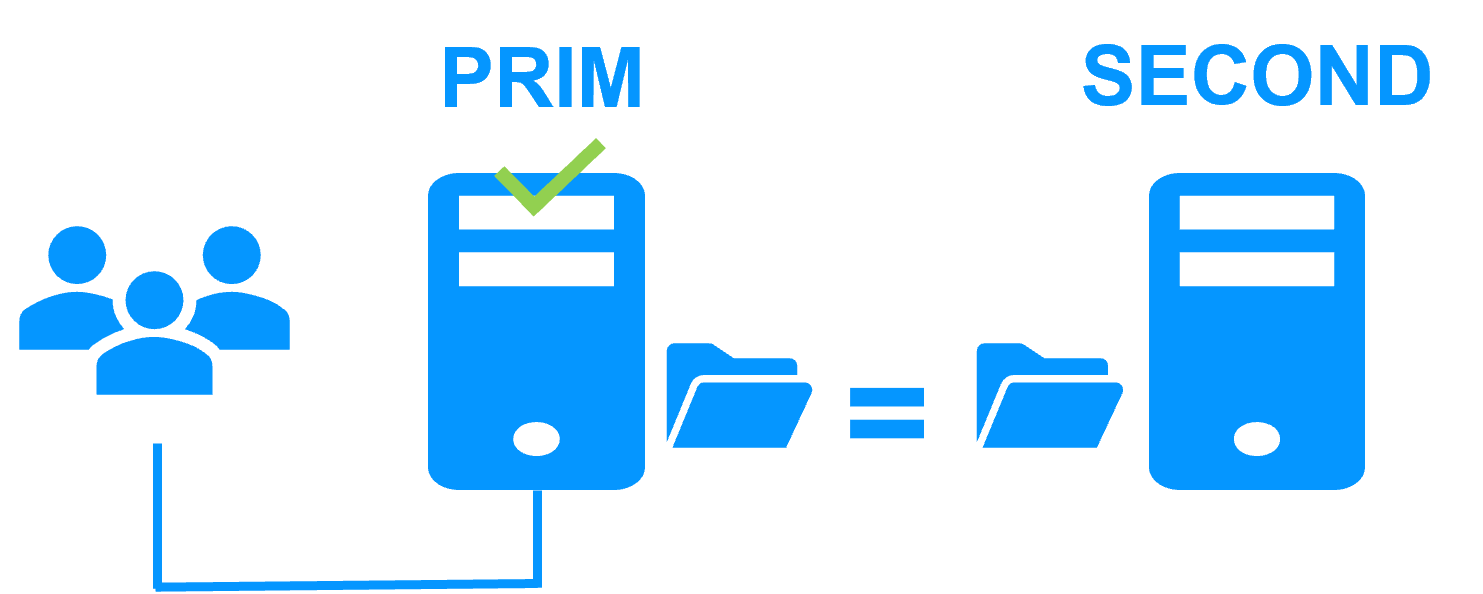
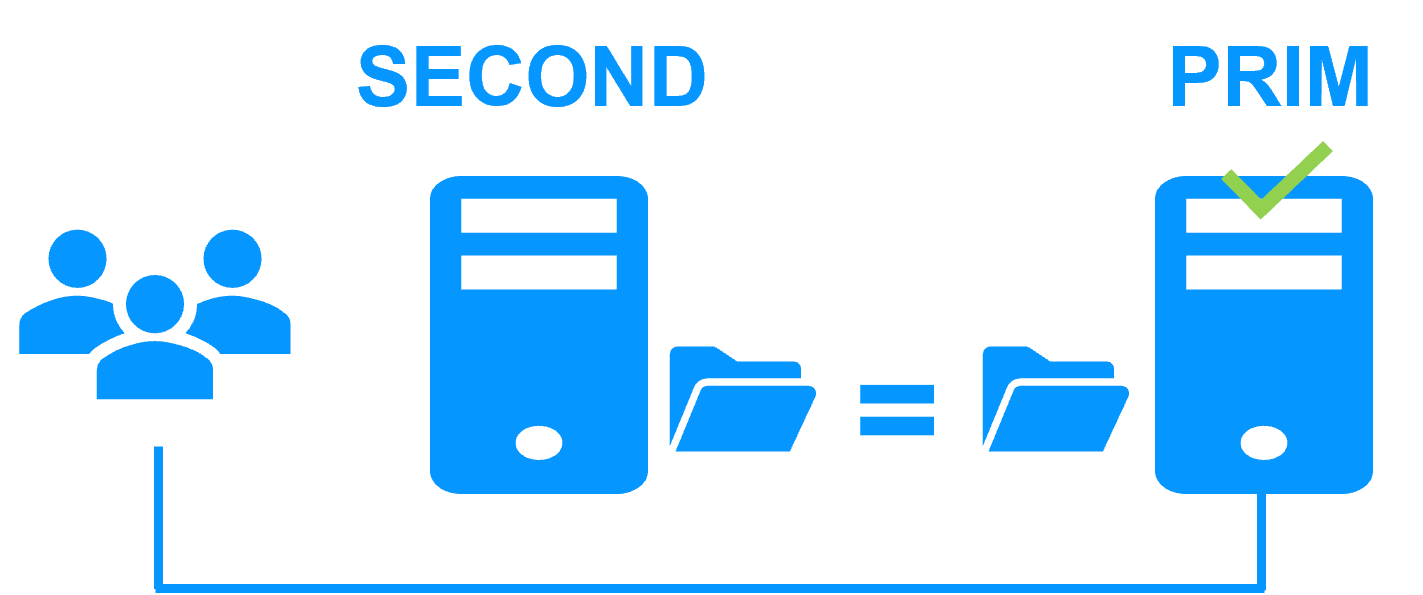
<p>Server 1 (PRIM) runs the Hyper-V VM (virtual machine). SafeKit replicates in real time the VM files (virtual hard disk, VM configuration). Only changes made in the files are replicated across the network.</p>
<img src="/wp-content/uploads/2023/02/safekit-prim-second-300.png" width="300" alt="File replication at byte level in a mirror Hyper-V cluster">
<p>The replication is <a href="/best-practises/synchronous-replication-vs-asynchronous-replication/">synchronous</a> with no data loss on failure contrary to asynchronous replication.</p>
<p>You just have to configure the VM directory name in SafeKit. There are no pre-requisites on disk organization. The directory may be located in the system disk.</p>
<h3 id="2-what-happens-during-an-automatic-hyper-v-failover">2. What happens during an automatic Hyper-V failover?</h3>
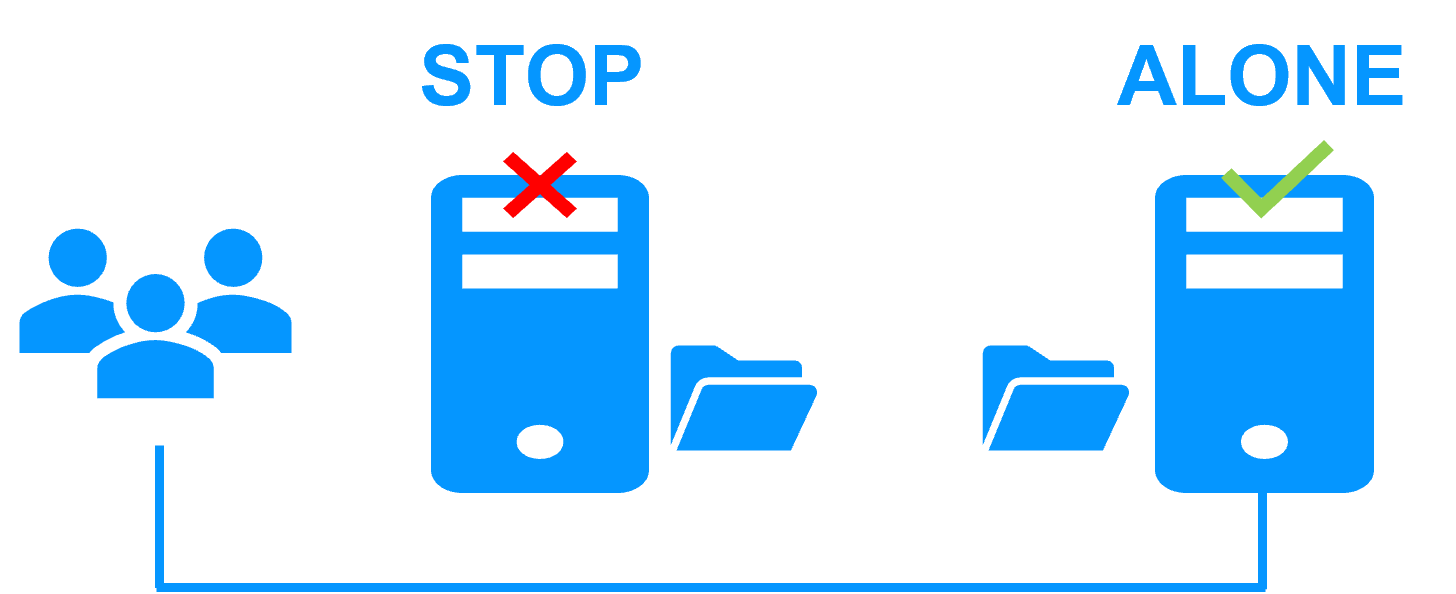
<p>When Server 1 fails, Server 2 takes over. SafeKit restarts the Hyper-V VM on Server 2. Hyper-V finds the files replicated by SafeKit uptodate on Server 2.<br>
The VM continues to run on Server 2 by locally modifying its files that are no longer replicated to Server 1.</p>
<img src="/wp-content/uploads/2023/02/safekit-stop-alone-300.png" width="300" alt="Failover of Hyper-V in a mirror cluster">
<p>The failover time is equal to the fault-detection time (set to 30 seconds by default) plus the VM reboot time.</p>
<h3 id="3-how-is-data-synchronized-after-a-hyper-v-failure">3. How is data synchronized after a Hyper-V failure?</h3>
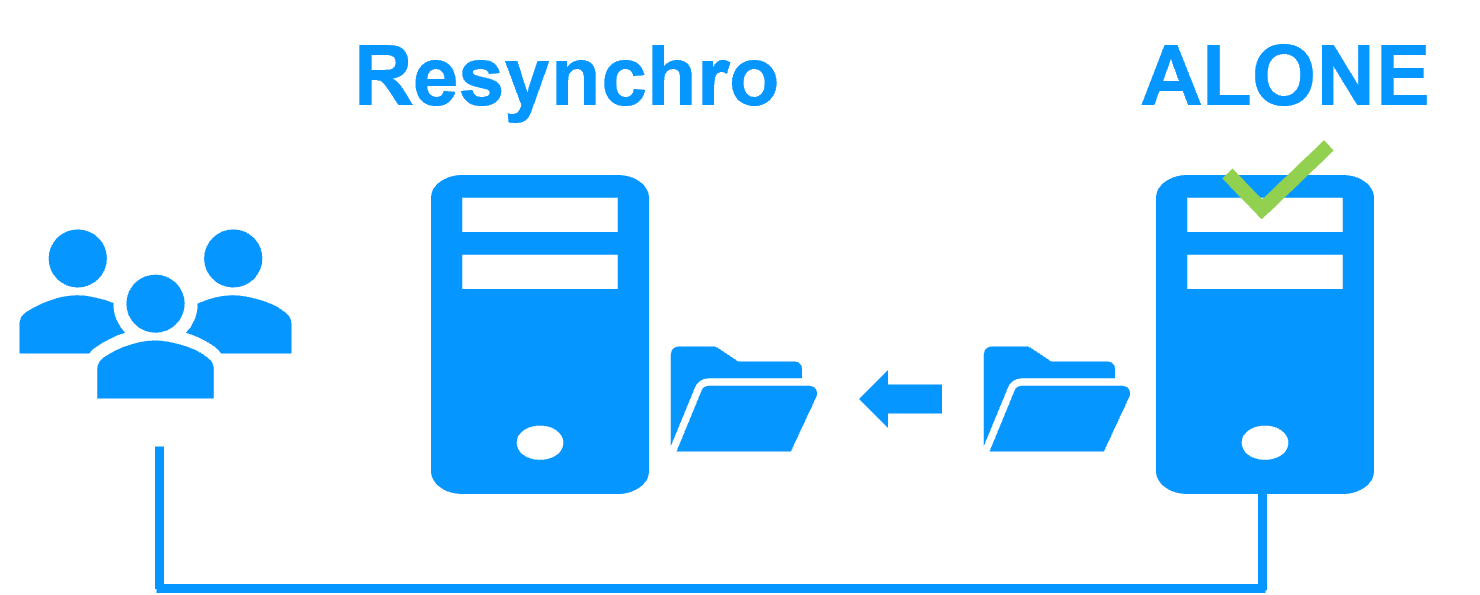
<p>Failback involves restarting Server 1 after fixing the problem that caused it to fail. SafeKit automatically resynchronizes the VM files.</p>
<img src="/wp-content/uploads/2023/02/safekit-resynchro-alone-300.png" width="300" alt="Failback in a mirror Hyper-V cluster">
<p>Failback takes place without disturbing the Hyper-V VM, which can continue running on Server 2.</p>
<h3 id="4-how-is-normal-hyper-v-operation-restored">4. How is normal Hyper-V operation restored?</h3>
<p>After reintegration, the VM files are once again in mirror mode, as in step 1. The system is back in high-availability mode, with the Hyper-V VM running on Server 2 and SafeKit replicating file updates to Server 1.</p>
<img src="/wp-content/uploads/2023/02/safekit-second-prim-300.png" width="300" alt="Return to normal operation in a mirror Hyper-V cluster">
<p>If the administrator wishes the VM to run on Server 1, this can be done manually through the web console at an appropriate time, or automatically through configuration.</p>
<h3 id="safekit-mirror-cluster-configure">How to configure a SafeKit Hyper-V Cluster?</h3>
<img src="/wp-content/uploads/2024/03/19-module-hyperv-edit-config-1.png" width="694" alt="SafeKit Web Console: 2-node Hyper-V cluster dashboard for VM replication and automatic failover.">
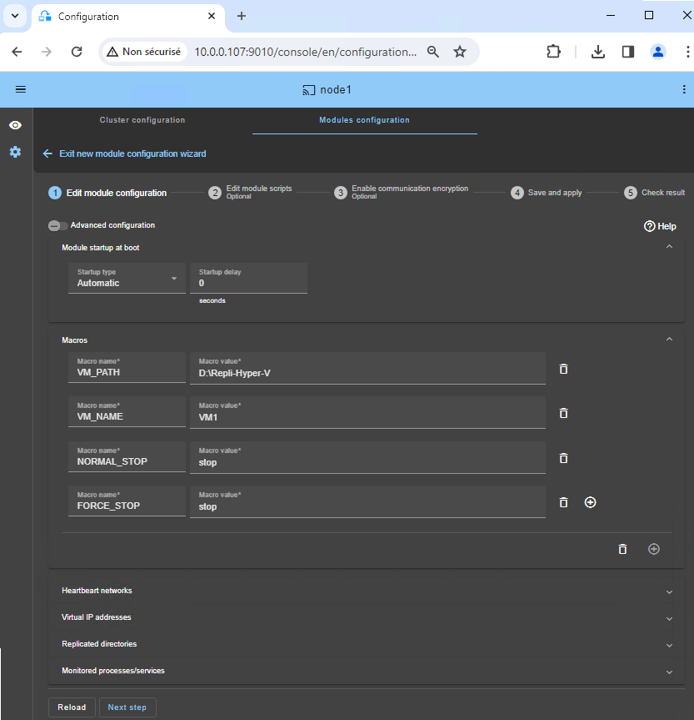
<p>The <strong>SafeKit web console</strong> provides an intuitive interface to configure high availability of your critical applications. In just a few steps, you can configure a <strong>SafeKit Hyper-V cluster</strong> to ensure business continuity:</p>
<ul>
<li>Put in <code>VM_PATH</code>, the root path of the replicated directory (D:/Repli-Hyper-V) where the Hyper-V VM files reside.</li>
<li>Enter in <code>VM_NAME</code>, the name of the Hyper-V virtual machine (VM1).</li>
</ul>
<p>The SafeKit cluster includes a dedicated <a href="/best-practises/heartbeat-failover-quorum-windows-linux-cluster/" title="Technical details on heartbeat and split-brain prevention">split-brain checker to resolve network isolation issues</a> without the need for a third witness machine or an additional heartbeat network.</p>
<h3 id="safekit-mirror-cluster-monitoring">How to monitor a SafeKit Hyper-V cluster?</h3>
<img src="/wp-content/uploads/2024/03/14-monitoring-prim-second.png" width="604" alt="SafeKit Web Console: Real-time monitoring of a 2-node mirror Hyper-V cluster showing PRIM and SECOND states with active data replication.">
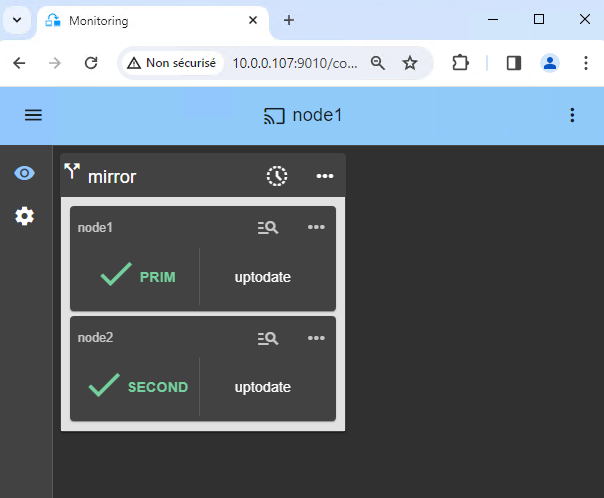
<p>The <strong>SafeKit management console</strong> offers a unified view of your high availability infrastructure. It allows administrators to monitor the <strong>operational state</strong> of the cluster and track data synchronization in real-time.</p>
<p>For a 2-node Hyper-V cluster, the console clearly displays the roles of each server:</p>
<ul>
<li><strong>PRIM (Primary):</strong> The active node currently running the application and managing the Virtual IP. It performs writes to the local storage and real-time replication to the secondary node.</li>
<li><strong>SECOND (Secondary):</strong> The standby node receiving synchronous byte-level updates. It is ready to take over instantly if the Primary fails.</li>
<li><strong>ALONE State:</strong> Visually alerts you when the cluster is running on a single node (e.g., during maintenance or after a failure), indicating that redundancy is temporarily lost.</li>
<li><strong>Resynchronization Progress:</strong> When a failed node recovers, its status turns orange during background data reintegration, ensuring no downtime during the &ldquo;return to normal&rdquo; phase.</li>
</ul>
<p>Beyond simple status icons, the interface provides <strong>one-click failover orchestration</strong> , allowing you to manually reassign the primary role for planned maintenance while ensuring continuous availability for user activity.</p>
<p>Note that if you deploy several VMs for replication and failover, you will have multiple PRIM/SECOND widgets. This allows independent failover for each VM and the ability to distribute the load across servers.</p>
<h2 id="safekit-ha-limitations">SafeKit High Availability Limitations</h2>
<h3 id="why-a-replication-of-a-few-tera-bytes">Why a replication of a few Tera-bytes?</h3>
<p>Resynchronization time after a failure (<a href="/architectures/file-replication-byte-level-with-failover-mirror-cluster/#safekit-mirror-cluster">step 3</a>)</p>
<ul>
<li>1 Gb/s network ≈ 3 Hours for 1 Tera-bytes.</li>
<li>10 Gb/s network ≈ 1 Hour for 1 Tera-bytes or less depending on disk write performances.</li>
</ul>
<h4 id="alternative">Alternative</h4>
<ul>
<li>For a large volume of data, use <a href="/best-practises/san-vs-nas-shared-storage-for-a-failover-cluster/">external shared storage</a>.</li>
<li>More expensive, more complex.</li>
</ul>
<h3 id="why-a-replication-lt-1000000-files">Why a replication &lt; 1,000,000 files?</h3>
<ul>
<li>Resynchronization time performance after a failure (<a href="/architectures/file-replication-byte-level-with-failover-mirror-cluster/#safekit-mirror-cluster">step 3</a>).</li>
<li>Time to check each file between both nodes.</li>
</ul>
<h4 id="alternative-1">Alternative</h4>
<ul>
<li>Put the many files to replicate in a virtual hard disk / virtual machine.</li>
<li>Only the files representing the virtual hard disk / virtual machine will be replicated and resynchronized in this case.</li>
</ul>
<h3 id="why-a-failover--32-replicated-vms">Why a failover ≤ 32 replicated VMs?</h3>
<ul>
<li>Each VM runs in an independent mirror module.</li>
<li>Maximum of 32 mirror modules running on the same cluster.</li>
</ul>
<h4 id="alternative-2">Alternative</h4>
<ul>
<li>Use an external shared storage and another VM clustering solution.</li>
<li>More expensive, more complex.</li>
</ul>
<h3 id="why-a-lanvlan-network-between-remote-sites">Why a LAN/VLAN network between remote sites?</h3>
<ul>
<li>Automatic failover of the <a href="/best-practises/how-a-virtual-ip-address-works/">virtual IP address</a> with 2 nodes in the same subnet.</li>
<li>Good bandwidth for resynchronization (<a href="/architectures/file-replication-byte-level-with-failover-mirror-cluster/#safekit-mirror-cluster">step 3</a>) and good latency for <a href="/best-practises/synchronous-replication-vs-asynchronous-replication/">synchronous replication</a> (typically a round-trip of less than 2ms).</li>
</ul>
<h4 id="alternative-3">Alternative</h4>
<ul>
<li>Use a <a href="/best-practises/how-a-virtual-ip-address-works/">load balancer for the virtual IP address</a> if the 2 nodes are in 2 subnets (supported by SafeKit, especially in the cloud).</li>
<li>Use backup solutions with asynchronous replication for high latency network.</li>
</ul>
<h2 id="safekit-hyperv-ha-comparison">Comparison: SafeKit for Hyper-V vs. Native Hyper-V Clustering</h2>
<table>
<thead>
<tr>
<th>Feature</th>
<th>SafeKit for Hyper-V</th>
<th>MS Failover Clustering</th>
<th>Hyper-V Replica</th>
</tr>
</thead>
<tbody>
<tr>
<td>Architecture</td>
<td><strong>SANless (Shared-Nothing)</strong></td>
<td>Shared Storage (SAN/S2D)</td>
<td>Shared-Nothing</td>
</tr>
<tr>
<td>Failover Logic</td>
<td><strong>Fully Automatic</strong></td>
<td>Fully Automatic</td>
<td>Manual Intervention (not a HA solution)</td>
</tr>
<tr>
<td>Replication Type</td>
<td>Synchronous (Zero RPO)</td>
<td>Synchronous (via SAN)</td>
<td>Asynchronous (Data Loss)</td>
</tr>
<tr>
<td>Quorum Requirement</td>
<td><strong>None (Built-in Checker)</strong></td>
<td>3rd Node / Cloud Witness</td>
<td>None</td>
</tr>
<tr>
<td>AD Dependency</td>
<td>Independent</td>
<td><strong>Required (Active Directory)</strong></td>
<td>Independent</td>
</tr>
<tr>
<td>Deployment Complexity</td>
<td>Low (&lt; 30 Minutes)</td>
<td>High (AD, Storage, Quorum)</td>
<td>Medium</td>
</tr>
</tbody>
</table>
<p><strong>In summary</strong> , by eliminating the need for a SAN and simplifying the setup—removing dependencies like <strong>Active Directory</strong> and specialized <strong>Quorum</strong> configurations—SafeKit provides a lean, hardware-agnostic alternative. This results in a significantly lower TCO while ensuring that your Hyper-V environment remains resilient with zero data loss and automated recovery.</p>
<h2 id="videoguide-safekit-hyperv-cluster">Video Guide: Configuring a SafeKit HA cluster for Hyper-V</h2>
<h3 id="demo-hyperv">SafeKit Video: Virtual Machine-Level Clustering with Hyper-V (5:15)</h3>
<p>In this video, discover how SafeKit implements <strong>high availability for Hyper-V</strong> without the complexity of a SAN. Learn to configure <strong>virtual machine replication</strong> across two nodes to ensure seamless failover for your critical virtualized workloads. Although this demonstration uses Hyper-V on Windows, the solution works identically with KVM on Linux.</p>
<h3 id="chapters">Chapters</h3>
<ol>
<li><a href="https://www.youtube.com/watch?v=H18s_-_CpmU&amp;amp;t=0s" target="_blank" rel="noopener">Architecture overview: 2 Hyper-V nodes and 2 virtual machines</a> (0:49)</li>
<li><a href="https://www.youtube.com/watch?v=H18s_-_CpmU&amp;amp;t=49s" target="_blank" rel="noopener">Configuring the cluster and the hyperv.safe modules</a> (1:59)</li>
<li><a href="https://www.youtube.com/watch?v=H18s_-_CpmU&amp;amp;t=168s" target="_blank" rel="noopener">Live testing: VM replication, migration, and automatic failover on crash</a> (2:26)</li>
</ol>
<h3 id="step-by-step-implementation">Step-by-Step Implementation</h3>
<ul>
<li><a href="/quick-install/safekit-quick-installation-guide-with-hyper-v/">Read the guide to set up a mirrored Hyper-V cluster on Windows.</a></li>
<li><a href="/quick-install/safekit-quick-installation-guide-with-kvm/">Read the guide to set up a mirrored KVM cluster on Linux.</a></li>
</ul>
<p>&amp;amp;amp;amp;amp;amp;lt;br /&amp;amp;amp;amp;amp;amp;gt;</p>
<h2 id="hub">🔍 SafeKit High Availability Navigation Hub</h2>
<p><strong>Explore SafeKit: Features, technical videos, documentation, and free trial</strong></p>
<table>
<thead>
<tr>
<th>Resource Type</th>
<th>Description</th>
<th>Direct Link</th>
</tr>
</thead>
<tbody>
<tr>
<td><strong>Key Features</strong></td>
<td>Why Choose SafeKit for Simple and Cost-Effective High Availability?</td>
<td><a href="/#why-choose-safekit-for-ha" title="Discover SafeKit features for simple and cost-effective high availability">See Why Choose SafeKit for High Availability</a></td>
</tr>
<tr>
<td><strong>Use Cases</strong></td>
<td>Explore How SafeKit Ensures the High Availability of Critical Infrastructure</td>
<td><a href="/#safekit-use-cases" title="Explore SafeKit high availability use cases">See All Use Cases (OEM Software, Edge Servers, SCADA, and more)</a></td>
</tr>
<tr>
<td><strong>Deployment Model</strong></td>
<td>All-in-One SANless HA: Shared-Nothing Software Clustering</td>
<td><a href="/#all-in-one-sanless-ha" title="Learn about all-in-one SANless high availability with shared-nothing software clustering">See SafeKit All-in-One SANless HA</a></td>
</tr>
<tr>
<td><strong>HA Strategies</strong></td>
<td>SafeKit: Infrastructure (VM) vs. Application-Level High Availability</td>
<td><a href="/#safekit-ha-redundancy-choices" title="Compare VM-level redundancy with SafeKit application-level high availability strategies">See SafeKit HA &amp; Redundancy: VM vs. Application Level</a></td>
</tr>
<tr>
<td><strong>Technical Specifications</strong></td>
<td>Technical Limitations for SafeKit Clustering</td>
<td><a href="/#safekit-ha-limitations" title="Technical requirements and limitations for SafeKit application clustering">See SafeKit High Availability Limitations</a></td>
</tr>
<tr>
<td><strong>Proof of Concept</strong></td>
<td>SafeKit: High Availability Configuration &amp; Failover Demos</td>
<td><a href="/#safekit-failover-tutorials" title="Step-by-step videos on SafeKit high availability, from installation to automated failover">See SafeKit Failover Tutorials</a></td>
</tr>
<tr>
<td><strong>Architecture</strong></td>
<td>How the SafeKit Mirror Cluster works (Real-Time Replication &amp; Failover)</td>
<td><a href="/#safekit-mirror-cluster" title="See technical architecture and failover mechanism of SafeKit Mirror Cluster">See SafeKit Mirror Cluster: Real-Time Replication &amp; Failover</a></td>
</tr>
<tr>
<td><strong>Architecture</strong></td>
<td>How the SafeKit Farm Cluster works (Network Load Balancing &amp; Failover)</td>
<td><a href="/#safekit-farm-cluster" title="Technical overview of SafeKit Farm Cluster architecture with network load balancing">See SafeKit Farm Cluster: Network Load Balancing &amp; Failover</a></td>
</tr>
<tr>
<td><strong>Competitive Advantages</strong></td>
<td>Comparison: SafeKit vs. Traditional High Availability (HA) Clusters</td>
<td><a href="/#safekit-ha-comparison" title="Detailed comparison of SafeKit software vs traditional hardware-based HA clusters">See SafeKit vs. Traditional HA Cluster Comparison</a></td>
</tr>
<tr>
<td><strong>Technical Resources</strong></td>
<td>SafeKit High Availability: Documentation, Downloads &amp; Trial</td>
<td><a href="/#safekit-ha-technical-resources" title="Access SafeKit free trial, technical documentation, and high availability white papers">See SafeKit HA Free Trial &amp; Technical Documentation</a></td>
</tr>
<tr>
<td><strong>Pre-configured Solutions</strong></td>
<td>SafeKit Application Module Library: Ready-to-Use HA Solutions</td>
<td><a href="/#safekit-ha-application-modules" title="Browse the library of pre-configured SafeKit modules for automated application failover">See SafeKit High Availability Application Modules</a></td>
</tr>
</tbody>
</table>
<div class="button-row">
  <a class="btn-action" href="https://safekit.eviden.com/contact-us-for-safekit/">🧑 Contact us</a>
  <a class="btn-action" href="/resources/safekit-free-trial/">🎁 SafeKit free trial</a>
  <a class="btn-action" href="https://training.my.evidian.com/mod/page/view.php?id=712">🏅 Free certification</a>
  <a class="btn-action" href="https://safekit.eviden.com/get-a-quote-safekit/">💰 Perpetual license cost</a>
</div>