---
title: "PostgreSQL High Availability with SafeKit: Install the postgresql.safe Module for Failover"
description: "SafeKit Video: Application-Level Clustering (8:47) In this video, discover how SafeKit implements a mirror HA cluster without the complexity of a SAN. While this demonstration uses Microsoft SQL Server, the solution works identically for other databases and applications. Chapters 2 nodes with SQL Server (0:32) Configure the cluster and the mirror.safe module (3:58) Start and […]"
canonical: "https://safekit.eviden.com/quick-install/safekit-quick-installation-guide-with-postgresql/"
topics: "High Availability Quick Installation Guide for PostgreSQL, SafeKit High Availability Limitations, Overview of the SafeKit / PostgreSQL solution, Installation of the SafeKit / PostgreSQL solution on Windows and Linux (postgresql.safe), Step by step configuration of the SafeKit / PostgreSQL solution, Demonstration of the SafeKit mirror solution, 🔍 SafeKit High Availability Navigation Hub"
category: "quick-install"
lang: "en"
---

<h1 id="postgresql-high-availability-with-safekit-install-the-postgresqlsafe-module-for-failover">PostgreSQL High Availability with SafeKit: Install the postgresql.safe Module for Failover</h1>
<h2 id="quick-guide">High Availability Quick Installation Guide for PostgreSQL</h2>
<p>This guide explains how to set up a <strong>postgresql.safe cluster</strong> for PostgreSQL using SafeKit, ensuring automatic failover and synchronous replication without the need for shared storage.</p>
<p>For help, you can use <a href="/resources/safekit-support/">SafeKit AI 🤖</a>.</p>
<h3 id="1-overview">1. Overview</h3>
<ul>
<li><strong>Architecture:</strong> Uses a two-node system (Primary/Secondary).</li>
<li><strong>Data Protection:</strong> Implements real-time synchronous replication for <strong>zero data loss</strong> (RPO=0).</li>
</ul>
<h3 id="2-installation">2. Installation</h3>
<ul>
<li><strong>Software:</strong> Install the SafeKit engine on both servers.</li>
<li><strong>Module:</strong> Download the pre-configured <code>postgresql.safe.safe</code> application module.</li>
</ul>
<h3 id="3-configuration">3. Configuration</h3>
<ul>
<li><strong>Web Console:</strong> Configure the specific folders containing the PostgreSQL files.</li>
<li><strong>Monitoring:</strong> Start monitoring and protecting the PostgreSQL application.</li>
</ul>
<h2 id="safekit-ha-limitations">SafeKit High Availability Limitations</h2>
<h3 id="why-a-replication-of-a-few-tera-bytes">Why a replication of a few Tera-bytes?</h3>
<p>Resynchronization time after a failure (<a href="/architectures/file-replication-byte-level-with-failover-postgresql.safe-cluster/#safekit-postgresql.safe-cluster">step 3</a>)</p>
<ul>
<li>1 Gb/s network ≈ 3 Hours for 1 Tera-bytes.</li>
<li>10 Gb/s network ≈ 1 Hour for 1 Tera-bytes or less depending on disk write performances.</li>
</ul>
<h4 id="alternative">Alternative</h4>
<ul>
<li>For a large volume of data, use <a href="/best-practises/san-vs-nas-shared-storage-for-a-failover-cluster/">external shared storage</a>.</li>
<li>More expensive, more complex.</li>
</ul>
<h3 id="why-a-replication-lt-1000000-files">Why a replication &lt; 1,000,000 files?</h3>
<ul>
<li>Resynchronization time performance after a failure (<a href="/architectures/file-replication-byte-level-with-failover-postgresql.safe-cluster/#safekit-postgresql.safe-cluster">step 3</a>).</li>
<li>Time to check each file between both nodes.</li>
</ul>
<h4 id="alternative-1">Alternative</h4>
<ul>
<li>Put the many files to replicate in a virtual hard disk / virtual machine.</li>
<li>Only the files representing the virtual hard disk / virtual machine will be replicated and resynchronized in this case.</li>
</ul>
<h3 id="why-a-failover--32-replicated-vms">Why a failover ≤ 32 replicated VMs?</h3>
<ul>
<li>Each VM runs in an independent postgresql.safe module.</li>
<li>Maximum of 32 postgresql.safe modules running on the same cluster.</li>
</ul>
<h4 id="alternative-2">Alternative</h4>
<ul>
<li>Use an external shared storage and another VM clustering solution.</li>
<li>More expensive, more complex.</li>
</ul>
<h3 id="why-a-lanvlan-network-between-remote-sites">Why a LAN/VLAN network between remote sites?</h3>
<ul>
<li>Automatic failover of the <a href="/best-practises/how-a-virtual-ip-address-works/">virtual IP address</a> with 2 nodes in the same subnet.</li>
<li>Good bandwidth for resynchronization (<a href="/architectures/file-replication-byte-level-with-failover-postgresql.safe-cluster/#safekit-postgresql.safe-cluster">step 3</a>) and good latency for <a href="/best-practises/synchronous-replication-vs-asynchronous-replication/">synchronous replication</a> (typically a round-trip of less than 2ms).</li>
</ul>
<h4 id="alternative-3">Alternative</h4>
<ul>
<li>Use a <a href="/best-practises/how-a-virtual-ip-address-works/">load balancer for the virtual IP address</a> if the 2 nodes are in 2 subnets (supported by SafeKit, especially in the cloud).</li>
<li>Use backup solutions with asynchronous replication for high latency network.</li>
</ul>
<h2 id="overview-of-the-safekit--postgresql-solution">Overview of the SafeKit / PostgreSQL solution</h2>
<p>The solution is described here: <strong><a href="/solutions/postgresql-high-availability-synchronous-replication-failover/">The Simplest PostgreSQL High Availability: 2-Node Synchronous Replication&amp; Failover</a></strong>.</p>
<h2 id="installation-of-the-safekit--postgresql-solution-on-windows-and-linux-postgresqlsafe">Installation of the SafeKit / PostgreSQL solution on Windows and Linux (postgresql.safe)</h2>
<h3 id="prerequisites">Prerequisites</h3>
<ul>
<li>You need PostgreSQL installed on 2 nodes (virtual machines or physical servers).</li>
</ul>
<h3 id="package-installation-on-windows">Package installation on Windows</h3>
<ul>
<li>Download and install the free version of SafeKit on 2 Windows nodes.<br>
Note: the free version includes all SafeKit features. At the end of the trial, you can activate permanent license keys without uninstalling the package.</li>
<li>Upon completing the package installation, select <strong>Set console credentials and firewall rules now</strong> and configure a password for the <strong>admin</strong> user of the SafeKit console.<br>
<strong>Set the same password on all nodes.</strong></li>
<li>Exclude from antivirus scans <strong>C:/safekit/</strong> (the default installation directory) and <strong>all replicated folders</strong> that you are going to define.<br>
Antiviruses may face detection challenges with SafeKit due to its close integration with the OS, virtual IP mechanisms, real-time replication and restart of critical services.</li>
</ul>
<p><a href="/resources/safekit-free-trial/"> Download SafeKit (Windows) &gt; </a></p>
<h3 id="module-installation-on-windows">Module installation on Windows</h3>
<ul>
<li>Download the postgresql.safe module. The module is free. It contains the files userconfig.xml and the restart scripts.</li>
<li>Put <strong>postgresql.safe</strong> under <strong>C:/safekit/Application_Modules/generic</strong>.</li>
</ul>
<p><a class="btn-download" href="/wp-content/uploads/downloads_safekit/version-82/modules_windows/firebird.safe" download="postgresql.safe">⬇️ Download postgresql.safe (Windows) &gt;</a></p>
<h3 id="package-installation-on-linux">Package installation on Linux</h3>
<ul>
<li>Install the free version of SafeKit on 2 Linux nodes. Note: the free trial includes all SafeKit features. At the end of the trial, you can activate permanent license keys without uninstalling the package.</li>
<li>After the download of safekit_xx.bin package, execute it to extract the rpm and the safekitinstall script and then execute the <strong>safekitinstall</strong> script</li>
<li>Answer <strong>yes</strong> to firewall automatic configuration</li>
<li>Set the password for the web console and the default user <strong>admin</strong>. <strong>Set the same password on all nodes.</strong></li>
</ul>
<p><a href="/resources/safekit-free-trial/"> Download SafeKit (Linux) &gt; </a></p>
<h3 id="module-installation-on-linux">Module installation on Linux</h3>
<ul>
<li>Download the postgresql.safe module.<br>
The module is free. It contains the files userconfig.xml and the restart scripts.</li>
<li>Put <strong>postgresql.safe</strong> under <strong>/opt/safekit/Application_Modules/generic/</strong>.</li>
</ul>
<p><a class="btn-download" href="/wp-content/uploads/downloads_safekit/version-82/modules_linux/firebird.safe" download="postgresql.safe">⬇️ Download postgresql.safe (Linux) &gt;</a></p>
<h2 id="step-by-step-configuration-of-the-safekit--postgresql-solution">Step by step configuration of the SafeKit / PostgreSQL solution</h2>
<h3 id="prerequisites-1">Prerequisites</h3>
<ul>
<li>PostgreSQL application installed on 2 nodes.</li>
<li>Total replicated data limited to a few terabytes — beyond this, resynchronization time becomes significant.</li>
<li>Minimum 1Gb/s interconnect between nodes (10Gb/s recommended for faster resynchronization).</li>
<li>IP failover requires both nodes on the same LAN or extended LAN (L2) — routed L3 networks not supported (except with <a href="/resources/safekit-user-guide-82/#Cloud">cloud load balancers</a>).</li>
</ul>
<h3 id="1-launch-the-safekit-console">1. Launch the SafeKit console</h3>
<ul>
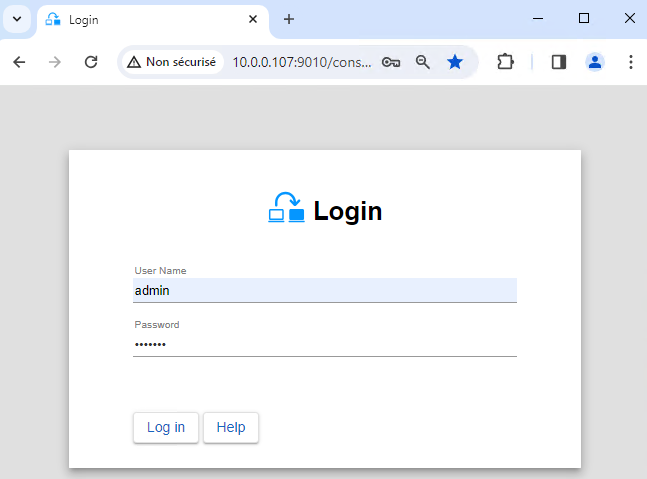
<li>Launch the web console in a browser on one cluster node by connecting to <code>http://localhost:9010</code>.</li>
<li>Enter <code>admin</code> as user name and the password defined during installation.</li>
</ul>
<p>You can also run the console in a browser on a workstation external to the cluster.</p>
<div class="callout callout-warning"><img src="/wp-content/uploads/2022/07/warning-small.png" alt="Warning"><span>The configuration of SafeKit is done on both nodes from a single browser.</span></div>
<div class="callout"><img src="/wp-content/uploads/2022/07/note.png" alt="Note"><span>To secure the web console, see <a href="/resources/safekit-user-guide-82/#https">11. Securing the SafeKit web service</a> in the User's Guide.</span></div>
<img src="/wp-content/uploads/2024/03/01-login-large.png" alt="Start the SafeKit web console to configure the PostgreSQL cluster">
<h3 id="2-configure-node-addresses">2. Configure node addresses</h3>
<ul>
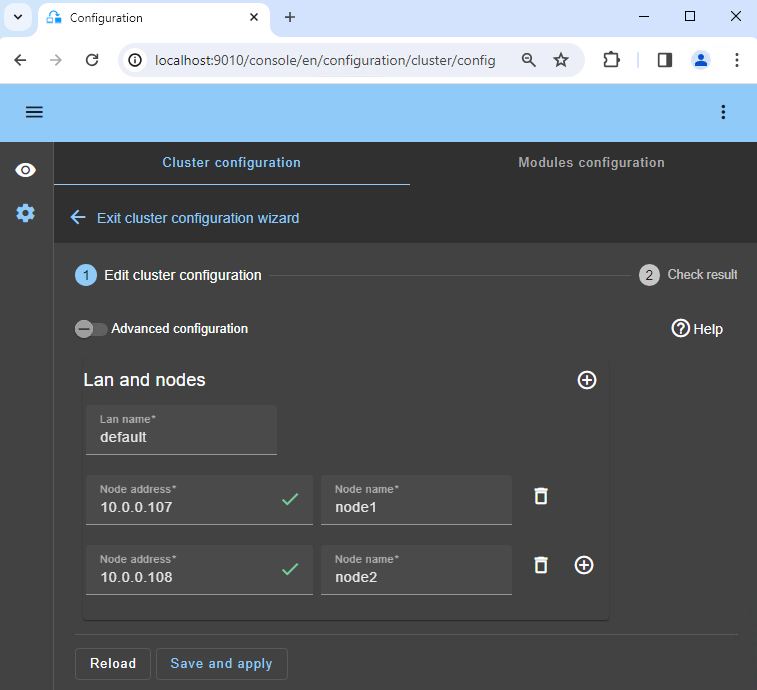
<li>Enter the node IP addresses, press the <code>Tab key</code> to check connectivity and fill node names. If either node1 or node2 has a red color, check connectivity of the browser to both nodes and check firewall on both nodes for <a href="/resources/safekit-user-guide-82/#Troubleshooting">troubleshooting</a>.</li>
<li>Then, click on <code>Save and apply</code> to save the configuration.</li>
<li>Check the <code>Success</code> ✅ message on both nodes.</li>
<li>If the configuration <code>Failure</code> ❌ occurs on one node, open the ▼ accordion for that node and review the messages. Note that you can use the SafeKit AI 🤖 for assistance.</li>
</ul>
<div class="callout"><img src="/wp-content/uploads/2022/07/note.png" alt="Note"><span>If you want, you can add a new `LAN and nodes` ( first ➕) to create a second heartbeat and a dedicated replication network.</span></div>
<div class="callout"><img src="/wp-content/uploads/2022/07/note.png" alt="Note"><span>If you click on `Advanced configuration`, the `cluster.xml` file is displayed. This file is automatically populated by the console and deployed on the nodes.</span></div>
<img src="/wp-content/uploads/2024/03/02-cluster-edit.png" alt="Enter the nodes of the PostgreSQL cluster">
<h3 id="3-select-a-module">3. Select a module</h3>
<ul>
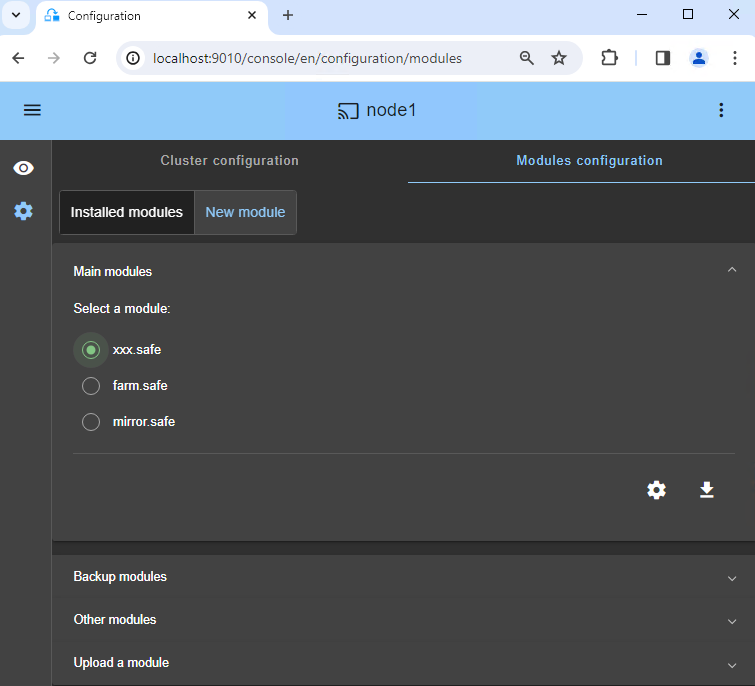
<li>In <code>New module</code>, click on the <code>postgresql.safe</code> module.</li>
</ul>
<div class="callout"><img src="/wp-content/uploads/2022/07/note.png" alt="Note"><span>In the blue banner at the top, 🛜 `node1` represents the console connection node. This node relays requests to `node2` when required.</span></div>
<div class="callout"><img src="/wp-content/uploads/2022/07/note.png" alt="Note"><span>The console looks for `xxx.safe` in the `Application_Modules/generic/` directory on the connection node (`node1`) if you placed a module there during installation.</span></div>
<img src="/wp-content/uploads/2024/03/04-module-new.png" alt="Choose the module for PostgreSQL">
<h3 id="4-configure-the-module">4. Configure the module</h3>
<ul>
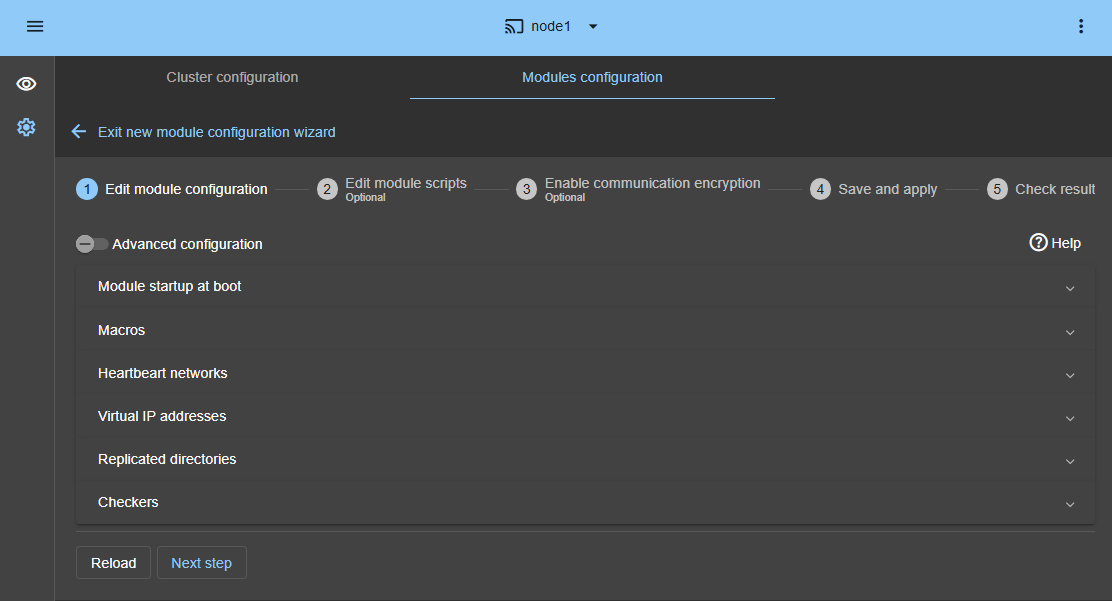
<li>In <code>Module startup at boot</code>, choose an automatic start of the module at boot without delay.</li>
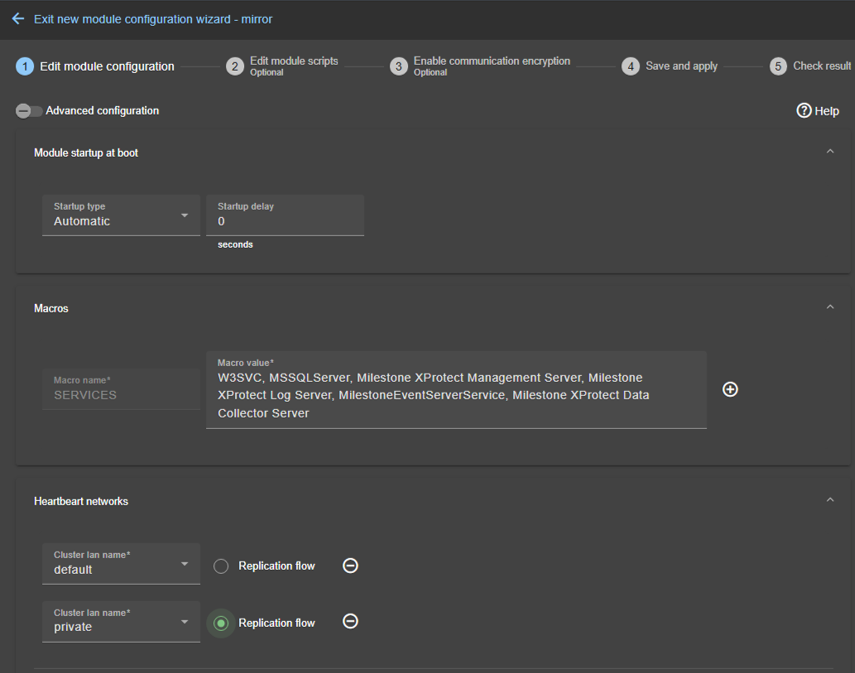
<li>In <code>Macros</code> / <code>SERVICES</code>, enter the service names of your application, in the startup order, separated by commas. See this screenshot for a visual example of <a href="/wp-content/uploads/2025/05/milestone-services.png">Milestone XProtect services 🖼️</a>.</li>
<li>In <code>Heartbeat networks</code>, you should have a single heartbeat network on which the replication is made. If you have added a private LAN at step 2, then you can configure two heartbeats with the replication flow on the private LAN.</li>
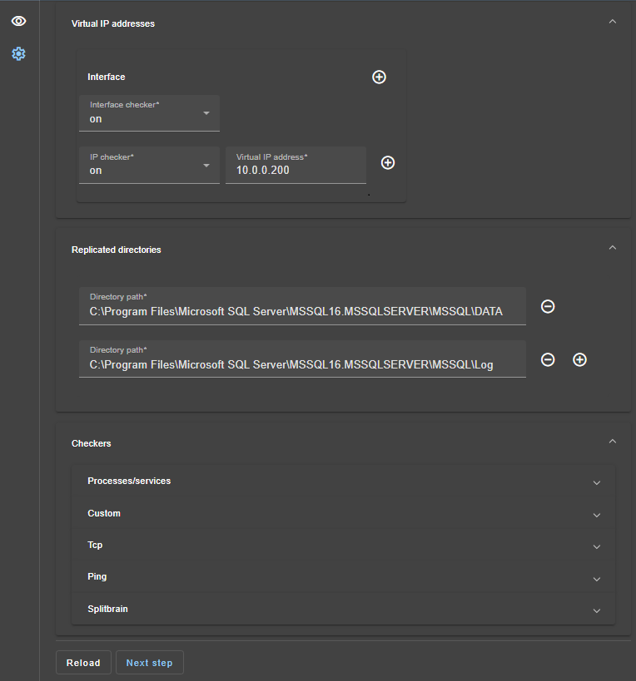
<li>In <code>Virtual IP addresses</code>, enter a virtual IP address. A virtual IP address is a standard IP address in the same IP network (same subnet) as the IP addresses of both nodes.<br>
Application clients must be configured with the virtual IP address (or the DNS name associated with the virtual IP address).<br>
The virtual IP address is automatically switched in the event of a failure.</li>
<li>In <code>Replicated directories</code>, set the paths of directories to replicate. Check that they exist on both nodes and contain the application data.<br>
Data and log replication are essential for a database.<br>
You can create additional replicated directories as required.<br>
See this screenshot for a visual example of <a href="/wp-content/uploads/2025/05/milestone-replication.png">Milestone XProtect SQL replication 🖼️</a>.</li>
<li>In <code>Checkers</code>, you will be able to configure checkers if needed, such as process monitoring, custom checkers, TCP, ping, or split-brain checkers.<br>
For example, if a process name is displayed in <code>Monitored processes/services</code>, it will be monitored with a restart action in case of failure. Configuring a wrong process name will cause the module to stop right after its start.</li>
</ul>
<div class="callout"><img src="/wp-content/uploads/2022/07/note.png" alt="Note"><span>If you click on `Advanced configuration`, the `userconfig.xml` file is displayed. This file is automatically populated by the console and deployed on the nodes with the restart scripts.</span></div>
<div class="callout"><img src="/wp-content/uploads/2022/07/note.png" alt="Note"><span>In a cloud deployment, you do not need to configure a virtual IP address in SafeKit. The virtual IP is managed at the <a href="/resources/safekit-user-guide-82/#Cloud">cloud load balancer level</a>.</span></div>
<div class="callout"><img src="/wp-content/uploads/2022/07/note.png" alt="Note"><span>When you apply the SafeKit configuration, the `startup type` of services is automatically set to `Manual` in Windows services. This ensures that services do not start automatically when the system boots, but are instead started only when the module itself is started (the same applies on PostgreSQL).</span></div>
<img src="/wp-content/uploads/2025/05/05-module-mirror-edit-config-3.png" alt="Enter the PostgreSQL module settings">
<h3 id="5-edit-scripts-optional">5. Edit scripts (optional)</h3>
<ul>
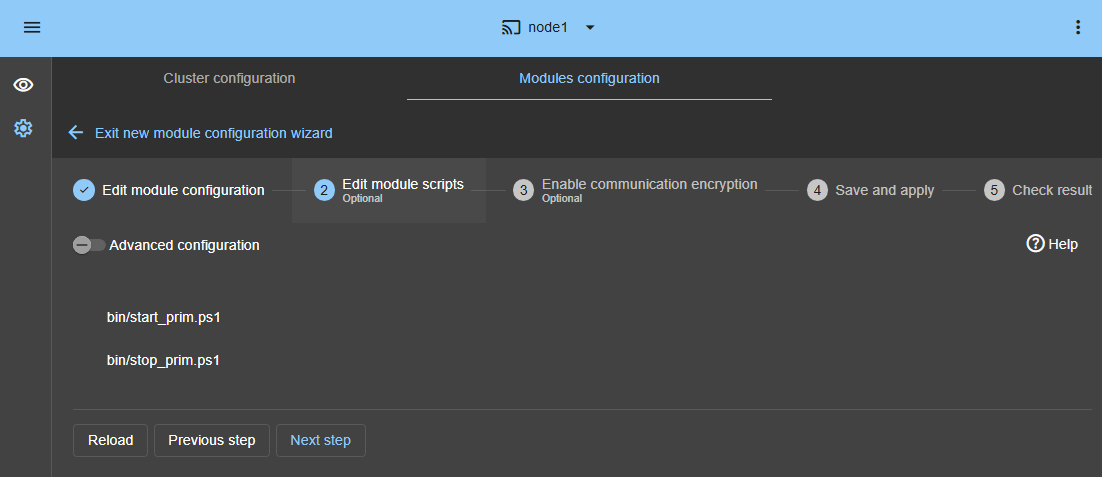
<li>This step is optional and can be skipped in most cases, as the restart scripts are already pre-configured to restart services defined in the previous step.</li>
<li>So, click directly on <code>Next step</code>.</li>
<li><code>start_prim.ps1</code> starts all services in the order specified in the <code>SERVICES</code> list, while <code>stop_prim.ps1</code> stops all services in the reverse order.</li>
<li>Additionally, <code>start_prim.ps1</code> checks the startup of each service and stops the module if any service fails to start correctly.</li>
</ul>
<img src="/wp-content/uploads/2025/05/28-module-sqlserver-edit-script-3.png" alt="Enter the PostgreSQL module settings">
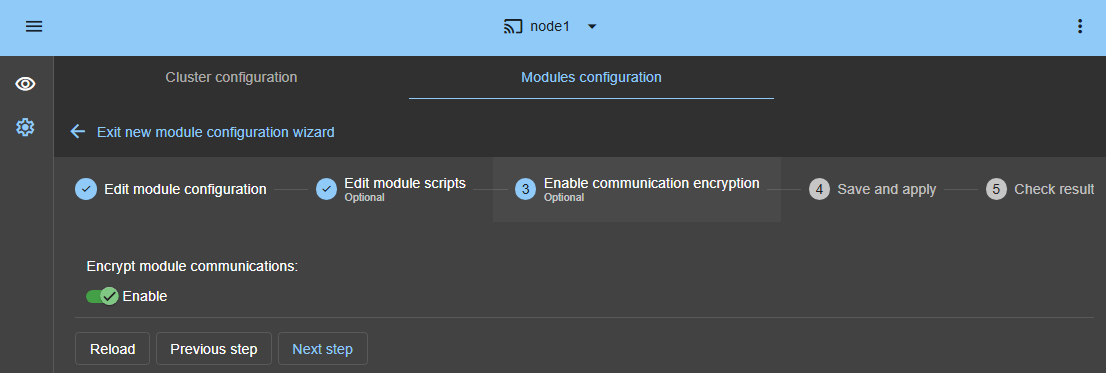
<h3 id="6-communication-encryption-optional">6. Communication encryption (optional)</h3>
<ul>
<li>Keep encryption of communication between nodes.</li>
</ul>
<img src="/wp-content/uploads/2025/05/07-module-encryption-1.png" alt="Communication encryption of the PostgreSQL module">
<h3 id="7-save-and-apply">7. Save and apply</h3>
<ul>
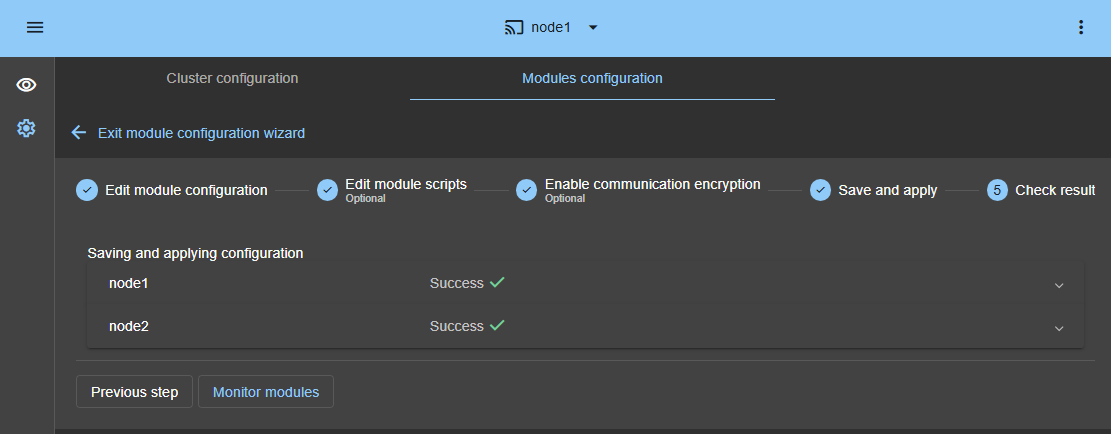
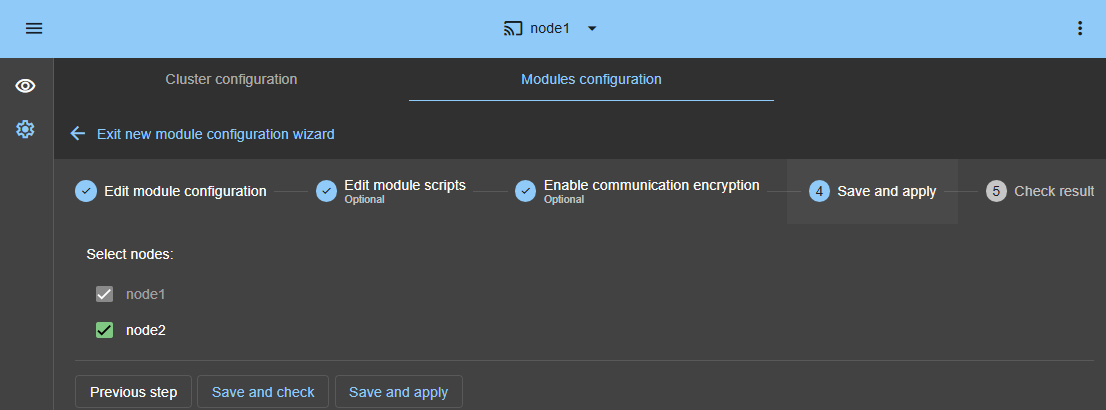
<li><code>Save and apply</code> the configuration and scripts on both nodes.</li>
</ul>
<img src="/wp-content/uploads/2025/05/08-module-save-1.png" alt="Save and apply the PostgreSQL module configuration">
<h3 id="8-verify-successful-configuration">8. Verify successful configuration</h3>
<ul>
<li>Check the <code>Success</code> ✅ message on both nodes and click on <code>Monitor modules</code>.</li>
<li>If the configuration <code>Failure</code> ❌ occurs on one node, open the ▼ accordion for that node and review the messages. Note that you can use the SafeKit AI 🤖 for assistance.</li>
</ul>
<div class="callout callout-warning"><img src="/wp-content/uploads/2022/07/warning-small.png" alt="Warning"><span>On PostgreSQL, you may get an error at this step if the replicated directories are mount points. <a href="https://github.com/FR-LES-SAFEKIT-DEV/safekit-packages/releases/download/v8.2/SafeKit_8.2_Knowledge_Base.pdf">See SK-0030 to solve the problem</a>.</span></div>
<img src="/wp-content/uploads/2025/05/09-module-save-check-1.png" alt="Check the PostgreSQL module configuration success">
<h3 id="9-start-the-node-with-up-to-date-data">9. Start the node with up-to-date data</h3>
<ul>
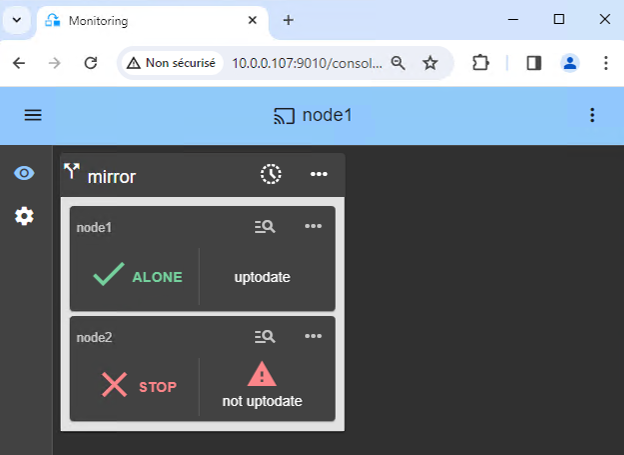
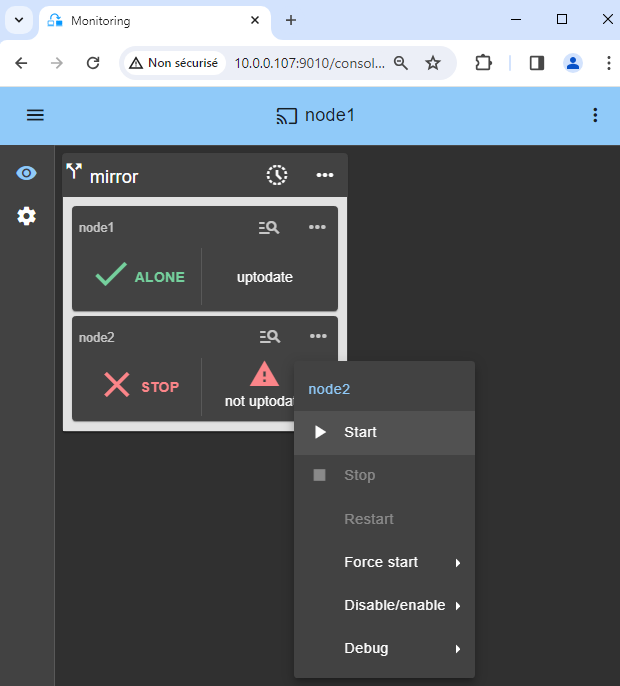
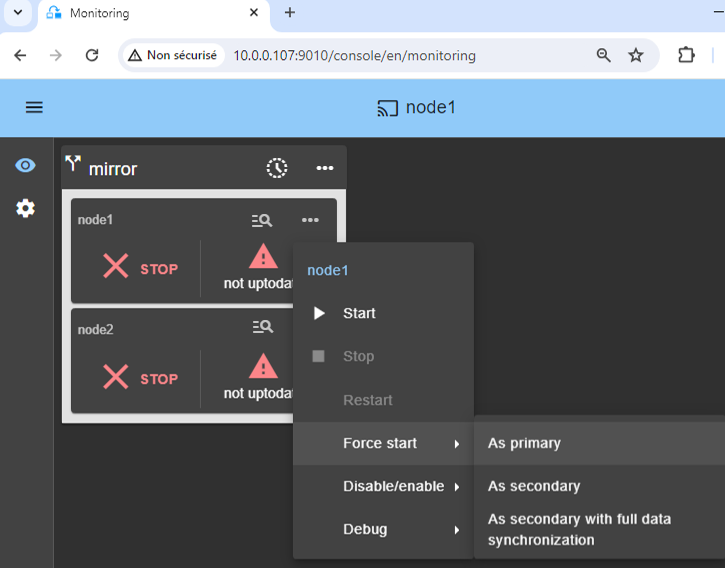
<li>If node 1 has the up-to-date replicated directories, select it and ⋯ <code>Force start</code> ▶ <code>As primary</code>.</li>
</ul>
<p>When node 2 will be started, all data will be copied from node 1 to node 2.</p>
<div class="callout callout-warning"><img src="/wp-content/uploads/2022/07/warning-small.png" alt="Warning"><span>If you make the wrong choice, you run the risk of synchronizing outdated data on both nodes.</span></div>
<div class="callout callout-warning"><img src="/wp-content/uploads/2022/07/warning-small.png" alt="Warning"><span>It is also assumed that the PostgreSQL application is stopped on node 1 so that SafeKit installs the replication mechanisms and then starts the application in the `start_prim` script.</span></div>
<div class="callout callout-warning"><img src="/wp-content/uploads/2022/07/warning-small.png" alt="Warning"><span>Use `Start` for subsequent starts: SafeKit retains the most up-to-date server. Starting `As primary` is a special start-up the first time or during exceptional operations.</span></div>
<img src="/wp-content/uploads/2024/03/10-monitoring-mirror-stop-stop-prim.png" alt="Start as primary the PostgreSQL node with the up-to-date data">
<h3 id="10-wait-for-the-transition-to-alone-green">10. Wait for the transition to ALONE (green)</h3>
<ul>
<li>Node 1 should reach the ALONE (green) state, which means that the virtual IP is set and that the <code>start_prim</code> script has been executed on node 1.</li>
</ul>
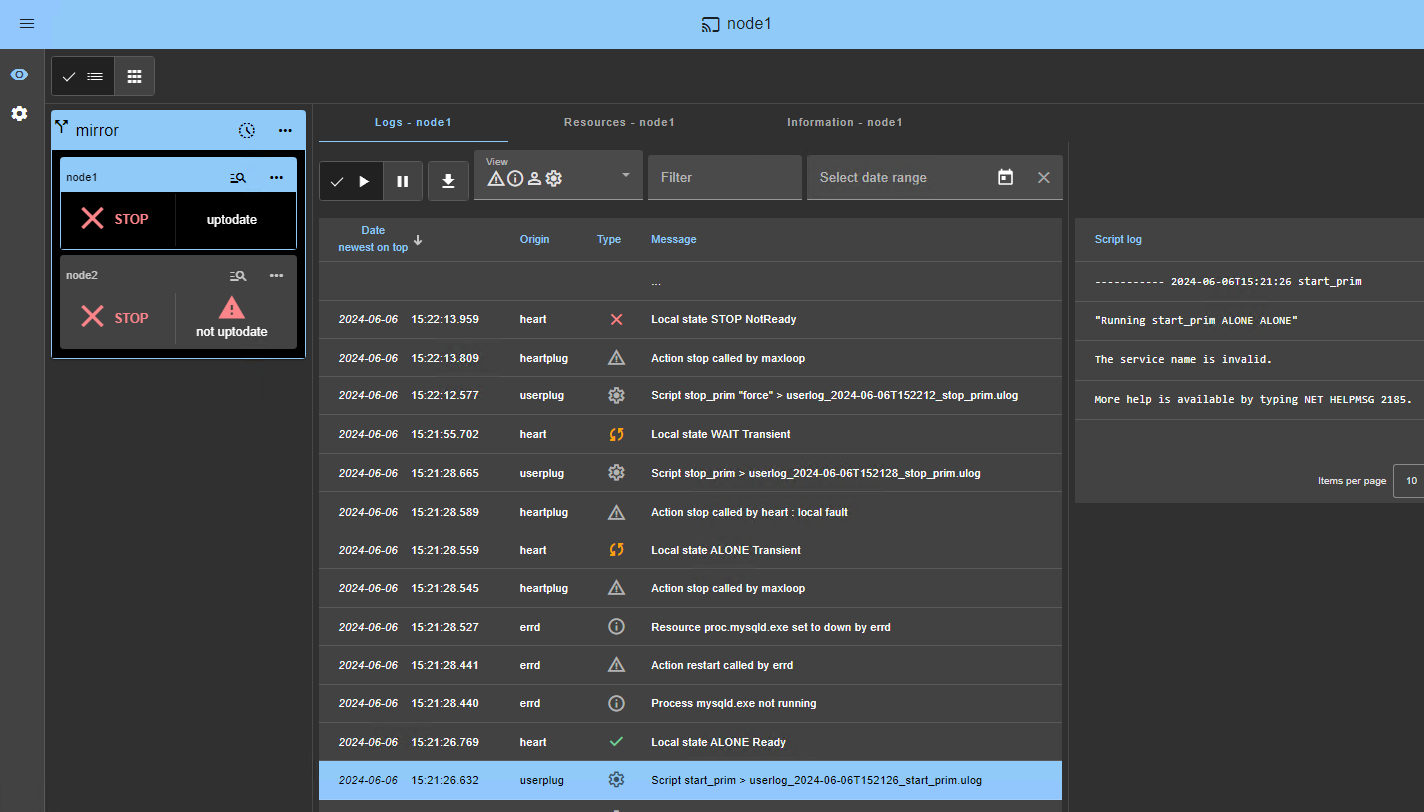
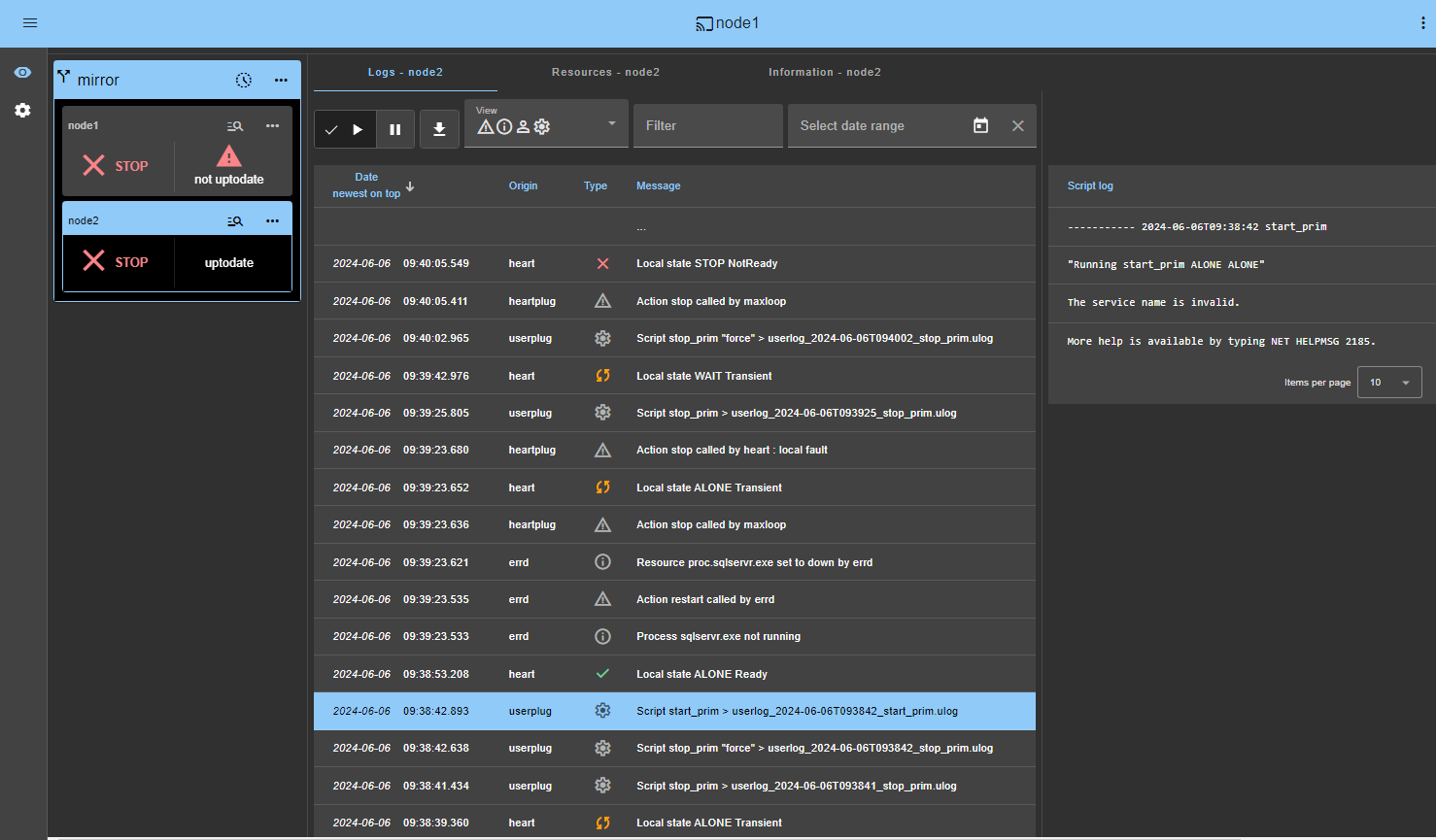
<div class="callout callout-warning"><img src="/wp-content/uploads/2022/07/warning-small.png" alt="Warning"><span>If ALONE (green) is not reached or if the application is not started, analyze why with the <a href="/wp-content/uploads/2024/03/24-module-log-script.png">module log 🖼️</a> of node 1.</span></div>
<ul>
<li>Click the 🔍 <strong>log</strong> icon of <code>node1</code> to open the module log and look for error messages such as a checker detecting an error and stopping the module.</li>
<li>Click on <code>start_prim</code> in the log: output messages of the script are displayed on the right and errors can be detected such as a service incorrectly started.</li>
<li>Use the SafeKit AI 🤖 for assistance with log messages.</li>
</ul>
<div class="callout callout-warning"><img src="/wp-content/uploads/2022/07/warning-small.png" alt="Warning"><span>If the cluster is in `WAIT (red) not uptodate, STOP (red) not uptodate` state, stop the WAIT node and <a href="/wp-content/uploads/2024/03/10-monitoring-mirror-stop-stop-prim.png">force its start as primary 🖼️</a>.</span></div>
<img src="/wp-content/uploads/2024/03/12-monitoring-alone-stop.png" alt="The first PostgreSQL node starts as primary and becomes ALONE">
<h3 id="11-start-node-2">11. Start node 2</h3>
<ul>
<li>⋯ <code>Start</code> node 2 with its contextual menu.</li>
<li>Wait for the SECOND (green) state.</li>
</ul>
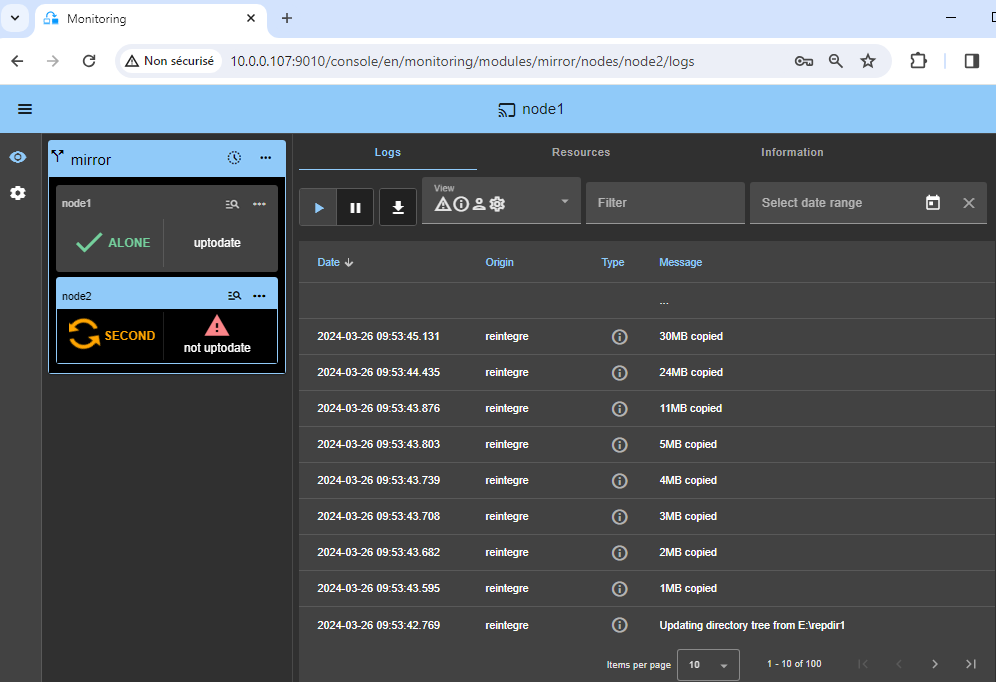
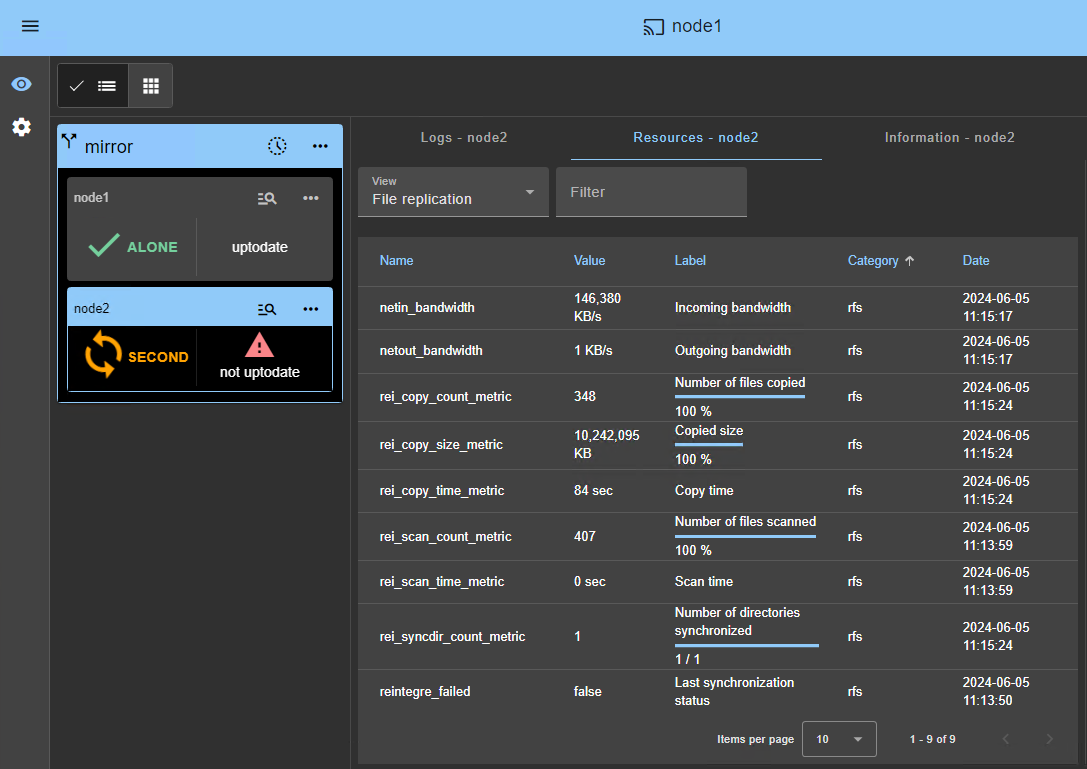
<div class="callout"><img src="/wp-content/uploads/2022/07/note.png" alt="Note"><span>Node 2 stays in the SECOND (orange) state while resynchronizing the replicated directories (copy from node 1 to node 2).</span></div>
<p>This may take a while depending on the size of files to resynchronize in replicated directories and the network bandwidth.</p>
<p>To see the progress of the copy, see the <a href="/wp-content/uploads/2024/03/27-module-log-reintegration.png">module log 🖼️</a> and the <a href="/wp-content/uploads/2024/03/26-replication-resources-reintegration.png">replication resources 🖼️</a> of node 2. Use the SafeKit AI 🤖 for assistance with log messages.</p>
<img src="/wp-content/uploads/2024/03/13-monitoring-alone-stop-start.png" alt="Start the PostgreSQL node 2">
<h3 id="12-verify-that-the-cluster-is-operational">12. Verify that the cluster is operational</h3>
<ul>
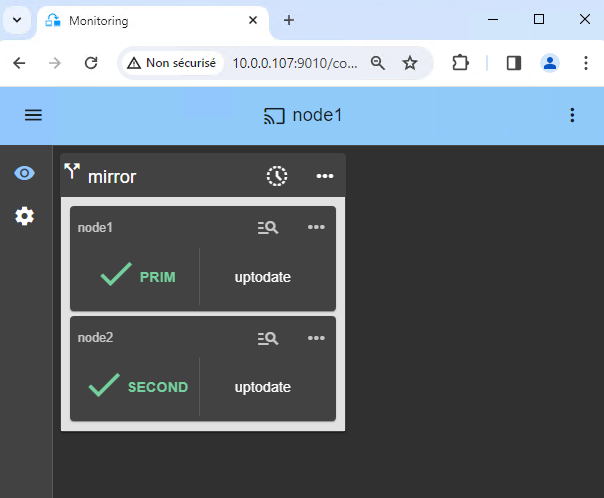
<li>Check that the cluster is green/green with PostgreSQL services running on the PRIM node and not running on the SECOND node.</li>
</ul>
<p>Only changes inside files are replicated in real time in this state.</p>
<div class="callout callout-warning"><img src="/wp-content/uploads/2022/07/warning-small.png" alt="Warning"><span>Components that are clients of PostgreSQL services must be configured with the virtual IP address. The configuration can be done with a DNS name (if a DNS name has been created and associated with the virtual IP address).</span></div>
<img src="/wp-content/uploads/2024/03/14-monitoring-prim-second.png" alt="The PostgreSQL node 2 is SECOND (green)">
<h3 id="13-testing">13. Testing</h3>
<ul>
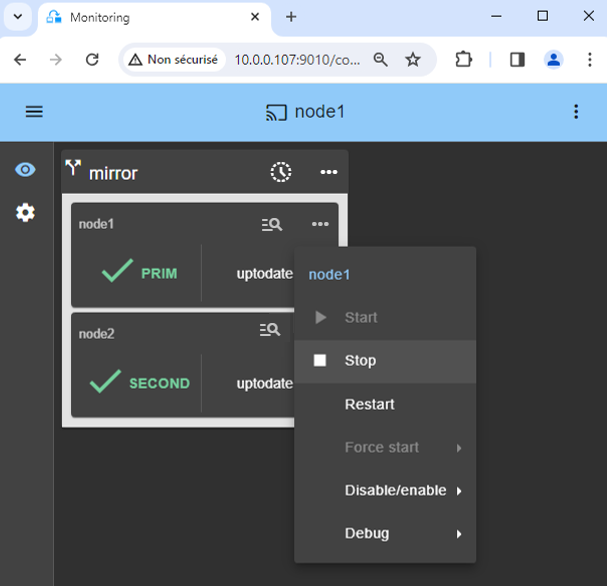
<li>Stop the PRIM node by scrolling down its contextual menu and clicking <code>Stop</code>.</li>
<li>Verify that there is a failover on the SECOND node which should become ALONE (green).</li>
<li>And with Microsoft Management Console (MMC) on Windows or with command lines on PostgreSQL, check the failover of PostgreSQL services (stopped on node 1 in the <code>stop_prim</code> script and started on node 2 in the <code>start_prim</code> script).</li>
</ul>
<div class="callout callout-warning"><img src="/wp-content/uploads/2022/07/warning-small.png" alt="Warning"><span>If ALONE (green) is not reached on node2 or if the application is not started, analyze why with the <a href="/wp-content/uploads/2024/03/38-module-log-script-second.png">module log 🖼️</a> of node 2.</span></div>
<ul>
<li>Click the 🔍 <strong>log</strong> icon of <code>node2</code> to open the module log and look for error messages such as a checker detecting an error and stopping the module.</li>
<li>Click on <code>start_prim</code> in the log: output messages of the script are displayed on the right and errors can be detected such as a service incorrectly started.</li>
<li>Use the SafeKit AI 🤖 for assistance with log messages.</li>
</ul>
<div class="callout callout-warning"><img src="/wp-content/uploads/2022/07/warning-small.png" alt="Warning"><span>If everything is okay, initiate a start on node1, which will resynchronize the replicated directories from node2.</span></div>
<p>If things go wrong, stop node2 and <a href="/wp-content/uploads/2024/03/10-monitoring-mirror-stop-stop-prim.png">force the start as primary 🖼️</a> of node1, which will restart with its locally healthy data at the time of the stop.</p>
<div class="callout"><img src="/wp-content/uploads/2022/07/note.png" alt="Note"><span>Find more details, along with videos, in the <a href="/resources/safekit-on-line-training/">SafeKit Online Training</a>.</span></div>
<img src="/wp-content/uploads/2024/03/16-monitoring-prim-second-stop.png" alt="Stop the PostgreSQL module on the PRIM server">
<h3 id="14-support">14. Support</h3>
<ul>
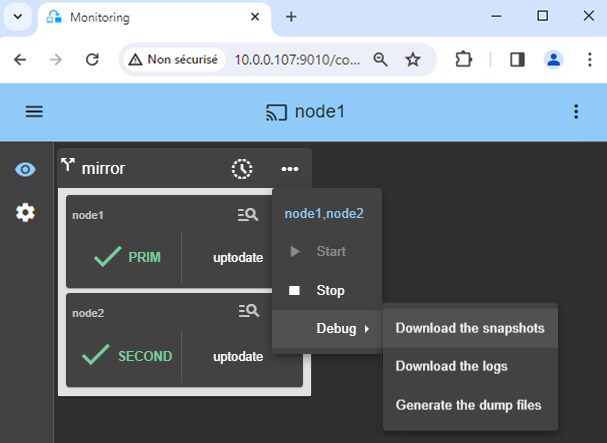
<li>For getting support, take 2 SafeKit <code>Snapshots</code> (2 .zip files), one for each node.</li>
</ul>
<div class="callout"><img src="/wp-content/uploads/2022/07/note.png" alt="Note"><span><a href="/resources/safekit-support/">More information on the support here</a>.</span></div>
<img src="/wp-content/uploads/2024/03/30-snapshots-mirror.png" alt="Take the PostgreSQL snaphots for support">
<h2 id="demonstration-of-the-safekit-mirror-solution">Demonstration of the SafeKit mirror solution</h2>
<h3 id="demo-mirror-ha-cluster">SafeKit Video: Application-Level Clustering (8:47)</h3>
<p>In this video, discover how SafeKit implements a <strong>mirror HA cluster</strong> without the complexity of a SAN. While this demonstration uses Microsoft SQL Server, the solution works identically for other databases and applications.</p>
<h3 id="chapters">Chapters</h3>
<ol>
<li><a href="https://www.youtube.com/watch?v=mGwEguDnnH0&amp;amp;t=0s" target="_blank" rel="noopener">2 nodes with SQL Server</a> (0:32)</li>
<li><a href="https://www.youtube.com/watch?v=mGwEguDnnH0&amp;amp;t=32s" target="_blank" rel="noopener">Configure the cluster and the mirror.safe module</a> (3:58)</li>
<li><a href="https://www.youtube.com/watch?v=mGwEguDnnH0&amp;amp;t=270s" target="_blank" rel="noopener">Start and test SQL replication, migration, failover on crash</a> (4:17)</li>
</ol>
<h3 id="step-by-step-implementation">Step-by-Step Implementation</h3>
<ul>
<li><a href="/quick-install/safekit-quick-installation-guide-for-a-new-windows-application-with-real-time-replication-and-failover/">Read the guide on setting up a mirrored cluster on Windows</a></li>
<li><a href="/quick-install/safekit-quick-installation-guide-for-a-new-linux-application-with-real-time-replication-and-failover/">Read the guide on setting up a mirrored cluster on Linux</a></li>
</ul>
<p>&amp;amp;amp;amp;amp;amp;lt;br /&amp;amp;amp;amp;amp;amp;gt;</p>
<h2 id="hub">🔍 SafeKit High Availability Navigation Hub</h2>
<p><strong>Explore SafeKit: Features, technical videos, documentation, and free trial</strong></p>
<table>
<thead>
<tr>
<th>Resource Type</th>
<th>Description</th>
<th>Direct Link</th>
</tr>
</thead>
<tbody>
<tr>
<td><strong>Key Features</strong></td>
<td>Why Choose SafeKit for Simple and Cost-Effective High Availability?</td>
<td><a href="/#why-choose-safekit-for-ha" title="Discover SafeKit features for simple and cost-effective high availability">See Why Choose SafeKit for High Availability</a></td>
</tr>
<tr>
<td><strong>Use Cases</strong></td>
<td>Explore How SafeKit Ensures the High Availability of Critical Infrastructure</td>
<td><a href="/#safekit-use-cases" title="Explore SafeKit high availability use cases">See All Use Cases (OEM Software, Edge Servers, SCADA, and more)</a></td>
</tr>
<tr>
<td><strong>Deployment Model</strong></td>
<td>All-in-One SANless HA: Shared-Nothing Software Clustering</td>
<td><a href="/#all-in-one-sanless-ha" title="Learn about all-in-one SANless high availability with shared-nothing software clustering">See SafeKit All-in-One SANless HA</a></td>
</tr>
<tr>
<td><strong>HA Strategies</strong></td>
<td>SafeKit: Infrastructure (VM) vs. Application-Level High Availability</td>
<td><a href="/#safekit-ha-redundancy-choices" title="Compare VM-level redundancy with SafeKit application-level high availability strategies">See SafeKit HA &amp; Redundancy: VM vs. Application Level</a></td>
</tr>
<tr>
<td><strong>Technical Specifications</strong></td>
<td>Technical Limitations for SafeKit Clustering</td>
<td><a href="/#safekit-ha-limitations" title="Technical requirements and limitations for SafeKit application clustering">See SafeKit High Availability Limitations</a></td>
</tr>
<tr>
<td><strong>Proof of Concept</strong></td>
<td>SafeKit: High Availability Configuration &amp; Failover Demos</td>
<td><a href="/#safekit-failover-tutorials" title="Step-by-step videos on SafeKit high availability, from installation to automated failover">See SafeKit Failover Tutorials</a></td>
</tr>
<tr>
<td><strong>Architecture</strong></td>
<td>How the SafeKit Mirror Cluster works (Real-Time Replication &amp; Failover)</td>
<td><a href="/#safekit-mirror-cluster" title="See technical architecture and failover mechanism of SafeKit Mirror Cluster">See SafeKit Mirror Cluster: Real-Time Replication &amp; Failover</a></td>
</tr>
<tr>
<td><strong>Architecture</strong></td>
<td>How the SafeKit Farm Cluster works (Network Load Balancing &amp; Failover)</td>
<td><a href="/#safekit-farm-cluster" title="Technical overview of SafeKit Farm Cluster architecture with network load balancing">See SafeKit Farm Cluster: Network Load Balancing &amp; Failover</a></td>
</tr>
<tr>
<td><strong>Competitive Advantages</strong></td>
<td>Comparison: SafeKit vs. Traditional High Availability (HA) Clusters</td>
<td><a href="/#safekit-ha-comparison" title="Detailed comparison of SafeKit software vs traditional hardware-based HA clusters">See SafeKit vs. Traditional HA Cluster Comparison</a></td>
</tr>
<tr>
<td><strong>Technical Resources</strong></td>
<td>SafeKit High Availability: Documentation, Downloads &amp; Trial</td>
<td><a href="/#safekit-ha-technical-resources" title="Access SafeKit free trial, technical documentation, and high availability white papers">See SafeKit HA Free Trial &amp; Technical Documentation</a></td>
</tr>
<tr>
<td><strong>Pre-configured Solutions</strong></td>
<td>SafeKit Application Module Library: Ready-to-Use HA Solutions</td>
<td><a href="/#safekit-ha-application-modules" title="Browse the library of pre-configured SafeKit modules for automated application failover">See SafeKit High Availability Application Modules</a></td>
</tr>
</tbody>
</table>
<div class="button-row">
  <a class="btn-action" href="https://safekit.eviden.com/contact-us-for-safekit/">🧑 Contact us</a>
  <a class="btn-action" href="/resources/safekit-free-trial/">🎁 SafeKit free trial</a>
  <a class="btn-action" href="https://training.my.evidian.com/mod/page/view.php?id=712">🏅 Free certification</a>
  <a class="btn-action" href="https://safekit.eviden.com/get-a-quote-safekit/">💰 Perpetual license cost</a>
</div>