---
title: "Microsoft NLB VMware Alternative: Multicast and Unicast Issues Solved"
description: "Microsoft NLB VMware Alternative: Multicast and Unicast Issues Solved Microsoft NLB multicast mode As explained in the knowledge base of  VMware on network load balancing (NLB) multicast mode configuration, you need to manually configure static ARP resolution at the switch or router for each port that connects to the cluster.  Deployment of the Microsoft NLB […]"
canonical: "https://safekit.eviden.com/best-practises/microsoft-nlb-vmware-multicast-unicast-alternative/"
topics: "Microsoft NLB multicast mode, Microsoft NLB unicast mode, Alternative with SafeKit, How the SafeKit cluster in farm mode works with Windows?, 🔍 SafeKit High Availability Navigation Hub"
category: "best-practises"
lang: "en"
---

<h1 id="microsoft-nlb-vmware-alternative-multicast-and-unicast-issues-solved">Microsoft NLB VMware Alternative: Multicast and Unicast Issues Solved</h1>
<h2 id="microsoft-nlb-multicast-mode">Microsoft NLB multicast mode</h2>
<p>As explained in the knowledge base of <a href="https://knowledge.broadcom.com/external/article?articleNumber=414968" target="_blank" rel="noopener">VMware on network load balancing (NLB) multicast mode configuration</a>, you need to manually configure static ARP resolution at the switch or router for each port that connects to the cluster. Deployment of the Microsoft NLB multicast mode in an unknown network environment can prove to be a complex and strenuous task.</p>
<h2 id="microsoft-nlb-unicast-mode">Microsoft NLB unicast mode</h2>
<p>With Microsoft NLB unicast mode, you must configure the ESXi/ESX host to not send RARP packets when any of its virtual machines is powered on. That&rsquo;s why, <a href="https://knowledge.broadcom.com/external/article/344421/microsoft-nlb-not-working-properly-in-un.html" target="_blank" rel="noopener">Microsoft NLB is not working properly in Unicast Mode with VMware</a>.</p>
<h2 id="alternative-with-safekit">Alternative with SafeKit</h2>
<p>The <a href="/best-practises/how-a-virtual-ip-address-works/">SafeKit virtual IP address</a> configuration does not require any special network configuration and the network load balancing can run in any environment. An important feature when the solution must be deployed in an unknown infrastructure: unknown switches or routers, physical servers or virtual servers.</p>
<h2 id="safekit-farm-cluster">How the SafeKit cluster in farm mode works with Windows/Linux?</h2>
<h3 id="virtual-ip-address-farm">Virtual IP address in a farm-mode cluster</h3>
<img src="/wp-content/uploads/2023/02/safekit-up-up-up-300.png" width="300" alt="How the SafeKit cluster in farm mode implements Windows/Linux network load balancing and failover">
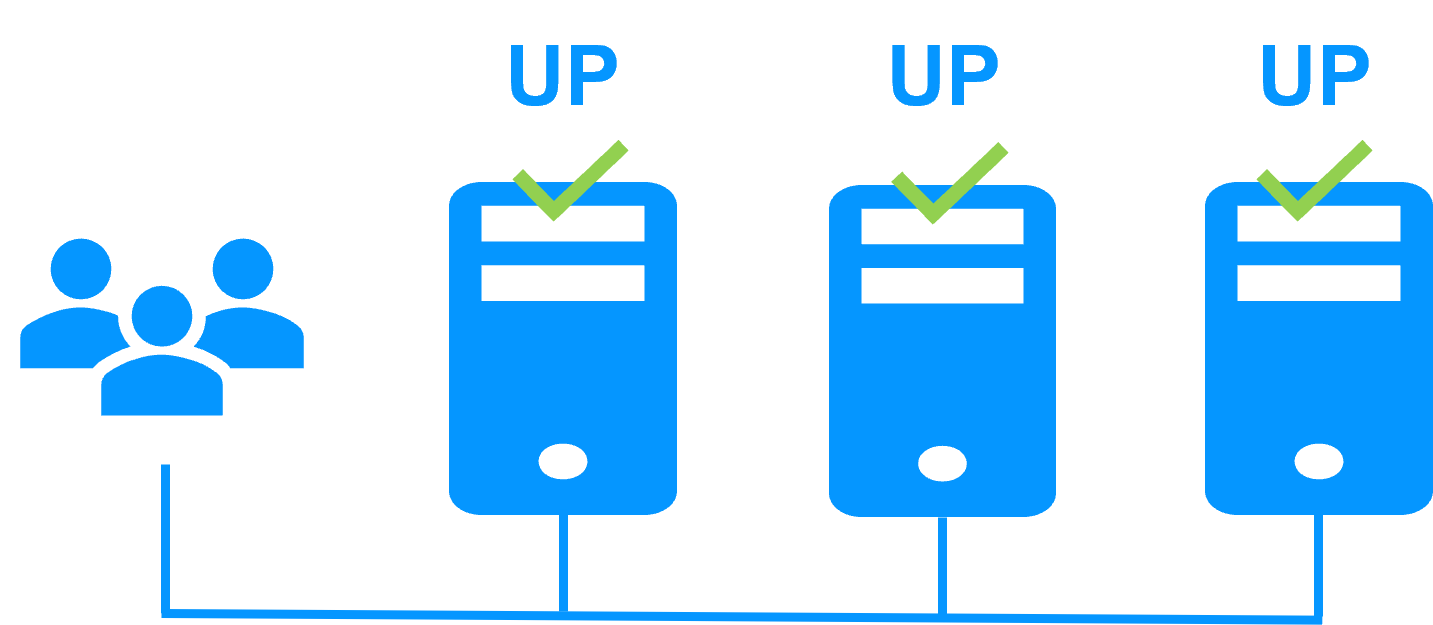
<p>On the previous figure, the Windows/Linux application is running on the 3 servers (3 is an example, it can be 2 or more). Users are connected to a virtual IP address.</p>
<p>The <a href="/best-practises/how-a-virtual-ip-address-works/">virtual IP address</a> is configured locally on each server in the farm-mode cluster.<br>
The input traffic to the virtual IP address is received by all the servers and split among them by a network filter inside each server&rsquo;s kernel.</p>
<p>SafeKit detects hardware and software failures, reconfigures network filters in the event of a failure, and offers configurable application checkers and recovery scripts.</p>
<h3 id="network-load-balancing">Load balancing in a network filter</h3>
<p>The network load balancing algorithm inside the network filter is based on the identity of the client packets (client IP address, client TCP port). Depending on the identity of the client packet input, only one filter in a server accepts the packet; the other filters in other servers reject it.</p>
<p>Once a packet is accepted by the filter on a server, only the CPU and memory of this server are used by the Windows/Linux application that responds to the request of the client. The output messages are sent directly from the application server to the client.</p>
<p>If a server fails, the farm heartbeat protocol reconfigures the filters in the network load balancing cluster to re-balance the traffic on the remaining available servers.</p>
<h3 id="stateful-stateless">Stateful or stateless applications</h3>
<p>With a stateful Windows/Linux application, there is session affinity. The same client must be connected to the same server on multiple TCP sessions to retrieve its context on the server. In this case, the SafeKit load balancing rule is configured on the client IP address. Thus, the same client is always connected to the same server on multiple TCP sessions. And different clients are distributed across different servers in the farm.</p>
<p>With a stateless Windows/Linux application, there is no session affinity. The same client can be connected to different servers in the farm on multiple TCP sessions. There is no context stored locally on a server from one session to another. In this case, the SafeKit load balancing rule is configured on the TCP client session identity. This configuration is the one which is the best for distributing sessions between servers, but it requires a TCP service without session affinity.</p>
<h3 id="safekit-farm-cluster-configuration">How to configure a SafeKit cluster in farm mode for Windows/Linux?</h3>
<img src="/wp-content/uploads/2026/01/safekit-farm-cluster-config.png" width="966" alt="SafeKit Web Console: Farm-mode cluster configuration for Windows/Linux network load balancing and virtual IP management.">
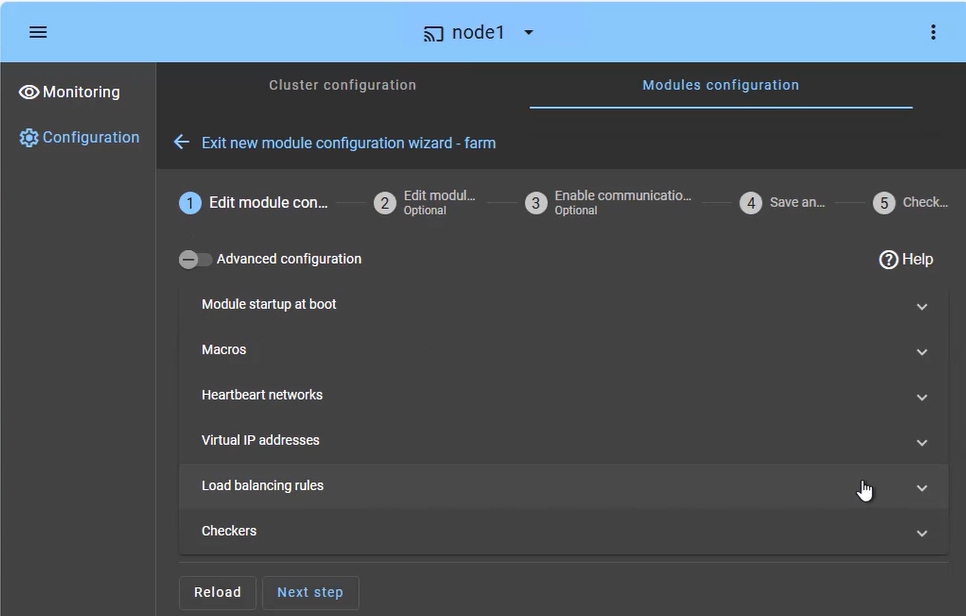
<p>The <strong>SafeKit cluster in farm mode</strong> is designed for high availability and scalability of services. The configuration focuses on distributing incoming traffic across both nodes simultaneously:</p>
<ul>
<li><strong>Load Balanced Services (Macros tab):</strong> Define the specific application services (e.g., Apache, IIS, Nginx) to be kept active on all nodes.</li>
<li><strong>Heartbeat network(s):</strong> Communication path(s) used to detect if a node has left the farm, triggering an immediate redistribution of the load.</li>
<li><strong>Virtual IP (Farm VIP):</strong> Unlike a mirror cluster, the Farm VIP is shared between nodes using kernel filtering algorithm to distribute network traffic.</li>
<li><strong>Load Balancing Rules:</strong> Define the traffic distribution policy based on the source IP address or port.</li>
<li><strong>Checkers:</strong> Monitor the application&rsquo;s health and trigger automatic restart if a process failure is detected.</li>
</ul>
<h3 id="safekit-farm-cluster-monitoring">How to monitor a SafeKit cluster in farm mode for Windows/Linux?</h3>
<img src="/wp-content/uploads/2026/01/safekit-farm-cluster-monitor.png" width="473" alt="SafeKit Console: Monitoring a 2-node farm-mode cluster showing both Windows/Linux nodes in UP state with active load balancing.">
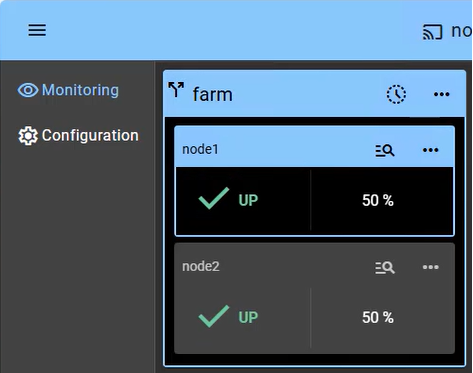
<p>Monitoring a cluster in farm mode provides visibility into the <strong>Active-Active</strong> nature of the infrastructure, where all nodes contribute to the application&rsquo;s performance (showing 2 nodes in this example):</p>
<ul>
<li><strong>UP State (50% on 2 nodes):</strong> In a healthy farm, both nodes are in the &ldquo;UP&rdquo; (50%) state, meaning they are both actively receiving and processing client requests via the shared Virtual IP.</li>
<li><strong>Automatic Re-balancing:</strong> If one node fails, the console visually shows the remaining node taking 100% of the traffic. There is no &ldquo;failover&rdquo; delay, as the surviving node is already active (aside from a detection time of a few seconds).</li>
<li><strong>Node Insertion:</strong> When a repaired node is restarted, it transitions from &ldquo;STOP&rdquo; to &ldquo;UP&rdquo; and automatically starts receiving its portion of the load without administrator intervention.</li>
<li><strong>No Data Sync:</strong> Note that in a farm-mode cluster, there is no &ldquo;Orange&rdquo; resynchronization state, as nodes are expected to be stateless or share a backend database (which can be protected separately in a mirror cluster).</li>
</ul>
<p>Beyond simple status icons, the interface provides one-click node management, allowing you to manually stop or start a node for planned maintenance while the shared Virtual IP automatically redistributes traffic without interrupting user activity.</p>
<h2 id="hub">🔍 SafeKit High Availability Navigation Hub</h2>
<p><strong>Explore SafeKit: Features, technical videos, documentation, and free trial</strong></p>
<table>
<thead>
<tr>
<th>Resource Type</th>
<th>Description</th>
<th>Direct Link</th>
</tr>
</thead>
<tbody>
<tr>
<td><strong>Key Features</strong></td>
<td>Why Choose SafeKit for Simple and Cost-Effective High Availability?</td>
<td><a href="/#why-choose-safekit-for-ha" title="Discover SafeKit features for simple and cost-effective high availability">See Why Choose SafeKit for High Availability</a></td>
</tr>
<tr>
<td><strong>Use Cases</strong></td>
<td>Explore How SafeKit Ensures the High Availability of Critical Infrastructure</td>
<td><a href="/#safekit-use-cases" title="Explore SafeKit high availability use cases">See All Use Cases (OEM Software, Edge Servers, SCADA, and more)</a></td>
</tr>
<tr>
<td><strong>Deployment Model</strong></td>
<td>All-in-One SANless HA: Shared-Nothing Software Clustering</td>
<td><a href="/#all-in-one-sanless-ha" title="Learn about all-in-one SANless high availability with shared-nothing software clustering">See SafeKit All-in-One SANless HA</a></td>
</tr>
<tr>
<td><strong>HA Strategies</strong></td>
<td>SafeKit: Infrastructure (VM) vs. Application-Level High Availability</td>
<td><a href="/#safekit-ha-redundancy-choices" title="Compare VM-level redundancy with SafeKit application-level high availability strategies">See SafeKit HA &amp; Redundancy: VM vs. Application Level</a></td>
</tr>
<tr>
<td><strong>Technical Specifications</strong></td>
<td>Technical Limitations for SafeKit Clustering</td>
<td><a href="/#safekit-ha-limitations" title="Technical requirements and limitations for SafeKit application clustering">See SafeKit High Availability Limitations</a></td>
</tr>
<tr>
<td><strong>Proof of Concept</strong></td>
<td>SafeKit: High Availability Configuration &amp; Failover Demos</td>
<td><a href="/#safekit-failover-tutorials" title="Step-by-step videos on SafeKit high availability, from installation to automated failover">See SafeKit Failover Tutorials</a></td>
</tr>
<tr>
<td><strong>Architecture</strong></td>
<td>How the SafeKit Mirror Cluster works (Real-Time Replication &amp; Failover)</td>
<td><a href="/#safekit-mirror-cluster" title="See technical architecture and failover mechanism of SafeKit Mirror Cluster">See SafeKit Mirror Cluster: Real-Time Replication &amp; Failover</a></td>
</tr>
<tr>
<td><strong>Architecture</strong></td>
<td>How the SafeKit Farm Cluster works (Network Load Balancing &amp; Failover)</td>
<td><a href="/#safekit-farm-cluster" title="Technical overview of SafeKit Farm Cluster architecture with network load balancing">See SafeKit Farm Cluster: Network Load Balancing &amp; Failover</a></td>
</tr>
<tr>
<td><strong>Competitive Advantages</strong></td>
<td>Comparison: SafeKit vs. Traditional High Availability (HA) Clusters</td>
<td><a href="/#safekit-ha-comparison" title="Detailed comparison of SafeKit software vs traditional hardware-based HA clusters">See SafeKit vs. Traditional HA Cluster Comparison</a></td>
</tr>
<tr>
<td><strong>Technical Resources</strong></td>
<td>SafeKit High Availability: Documentation, Downloads &amp; Trial</td>
<td><a href="/#safekit-ha-technical-resources" title="Access SafeKit free trial, technical documentation, and high availability white papers">See SafeKit HA Free Trial &amp; Technical Documentation</a></td>
</tr>
<tr>
<td><strong>Pre-configured Solutions</strong></td>
<td>SafeKit Application Module Library: Ready-to-Use HA Solutions</td>
<td><a href="/#safekit-ha-application-modules" title="Browse the library of pre-configured SafeKit modules for automated application failover">See SafeKit High Availability Application Modules</a></td>
</tr>
</tbody>
</table>
<div class="button-row">
  <a class="btn-action" href="https://safekit.eviden.com/contact-us-for-safekit/">🧑 Contact us</a>
  <a class="btn-action" href="/resources/safekit-free-trial/">🎁 SafeKit free trial</a>
  <a class="btn-action" href="https://training.my.evidian.com/mod/page/view.php?id=712">🏅 Free certification</a>
  <a class="btn-action" href="https://safekit.eviden.com/get-a-quote-safekit/">💰 Perpetual license cost</a>
</div>