---
title: "Alternative to SQL Server Always On: HA for Express and Standard Editions"
description: "Alternative to SQL Server Always On: HA for Express and Standard Editions Alternative to Always On SQL Server for express and standard editions"
canonical: "https://safekit.eviden.com/best-practises/alternative-always-on-sql-server-express-standard-editions/"
topics: "Alternative to Always On SQL Server for express and standard editions, How the SafeKit mirror cluster works with Microsoft SQL Server?, Video Guide: Configuring a SafeKit HA mirror cluster for SQL Server, 🔍 SafeKit High Availability Navigation Hub"
category: "best-practises"
lang: "en"
---

<h1 id="alternative-to-sql-server-always-on-ha-for-express-and-standard-editions">Alternative to SQL Server Always On: HA for Express and Standard Editions</h1>
<h2 id="alternative-to-always-on-sql-server-for-express-and-standard-editions">Alternative to Always On SQL Server for express and standard editions</h2>
<h3 id="the-solution-for-microsoft-sql-server">The solution for Microsoft SQL Server</h3>
<p>SafeKit brings high availability to Microsoft SQL Server between two redundant nodes with synchronous real-time replication of data and automatic failover.</p>
<p>The solution is independent of the Microsoft SQL Server edition and works with express and standard editions.</p>
<h3 id="a-generic-product">A generic product</h3>
<p>SafeKit is a generic product. You can replicate more than SQL server data and logs. If your application is SQL Server-based with specific folders containing your configuration or other files, you can replicate them in the same way. And you can restart your own services in addition to SQL server services.</p>
<p><a href="/quick-install/safekit-quick-installation-guide-with-microsoft-sql-server/">SafeKit installation guide with Microsoft SQL Server express and standard editions</a></p>
<h3 id="without-microsoft-failover-cluster">Without Microsoft failover cluster</h3>
<p>SafeKit works without Microsoft failover cluster as with Always On SQL Server. It is an all-in-one offer that brings virtual IP address, synchronous real-time replication of folders, automatic failover and failback, and more&hellip; SafeKit eliminates the need for shared disks and database enterprise editions.</p>
<h3 id="without-domain-controller-and-active-directory">Without domain controller and active directory</h3>
<p>SafeKit works without configuring domain controller and active directory as with Always On SQL Server. This easy-to-deploy, cost-effective solution does not require any specific skills.</p>
<h3 id="without-3-nodes-for-quorum">Without 3 nodes for quorum</h3>
<p>SafeKit works without the need for 3 nodes for quorum as with Always On SQL Server. In case of network isolation, SafeKit implements a split brain checker with a ping to a router playing the role of witness. Moreover, multiple heartbeats can be easily configured in the product.</p>
<h3 id="other-redundancy-and-high-availability-solutions">Other redundancy and high availability solutions</h3>
<p>With SafeKit, you can implement on Windows and Linux, real-time replication and failover of any folders and services, databases, complete Hyper-V or KVM virtual machines, Docker, Kubernetes, Cloud applications.</p>
<h3 id="a-complete-solution">A complete solution</h3>
<p>SafeKit solves:</p>
<ul>
<li>hardware failures (20% of problems), including the complete failure of a computer room,</li>
<li>software failures (40% of problems), including restart of critical processes,</li>
<li>and human errors (40% of problems) thanks to its ease of use and its web console.</li>
</ul>
<h2 id="safekit-mirror-cluster">How the SafeKit mirror cluster works with Windows/Linux?</h2>
<h3 id="step1">Step 1. Real-time replication</h3>
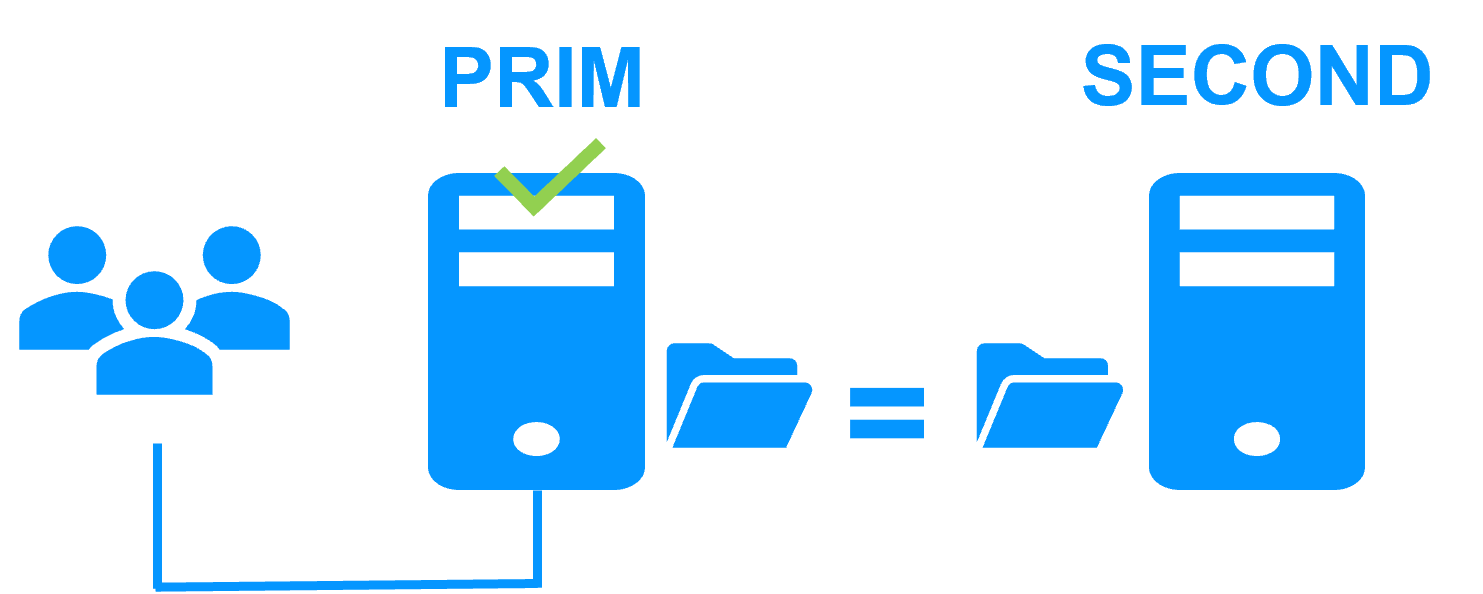
<p>Server 1 (PRIM) runs the Windows/Linux application. Clients are connected to a <a href="/best-practises/how-a-virtual-ip-address-works/">virtual IP address</a>. SafeKit replicates in real time modifications made inside files through the network.</p>
<img src="/wp-content/uploads/2023/02/safekit-prim-second-300.png" width="300" alt="File replication at byte level in a mirror Windows/Linux cluster">
<p>The replication is <a href="/best-practises/synchronous-replication-vs-asynchronous-replication/">synchronous</a> with no data loss on failure contrary to asynchronous replication.</p>
<p>You just have to configure the names of directories to replicate in SafeKit. There are no pre-requisites on disk organization. Directories may be located in the system disk.</p>
<h3 id="step2">Step 2. Automatic failover</h3>
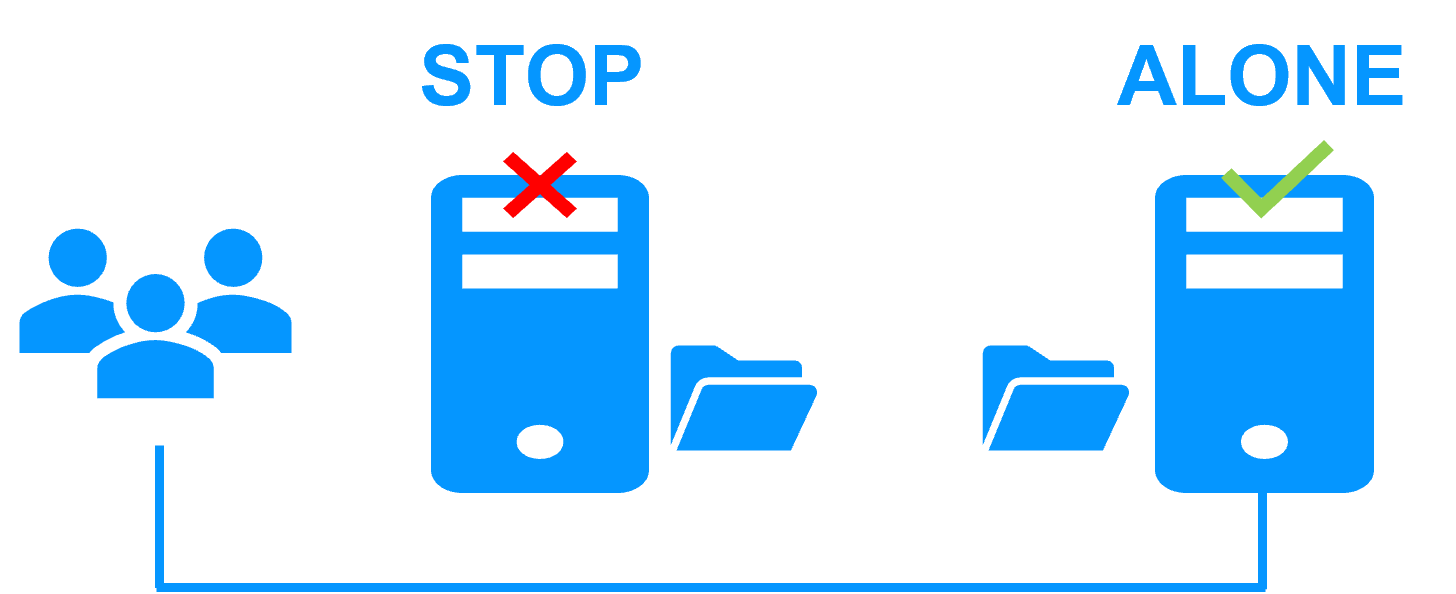
<p>When Server 1 fails, Server 2 takes over. SafeKit switches the virtual IP address and restarts the Windows/Linux application automatically on Server 2.</p>
<p>The application finds the files replicated by SafeKit uptodate on Server 2. The application continues to run on Server 2 by locally modifying its files that are no longer replicated to Server 1.</p>
<img src="/wp-content/uploads/2023/02/safekit-stop-alone-300.png" width="300" alt="Failover of Windows/Linux in a mirror cluster">
<p>The failover time is equal to the fault-detection time (30 seconds by default) plus the application start-up time.</p>
<h3 id="step3">Step 3. Automatic failback</h3>
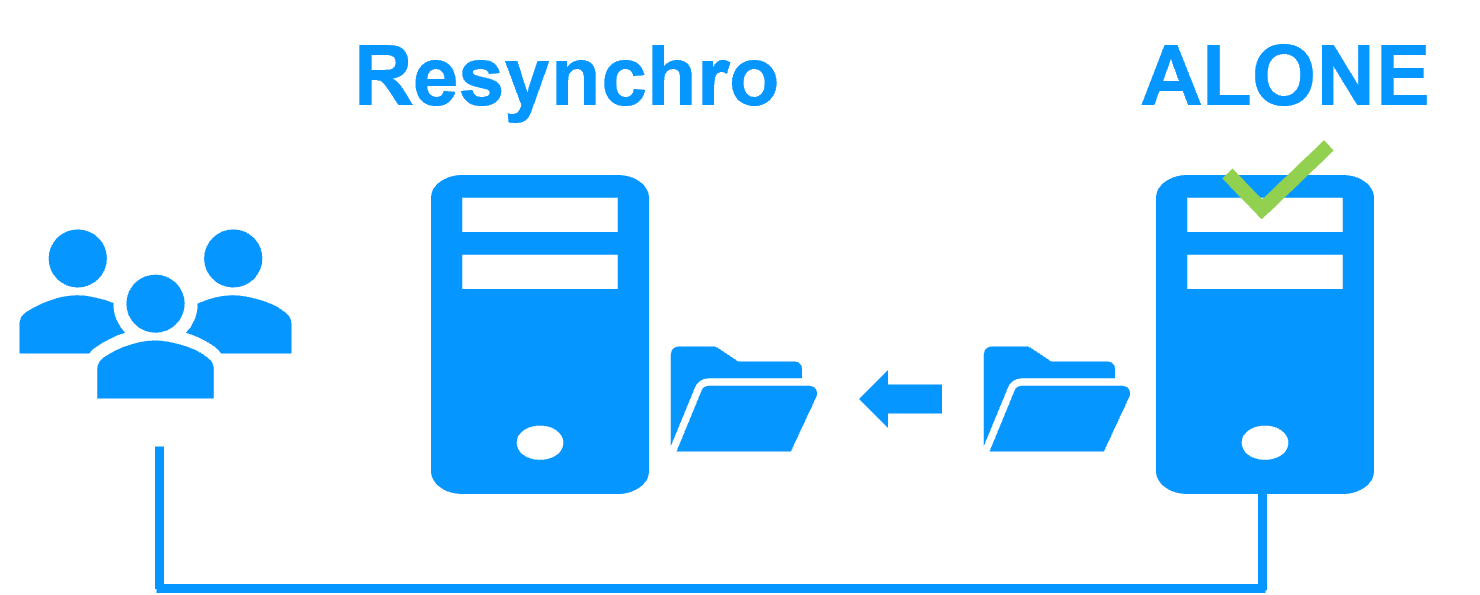
<p>Failback involves restarting Server 1 after fixing the problem that caused it to fail.</p>
<p>SafeKit automatically resynchronizes the files, updating only the files modified on Server 2 while Server 1 was halted.</p>
<img src="/wp-content/uploads/2023/02/safekit-resynchro-alone-300.png" width="300" alt="Failback in a mirror Windows/Linux cluster">
<p>Failback takes place without disturbing the Windows/Linux application, which can continue running on Server 2.</p>
<h3 id="step-4-back-to-normal">Step 4. Back to normal</h3>
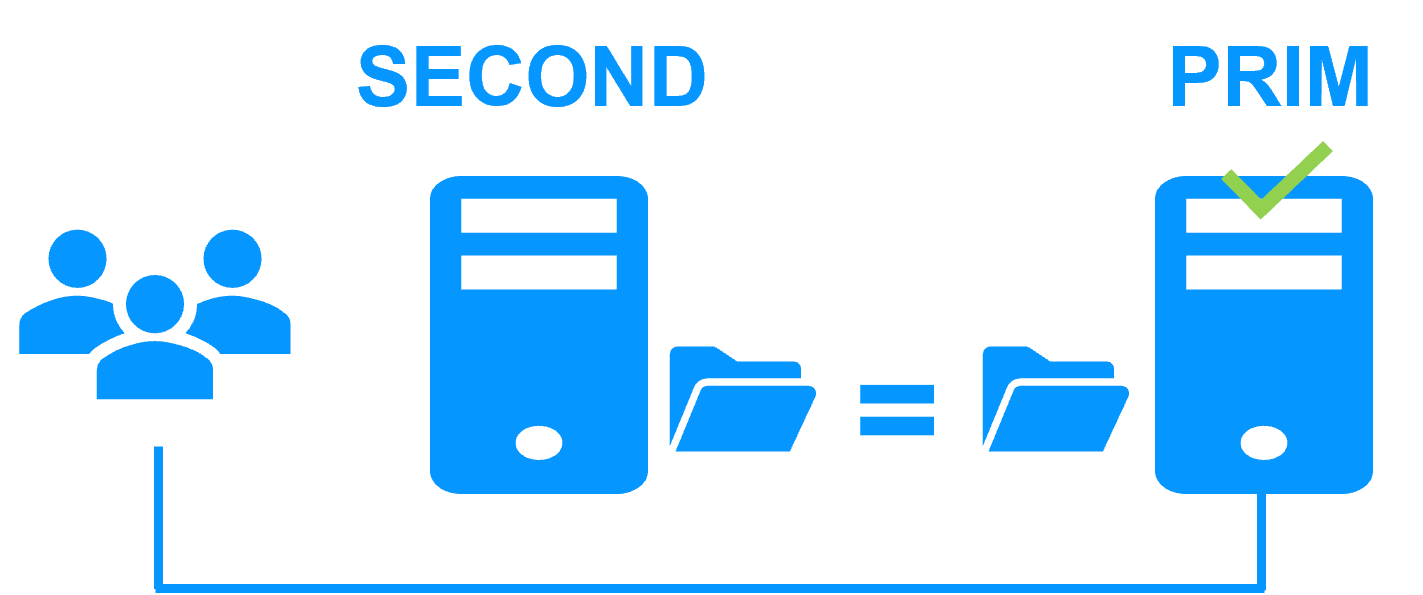
<p>After reintegration, the files are once again in mirror mode, as in step 1. The system is back in high-availability mode, with the Windows/Linux application running on Server 2 and SafeKit replicating file updates to Server 1.</p>
<img src="/wp-content/uploads/2023/02/safekit-second-prim-300.png" width="300" alt="Return to normal operation in a mirror Windows/Linux cluster">
<p>If the administrator wishes the application to run on Server 1, this can be done manually through the web console at an appropriate time, or automatically through configuration.</p>
<h3 id="safekit-mirror-cluster-configure">How to configure a SafeKit Mirror Cluster for Windows/Linux?</h3>
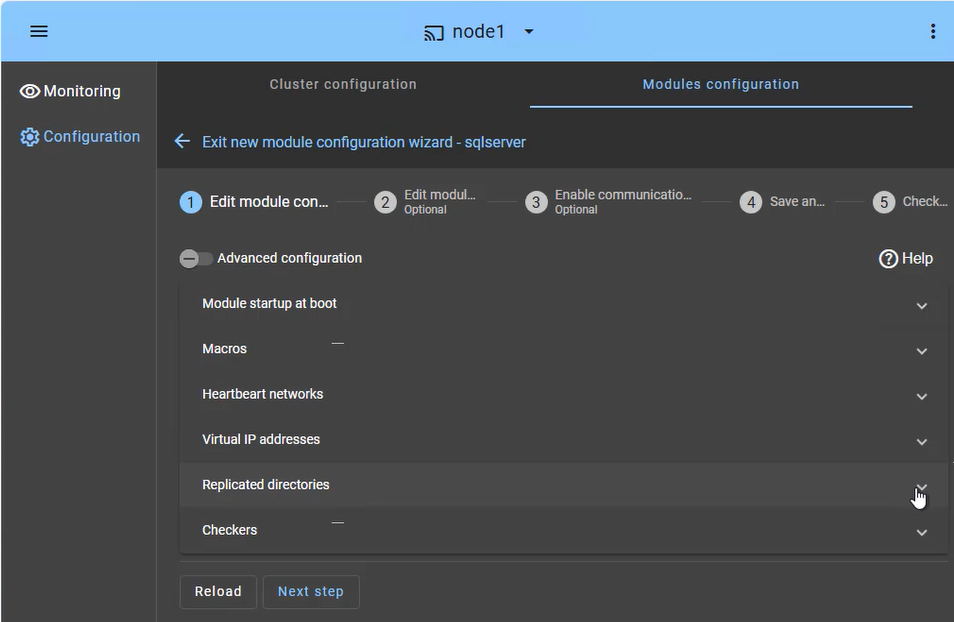
<img src="/wp-content/uploads/2026/01/safekit-mirror-cluster-config.png" width="763" alt="SafeKit Web Console: High Availability configuration dashboard for Windows/Linux showing heartbeat networks, virtual IP setup, and real-time directory replication for a mirror cluster.">
<p>The <strong>SafeKit web console</strong> provides an intuitive interface to orchestrate high availability for your critical applications. In just a few steps, you can configure a <strong>SafeKit mirror cluster</strong> to ensure business continuity:</p>
<ul>
<li><strong>Application Failover (Macros Tab):</strong> Define the specific application services to be automatically restarted in the event of a failure.</li>
<li><strong>Heartbeat network(s):</strong> Dedicated communication path(s) used by cluster nodes to continuously monitor each other&rsquo;s health and availability and synchronize failover decisions.</li>
<li><strong>Virtual IP Management:</strong> Set up the Virtual IP (VIP) for transparent client reconnection after a failover.</li>
<li><strong>Real-Time Replication:</strong> Select the critical directories for host-based, synchronous byte-level replication.</li>
<li><strong>Checkers:</strong> Monitor the application&rsquo;s health and trigger automatic recovery if a process failure is detected.</li>
</ul>
<p>The SafeKit cluster includes a dedicated split-brain checker to resolve network isolation issues without the need for a third witness machine or an additional heartbeat network. Learn more about <a href="/best-practises/heartbeat-failover-quorum-windows-linux-cluster/">heartbeat, failover and quorum in a cluster</a>.</p>
<h3 id="safekit-mirror-cluster-monitoring">How to monitor a SafeKit mirror cluster for Windows/Linux?</h3>
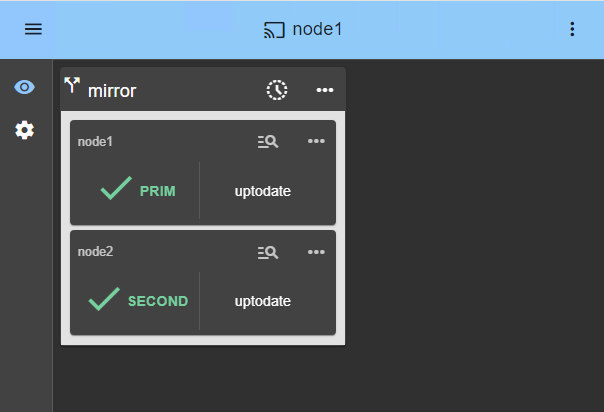
<img src="/wp-content/uploads/2026/05/mirror-monitoring-prim-second.png" width="604" alt="SafeKit Web Console: Real-time monitoring of a 2-node mirror cluster for Windows/Linux showing PRIM and SECOND states with active data replication.">
<p>The <strong>SafeKit management console</strong> offers a unified view of your high availability infrastructure. It allows administrators to monitor the <strong>operational state</strong> of the cluster and track data synchronization in real-time.</p>
<p>For a 2-node mirror cluster, the console clearly displays the roles of each server:</p>
<ul>
<li><strong>PRIM (Primary):</strong> The active node currently running the application and managing the Virtual IP. It performs writes to the local storage and real-time replication to the secondary node.</li>
<li><strong>SECOND (Secondary):</strong> The standby node receiving synchronous byte-level updates. It is ready to take over instantly if the Primary fails.</li>
<li><strong>ALONE State:</strong> Visually alerts you when the cluster is running on a single node (e.g., during maintenance or after a failure), indicating that redundancy is temporarily lost.</li>
<li><strong>Resynchronization Progress:</strong> When a failed node recovers, its status turns orange during background data reintegration, ensuring no downtime during the &ldquo;return to normal&rdquo; phase.</li>
</ul>
<p>Beyond simple status icons, the interface provides <strong>one-click failover orchestration</strong> , allowing you to manually reassign the primary role for planned maintenance while ensuring continuous availability for user activity.</p>
<h2 id="videoguide-safekit-mirror-cluster">Video Guide: Configuring a SafeKit HA mirror cluster for SQL Server</h2>
<h3 id="demo-mirror-ha-cluster">SafeKit Video: Application-Level Clustering (8:47)</h3>
<p>In this video, discover how SafeKit implements a <strong>mirror HA cluster</strong> without the complexity of a SAN. While this demonstration uses Microsoft SQL Server, the solution works identically for other databases and applications.</p>
<h3 id="chapters">Chapters</h3>
<ol>
<li><a href="https://www.youtube.com/watch?v=mGwEguDnnH0&amp;amp;t=0s" target="_blank" rel="noopener">2 nodes with SQL Server</a> (0:32)</li>
<li><a href="https://www.youtube.com/watch?v=mGwEguDnnH0&amp;amp;t=32s" target="_blank" rel="noopener">Configure the cluster and the mirror.safe module</a> (3:58)</li>
<li><a href="https://www.youtube.com/watch?v=mGwEguDnnH0&amp;amp;t=270s" target="_blank" rel="noopener">Start and test SQL replication, migration, failover on crash</a> (4:17)</li>
</ol>
<h3 id="step-by-step-implementation">Step-by-Step Implementation</h3>
<ul>
<li><a href="/quick-install/safekit-quick-installation-guide-for-a-new-windows-application-with-real-time-replication-and-failover/">Read the guide on setting up a mirrored cluster on Windows</a></li>
<li><a href="/quick-install/safekit-quick-installation-guide-for-a-new-linux-application-with-real-time-replication-and-failover/">Read the guide on setting up a mirrored cluster on Linux</a></li>
</ul>
<p>&amp;amp;amp;amp;amp;amp;lt;br /&amp;amp;amp;amp;amp;amp;gt;</p>
<h2 id="hub">🔍 SafeKit High Availability Navigation Hub</h2>
<p><strong>Explore SafeKit: Features, technical videos, documentation, and free trial</strong></p>
<table>
<thead>
<tr>
<th>Resource Type</th>
<th>Description</th>
<th>Direct Link</th>
</tr>
</thead>
<tbody>
<tr>
<td><strong>Key Features</strong></td>
<td>Why Choose SafeKit for Simple and Cost-Effective High Availability?</td>
<td><a href="/#why-choose-safekit-for-ha" title="Discover SafeKit features for simple and cost-effective high availability">See Why Choose SafeKit for High Availability</a></td>
</tr>
<tr>
<td><strong>Use Cases</strong></td>
<td>Explore How SafeKit Ensures the High Availability of Critical Infrastructure</td>
<td><a href="/#safekit-use-cases" title="Explore SafeKit high availability use cases">See All Use Cases (OEM Software, Edge Servers, SCADA, and more)</a></td>
</tr>
<tr>
<td><strong>Deployment Model</strong></td>
<td>All-in-One SANless HA: Shared-Nothing Software Clustering</td>
<td><a href="/#all-in-one-sanless-ha" title="Learn about all-in-one SANless high availability with shared-nothing software clustering">See SafeKit All-in-One SANless HA</a></td>
</tr>
<tr>
<td><strong>HA Strategies</strong></td>
<td>SafeKit: Infrastructure (VM) vs. Application-Level High Availability</td>
<td><a href="/#safekit-ha-redundancy-choices" title="Compare VM-level redundancy with SafeKit application-level high availability strategies">See SafeKit HA &amp; Redundancy: VM vs. Application Level</a></td>
</tr>
<tr>
<td><strong>Technical Specifications</strong></td>
<td>Technical Limitations for SafeKit Clustering</td>
<td><a href="/#safekit-ha-limitations" title="Technical requirements and limitations for SafeKit application clustering">See SafeKit High Availability Limitations</a></td>
</tr>
<tr>
<td><strong>Proof of Concept</strong></td>
<td>SafeKit: High Availability Configuration &amp; Failover Demos</td>
<td><a href="/#safekit-failover-tutorials" title="Step-by-step videos on SafeKit high availability, from installation to automated failover">See SafeKit Failover Tutorials</a></td>
</tr>
<tr>
<td><strong>Architecture</strong></td>
<td>How the SafeKit Mirror Cluster works (Real-Time Replication &amp; Failover)</td>
<td><a href="/#safekit-mirror-cluster" title="See technical architecture and failover mechanism of SafeKit Mirror Cluster">See SafeKit Mirror Cluster: Real-Time Replication &amp; Failover</a></td>
</tr>
<tr>
<td><strong>Architecture</strong></td>
<td>How the SafeKit Farm Cluster works (Network Load Balancing &amp; Failover)</td>
<td><a href="/#safekit-farm-cluster" title="Technical overview of SafeKit Farm Cluster architecture with network load balancing">See SafeKit Farm Cluster: Network Load Balancing &amp; Failover</a></td>
</tr>
<tr>
<td><strong>Competitive Advantages</strong></td>
<td>Comparison: SafeKit vs. Traditional High Availability (HA) Clusters</td>
<td><a href="/#safekit-ha-comparison" title="Detailed comparison of SafeKit software vs traditional hardware-based HA clusters">See SafeKit vs. Traditional HA Cluster Comparison</a></td>
</tr>
<tr>
<td><strong>Technical Resources</strong></td>
<td>SafeKit High Availability: Documentation, Downloads &amp; Trial</td>
<td><a href="/#safekit-ha-technical-resources" title="Access SafeKit free trial, technical documentation, and high availability white papers">See SafeKit HA Free Trial &amp; Technical Documentation</a></td>
</tr>
<tr>
<td><strong>Pre-configured Solutions</strong></td>
<td>SafeKit Application Module Library: Ready-to-Use HA Solutions</td>
<td><a href="/#safekit-ha-application-modules" title="Browse the library of pre-configured SafeKit modules for automated application failover">See SafeKit High Availability Application Modules</a></td>
</tr>
</tbody>
</table>
<div class="button-row">
  <a class="btn-action" href="https://safekit.eviden.com/contact-us-for-safekit/">🧑 Contact us</a>
  <a class="btn-action" href="/resources/safekit-free-trial/">🎁 SafeKit free trial</a>
  <a class="btn-action" href="https://training.my.evidian.com/mod/page/view.php?id=712">🏅 Free certification</a>
  <a class="btn-action" href="https://safekit.eviden.com/get-a-quote-safekit/">💰 Perpetual license cost</a>
</div>