High Availability and Redundancy for Video Management Software (VMS)
What is video management software (VMS)?
Video Management Software (VMS) collects and records camera video and provides an interface for operators to view live and recorded video.
Video management software increases life safety, reduces theft and improves security officers efficiency.
Why a VMS software is critical?
Video Management Software (VMS) records all criminal acts, from theft to murder, and provides a means to track criminals.
The safety of people is directly associated with the proper execution of the VMS software.
And that’s why the system must always be available to security officers who must react immediately to the slightest incident.
Key players list in VMS
The key players in VMS are:
Genetec (Canada)
Milestone (Denmark)
Hikvision (China)
Dahua (China)
Motorola (Avigilon) (Canada)
Johnson Controls (Ireland)
Tiandy (China)
Eagle Eye Networks (US)
ISS (US)
Teledyne Flir (US)
SafeKit brings two solutions for redundancy and high availability of a VMS software
Redundancy and high availability at the application level
In this type of solution, only application data are replicated. And only the application is restared in case of failure.
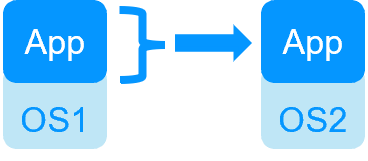
This solution requires a technical understanding of the application. You need to define which services to restart, specify the application folders to replicate, and configure a virtual IP address for failover. But this solution is platform agnostic and works with applications inside physical machines, virtual machines, in the Cloud. Any hypervisor is supported (VMware, Hyper-V…).
Examples
- Video management: Milestone (Management, SQL, Log, Event)/SafeKit
- Video management: Genetec (SQL)/SafeKit
- Access control: Nedap (AEOS, SQL)/SafeKit
- New application (define services to restart, application folders to replicate, a virtual IP address for failover): Windows, Linux
Redundancy and high availability at the virtual machine level
In this type of solution, the VMS software is put inside a virtual machine. The full Virtual Machine (VM) is replicated and restarted (Application + OS).
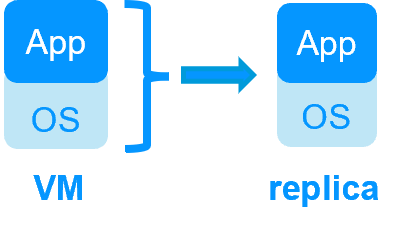
The advantage of this solution is that it does not require a technical understanding of the application; you only need to define the location of the VM files where the application is installed. This solution is generic for any VMS software. However, it works only with Windows/Hyper-V and Linux/KVM, but not with VMware. This is an active/active solution with several virtual machines replicated and restarted between two nodes.
Examples
- Building management: Siemens Desigo CC/SafeKit
- Video management and access control: Siemens Siveillance suite/SafeKit
- New application (define the location of the VM files folder where the application is installed): Windows/Hyper-V, Linux/KVM
More comparison between VM HA vs Application HA
SafeKit, a recognized solution on the security market
Milestone has chosen SafeKit
SafeKit is deployed in 30+ countries with the video management software of Milestone.
SafeKit is validated by Milestone for redundancy and high availability of the management server.
SafeKit is the best solution because it is purely software, completely hardware-agnostic.
Solution preferred by Siemens
SafeKit is available in the Siemens marketplace with its Siveillance suite (video and access control) and with its SCADA software: Desigo CC (building management), SIMATIC WinCC, SIMATIC PCS 7.
SafeKit is deployed by Siemens in Australia, France, the Netherlands, Qatar, Switzerland, the UAE, the UK, the US.
SafeKit recommended by Nedap
Nedap, a key player in physical access control, recommends SafeKit for redundancy and high availability of its AEOS application.
The Nedap/SafeKit solution is available with a free trial and a quick installation guide.
TIL Technologies has chosen SafeKit
SafeKit is deployed in 100+ customer sites by TIL Technologies for access control and building management.
SafeKit is the high availability option of MICROSESAME.
Innovation award in Video Management Software
Readers of Benchmark Magazine (specialized in physical security systems for resellers & SI) have voted for SafeKit as an innovation in Video Management Software.
This award shows the importance of redundancy in security offerings.
🔍 SafeKit High Availability Navigation Hub
Explore SafeKit: Features, technical videos, documentation, and free trial
| Resource Type | Description | Direct Link |
|---|---|---|
| Key Features | Why Choose SafeKit for Simple and Cost-Effective High Availability? | See Why Choose SafeKit for High Availability |
| Use Cases | Explore How SafeKit Ensures the High Availability of Critical Infrastructure | See All Use Cases (OEM Software, Edge Servers, SCADA, and more) |
| Deployment Model | All-in-One SANless HA: Shared-Nothing Software Clustering | See SafeKit All-in-One SANless HA |
| HA Strategies | SafeKit: Infrastructure (VM) vs. Application-Level High Availability | See SafeKit HA & Redundancy: VM vs. Application Level |
| Technical Specifications | Technical Limitations for SafeKit Clustering | See SafeKit High Availability Limitations |
| Proof of Concept | SafeKit: High Availability Configuration & Failover Demos | See SafeKit Failover Tutorials |
| Architecture | How the SafeKit Mirror Cluster works (Real-Time Replication & Failover) | See SafeKit Mirror Cluster: Real-Time Replication & Failover |
| Architecture | How the SafeKit Farm Cluster works (Network Load Balancing & Failover) | See SafeKit Farm Cluster: Network Load Balancing & Failover |
| Competitive Advantages | Comparison: SafeKit vs. Traditional High Availability (HA) Clusters | See SafeKit vs. Traditional HA Cluster Comparison |
| Technical Resources | SafeKit High Availability: Documentation, Downloads & Trial | See SafeKit HA Free Trial & Technical Documentation |
| Pre-configured Solutions | SafeKit Application Module Library: Ready-to-Use HA Solutions | See SafeKit High Availability Application Modules |